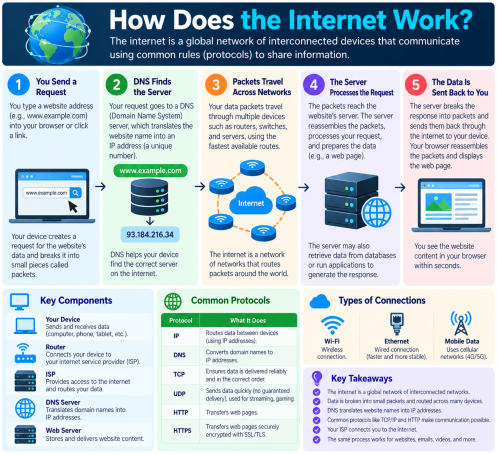
You click a link, and a web page appears in less than a second. But what actually happens in between? More than five billion people go online every day, yet very few know how the internet works or where their data is exposed along the way. Understanding how the internet works is the first step to protecting yourself from hackers, phishing, and data theft.
This guide breaks down how the internet works in plain language, explains the technology behind it, and shows you the security risks and best practices at each step.
What Is the Internet?
The internet is a global network of connected computers, servers, routers, and devices that exchange information using shared rules called protocols. It is not one single machine or company. It is millions of smaller networks, owned by businesses, governments, universities, and internet service providers (ISPs), all linked together.
Internet vs. World Wide Web
People often use these terms interchangeably, but they differ. The internet is the underlying infrastructure (cables, routers, servers). The World Wide Web is a service that runs on top of it, made up of websites and pages you open in a browser. Email, online gaming, and video calls also use the internet without being part of the web.
How Does the Internet Work? Step by Step
Here is the journey of a single web request, from your device to a website and back.
Step 1: Your Device Connects to an ISP
Your laptop or phone connects to a router, which connects to your Internet Service Provider (ISP). The ISP gives you access to the wider internet through fiber, cable, DSL, satellite, or mobile networks.
Step 2: Your Device Gets an IP Address
Every connected device needs an IP address, a unique number that identifies it on the network. Think of it as a mailing address. Without it, data wouldn’t know where to go or where to return.
Step 3: DNS Finds the Website
You type a name like example.com, but computers use numbers. The Domain Name System (DNS) works like a phone book, translating that name into the server’s IP address.
Step 4: Data Travels in Packets
Information is broken into small pieces called data packets. The TCP/IP protocol labels each packet with its destination and order. Packets may take different routes across the network and are reassembled when they arrive.
Step 5: Routers Direct the Traffic
Routers read each packet’s address and pass it along the most efficient path. Your request may cross many routers, undersea cables, and data centers in milliseconds.
Step 6: The Server Responds
The web server receives your request and sends back the page, images, and files using HTTP or HTTPS. Your browser assembles those packets into the page you see.
Key Components That Make the Internet Work
- Servers: Powerful computers that store websites, apps, and data
- Routers and switches: Devices that direct packets
- Fiber-optic and undersea cables: The physical backbone carrying most global traffic
- Data centers and cloud platforms: Facilities hosting applications and storage
- Protocols (TCP/IP, HTTP, HTTPS, DNS): The shared rules that let devices communicate
- Browsers: Software that requests and displays web content
Why Understanding How the Internet Works Matters for Cybersecurity
Every step above is a potential target. Knowing how the internet works helps you spot where attacks happen.
Unencrypted Traffic (HTTP)
Data sent over plain HTTP can be intercepted and read. Attackers on public Wi-Fi can use man-in-the-middle attacks to steal passwords and personal information.
DNS Attacks
Hackers can poison or hijack DNS records to redirect you to fake websites that look real, a common tactic in phishing and credential theft.
Packet Interception and Eavesdropping
Without encryption, packets crossing networks can be captured and analyzed by attackers.
DDoS Attacks
In a distributed denial-of-service (DDoS) attack, criminals flood a server with traffic so legitimate users can’t reach it.
Malware and Phishing
Malicious downloads, infected ads, and phishing links use the open nature of the internet to reach your device, often bypassing basic defenses.
How to Stay Safe Online: Actionable Tips
Now that you know how the internet works, here is how to protect yourself and your business:
- Use HTTPS. Look for the padlock and
https://before entering sensitive information. - Use a trusted VPN on public Wi-Fi. It encrypts your traffic and blocks eavesdropping.
- Secure your router. Change default passwords, use WPA3 or WPA2 encryption, and update firmware.
- Choose a secure DNS provider. Consider DNS filtering that blocks known malicious domains.
- Enable multi-factor authentication (MFA). A stolen password alone won’t be enough.
- Keep software and devices updated. Patches close the vulnerabilities attackers exploit.
- Be careful with links and attachments. Verify senders before clicking.
- Deploy endpoint and network security. Advanced protection blocks unknown threats before they run.
- Back up your data. Regular offline backups limit damage from ransomware.
Frequently Asked Questions (FAQs)
1. How does the internet work in simple terms?
The internet is a worldwide network of connected devices. When you request a website, your device sends data packets through your ISP and routers to a server, which sends the page back to your browser.
2. Who owns the internet?
No single person or company owns it. It is a collection of independent networks run by ISPs, businesses, governments, and organizations that agree to use common protocols.
3. What is the role of DNS on the internet?
DNS translates easy-to-remember domain names into the IP addresses computers use to find each other.
4. Is the internet safe to use?
It can be, but only with the right precautions. Using HTTPS, strong passwords, MFA, updated software, and reliable security tools greatly reduces your risk.
5. What is the difference between HTTP and HTTPS?
HTTPS encrypts the data between your browser and the website, while HTTP does not. HTTPS protects you from interception and tampering.
Conclusion: Know the Network, Protect Your Data
So, how does the internet work? Through a chain of devices, ISPs, IP addresses, DNS lookups, packets, routers, and servers, all following shared protocols. Each link in that chain can be attacked, which is why layered security matters. By understanding how the internet works and following the tips above, you can browse, work, and communicate with far more confidence.
Don’t leave your network exposed to unknown threats. Request a free demo of Xcitium today and discover how Zero Trust technology keeps your endpoints, data, and users protected.
Please give us a star rating based on your experience.


 (15 votes, average: 2.40 out of 5, rated)


