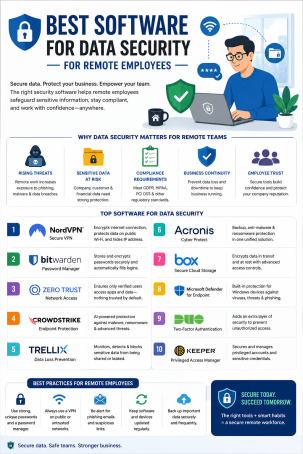
Is your company’s data actually safe the moment an employee logs in from a coffee shop, a home router, or an airport lounge? For most organizations, the honest answer is “we’re not sure” — and that uncertainty is exactly what cybercriminals are counting on. As remote and hybrid work become permanent fixtures rather than temporary arrangements, choosing the best software for data security for remote employees has moved from a “nice to have” IT project to a board-level priority.
Remote work has permanently expanded the corporate attack surface. Every laptop, home Wi-Fi network, and personal device that touches company data is a potential entry point for attackers. According to multiple industry reports, phishing and credential-based attacks targeting remote workers have risen sharply since distributed work became the norm, and the average cost of a data breach involving remote work is now measurably higher than one confined to a traditional office network. In this guide, we’ll break down exactly what to look for, compare the top categories of tools, and share actionable tips to help you choose the best software for data security for remote employees — before a breach forces the decision for you.
Why Data Security for Remote Employees Has Become Non-Negotiable
When employees worked exclusively inside a corporate office, IT teams controlled the network perimeter, the hardware, and physical access. Remote work erased that perimeter overnight. Today’s distributed workforce security challenges look very different:
- Unmanaged home networks with weak router passwords and outdated firmware
- Personal devices (BYOD) that mix work and personal data without proper isolation
- Public Wi-Fi usage at cafes, airports, and co-working spaces
- Shadow IT — employees installing unapproved apps or using personal cloud storage
- Phishing and social engineering aimed specifically at isolated, distracted remote workers
Any one of these gaps can expose sensitive company data, customer records, or intellectual property. That’s why remote employee data security software isn’t a single product — it’s a layered strategy combining endpoint protection, identity verification, network security, and data monitoring into one coordinated defense.
What to Look for in the Best Software for Data Security for Remote Employees
Not all cybersecurity tools are built for a distributed workforce. Before you invest, evaluate vendors against these core capabilities.
1. Endpoint Detection and Response (EDR)
Every laptop or mobile device an employee uses is now an “endpoint” — and endpoints are the number one target for attackers working remotely. Strong endpoint protection software should offer real-time threat detection, automatic isolation of infected devices, and behavioral analysis that catches malware signatures alone would miss. Look for solutions that combine antivirus, firewall, and EDR into a single lightweight agent so remote employees aren’t slowed down.
2. Zero Trust Network Access (ZTNA)
Traditional VPNs grant broad network access once a user logs in, which is risky if credentials are stolen. A zero trust security model instead verifies every user and device continuously, granting access only to the specific applications needed — nothing more. This “never trust, always verify” approach is quickly becoming the gold standard for remote employee data security software.
3. Data Loss Prevention (DLP)
Data loss prevention tools monitor how sensitive information — customer records, financial data, source code — moves across devices, email, and cloud apps. The best software for data security for remote employees will flag or block unauthorized transfers of confidential data automatically, whether it’s an accidental email attachment or a deliberate exfiltration attempt.
4. Multi-Factor Authentication (MFA) and Identity Management
Stolen passwords are still one of the leading causes of breaches. Multi-factor authentication adds a critical second layer — a code, biometric scan, or hardware key — so a compromised password alone can’t grant access to company systems.
5. Encrypted Cloud Backup and Secure File Sharing
Remote teams rely heavily on cloud collaboration, which means encrypted backup and secure file-sharing tools are essential. Look for end-to-end encryption both in transit and at rest, along with granular permission controls so files aren’t accidentally shared outside the organization.
Top Categories of Remote Employee Data Security Software
Rather than recommending a single silver-bullet product, the most resilient organizations combine tools across these categories:
- Endpoint Protection Platforms (EPP/EDR): Continuous monitoring and automated response on every device
- Secure Web Gateways & DNS Filtering: Blocks access to malicious or phishing websites before they load
- Zero Trust Access Solutions: Replaces or augments legacy VPNs with identity-aware access control
- Cloud Access Security Brokers (CASB): Enforces security policy across SaaS and cloud applications
- Managed Detection and Response (MDR): Adds 24/7 human-led threat hunting on top of automated tools
- Password Managers & MFA Platforms: Reduces credential-based attack risk across the entire team
A comprehensive, best-in-class approach — such as the endpoint protection and zero trust solutions offered by Xcitium — layers several of these categories together under a single console, giving IT teams full visibility without juggling multiple disconnected dashboards.
Actionable Tips to Strengthen Remote Workforce Security Today
Software alone isn’t enough — how you deploy and reinforce it matters just as much. Use these practical steps to get more value from your remote employee data security software:
- Enforce MFA on every account, not just email — include VPN, cloud storage, and admin dashboards.
- Patch and update automatically. Configure endpoint tools to push OS and application updates without waiting on employees to click “update later.”
- Segment access by role. Apply least-privilege principles so a compromised account can’t reach systems outside that employee’s job function.
- Run quarterly phishing simulations. Ongoing security awareness training measurably reduces click-through rates on real phishing attempts.
- Require company-approved VPN or ZTNA on all public Wi-Fi. Never let sensitive data travel over an unsecured connection.
- Audit third-party app permissions regularly. Shadow IT often introduces the biggest blind spots in remote environments.
- Encrypt every device. Full-disk encryption ensures a lost or stolen laptop doesn’t equal a data breach.
How to Choose the Right Vendor
When comparing providers of remote employee data security software, ask these questions:
- Does the platform unify endpoint protection, DLP, and access control, or will you need separate tools that don’t talk to each other?
- Can IT deploy and manage it remotely without requiring employees to be technically skilled?
- Does it scale affordably as your remote or hybrid team grows?
- Is threat intelligence updated continuously, or only on periodic release cycles?
- Does the vendor offer 24/7 support and a proven incident response track record?
Prioritizing platforms that answer “yes” to all five reduces both your attack surface and the operational burden on your IT team.
FAQ: Best Software for Data Security for Remote Employees
1. What is the best software for data security for remote employees?
There isn’t a single universal answer — the best software for data security for remote employees combines endpoint detection and response, zero trust access, data loss prevention, and multi-factor authentication into one coordinated platform tailored to your team’s size and industry.
2. Is a VPN enough to secure remote employees?
No. A VPN encrypts network traffic but doesn’t stop malware, phishing, or credential theft. Modern remote employee data security software pairs VPN or zero trust access with endpoint protection and continuous monitoring for full coverage.
3. How much does remote employee data security software cost?
Pricing varies by vendor and typically follows a per-endpoint or per-user monthly subscription model. Costs generally scale with the number of devices, features included, and level of managed support.
4. Can small businesses afford enterprise-grade remote security tools?
Yes. Many vendors, including Xcitium, offer scalable plans designed for small and mid-sized businesses, so strong endpoint protection and zero trust access aren’t limited to large enterprises with dedicated security teams.
5. How often should remote security software be updated or reviewed?
Security software should update threat definitions continuously and automatically. Beyond that, IT teams should review overall policy configurations, access permissions, and vendor performance at least quarterly.
Protect Your Remote Workforce Before a Breach Forces Your Hand
Remote work isn’t going away, and neither are the threats targeting it. Investing in the best software for data security for remote employees today is far less costly than recovering from a breach tomorrow. Xcitium’s layered endpoint protection and zero trust security solutions are built specifically to close the gaps that distributed teams create — without slowing your employees down.
Ready to see it in action? Request a free demo from Xcitium and discover how comprehensive remote employee data security software can protect your business from day one.
Please give us a star rating based on your experience.


 (20 votes, average: 2.55 out of 5, rated)


