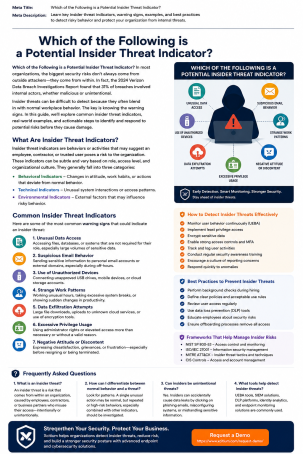
Could the biggest risk to your company’s data be sitting inside your own office right now? It’s an uncomfortable question, but security teams ask it every day — and for good reason. Studies on internal risk show that incidents involving employees, contractors, and trusted partners have climbed sharply in recent years, and the cleanup costs when one slips through can run into the millions. So which of the following is a potential insider threat indicator, and how do you tell a harmless quirk from an early warning sign? This guide breaks down the behavioral, digital, financial, and access-related red flags every organization should know, so you can catch a problem before it becomes a breach.
What Is an Insider Threat?
An insider threat is a security risk that comes from someone who already has legitimate access to your systems, facilities, or data — a current or former employee, contractor, vendor, or business partner. Because these individuals are trusted by design, they can often bypass the defenses built to keep outsiders out. That’s exactly why learning to spot a potential insider threat indicator matters: the threat isn’t knocking on the front door, it’s already inside the building.
The Three Types of Insider Threats
Not every insider threat looks the same, and the intent behind it changes how you should respond.
- Malicious insiders deliberately misuse their access to steal data, sabotage systems, or leak confidential information, often for financial gain, revenge, or ideology.
- Negligent insiders cause harm without meaning to — clicking a phishing link, misconfiguring a cloud bucket, or losing an unencrypted laptop.
- Compromised insiders are legitimate users whose credentials or devices have been hijacked by an external attacker, who then operates undetected using that trusted access.
Understanding which category you’re dealing with shapes the detection strategy and the response plan you build around it.
Common Potential Insider Threat Indicators to Watch For
This is the core question every security-conscious organization needs to be able to answer confidently. Indicators generally fall into four buckets: behavioral, digital, financial, and access-related. Spotting one on its own isn’t proof of wrongdoing — but a pattern of several together should trigger a closer look.
Behavioral Indicators
Human behavior often changes before a security incident occurs, which makes behavioral cues some of the earliest warning signs available.
- Sudden hostility, disgruntlement, or open conflict with managers or coworkers
- Repeated attempts to bypass established security controls or policies
- Working unusual hours with no clear business justification
- Unusual curiosity about projects, systems, or data outside their normal responsibilities
- Boasting about access to sensitive systems or information
Digital and Technical Indicators
Technical footprints are often the clearest evidence, and they’re the easiest to monitor with the right tools.
- Downloading unusually large volumes of data in a short window
- Logging in from unrecognized devices, unfamiliar locations, or at odd hours
- Plugging in unauthorized USB drives or uploading data to personal cloud accounts
- Renaming files or altering file extensions to disguise their true content
- Repeated failed attempts to access restricted files or systems
Financial and Lifestyle Indicators
Money troubles — or unexplained wealth — are consistently cited across insider threat research as a meaningful risk signal.
- A sudden, unexplained increase in spending or a noticeably higher standard of living
- Visible financial stress, mounting debt, or desperation
- Undisclosed side employment, especially with a competitor
- Requests for compensation that don’t match their role or performance
Access and Separation Indicators
Some of the riskiest windows occur around an employee’s exit, whether voluntary or not.
- Accessing systems, files, or data unrelated to their current job duties
- Requesting broader system privileges than the role requires
- A spike in data access or downloads in the weeks before resignation or termination
- Retaining login credentials, badges, or device access after departure
Real-World Examples of Insider Threats
Theory is useful, but real incidents make the stakes concrete. High-profile cases — such as the Edward Snowden leak of classified government documents, or healthcare breaches traced back to stolen internal credentials — show how a single trusted account, misused or hijacked, can expose massive volumes of sensitive data. In both malicious and compromised scenarios, the common thread is the same: access that should have been monitored more closely, and behavior that, in hindsight, showed clear indicators.
How to Detect and Prevent Insider Threats
Knowing the common potential insider threat indicators is only the first step — organizations also need a system to catch these signs in practice. Here are actionable steps worth putting in place today.
- Deploy user and entity behavior analytics (UEBA). These tools baseline normal activity for each user and flag deviations, such as mass downloads or logins from new locations, far faster than manual review ever could.
- Enforce the principle of least privilege. Employees should only have access to the systems and data required for their specific role, reducing the blast radius if an account is misused.
- Monitor offboarding closely. Revoke access immediately upon resignation or termination, and review activity logs from the final weeks of employment.
- Train employees to recognize and report red flags. A well-informed workforce is often the first line of defense against both malicious and negligent insider activity.
- Combine endpoint, network, and identity monitoring. Layered visibility makes it far harder for a threat — internal or externally compromised — to operate unnoticed.
- Establish a clear reporting and response process. Employees and managers need a simple, confidential way to flag concerning behavior without fear of retaliation.
Why Insider Threat Detection Matters for Your Business
Every category of insider threat indicator points to the same underlying truth: the earlier you catch the warning sign, the less damage it does. Left undetected, insider incidents can lead to data breaches, regulatory penalties, operational downtime, and long-term reputational harm — costs that dwarf the investment required for proactive monitoring. Building a culture where employees understand these insider threat indicators, and feel comfortable reporting them, is one of the most cost-effective security investments an organization can make.
Frequently Asked Questions
1. Which of the following is a potential insider threat indicator: unusual data downloads or occasional overtime?
Unusual data downloads — especially large transfers outside normal business patterns — are a recognized insider threat indicator. Occasional overtime alone is not, unless it’s paired with other suspicious behavior like accessing unrelated systems.
2. Is one indicator enough to confirm an insider threat?
No. A single behavioral or technical signal rarely confirms malicious intent on its own. Security teams look for patterns and combinations of indicators before escalating an investigation.
3. What’s the difference between a malicious and a negligent insider threat?
A malicious insider intentionally misuses access to cause harm, while a negligent insider creates risk unintentionally, often through carelessness, poor judgment, or falling for a phishing attempt.
4. Can insider threats come from former employees?
Yes. If access, credentials, or badges aren’t revoked promptly after departure, former employees can remain a security risk long after they’ve left the organization.
5. How can small businesses monitor for insider threat indicators without a large security team?
Small businesses can start with least-privilege access controls, basic activity logging, employee training, and affordable behavior-monitoring or endpoint security tools that flag anomalies automatically.
Protect Your Business From the Inside Out
Insider threats don’t always announce themselves — but the indicators are there if you know where to look. Don’t wait for a data breach to find out your organization was missing the warning signs. See how Xcitium’s security solutions help you detect insider threat indicators before they turn into costly incidents.
Please give us a star rating based on your experience.


 (23 votes, average: 2.39 out of 5, rated)


