A cyberattack now happens roughly every 39 seconds, and the global average cost of a data breach has climbed to $4.44 million, according to IBM’s Cost of a Data Breach Report. If those numbers make you uneasy, they should — but the good news is that most breaches are preventable. Following proven cybersecurity best practices dramatically reduces your risk, whether you’re securing a small business network or a sprawling enterprise environment.
This guide covers the most important, actionable steps for building a resilient security posture in 2026 — from password hygiene and employee training to endpoint protection and incident response. Every recommendation here is designed to be practical, not theoretical, so you can start strengthening your defenses today.
Why Cybersecurity Best Practices Matter More Than Ever
The threat landscape has grown more dangerous and more automated. Verizon’s 2025 Data Breach Investigations Report found that 68% of breaches involve a human element — meaning most attacks succeed not because of some exotic zero-day exploit, but because of a missed patch, a weak password, or an employee who clicked the wrong link. Meanwhile, AI-generated phishing emails now make up the vast majority of phishing traffic, making attacks harder to spot at a glance than ever before.
This combination of human vulnerability and increasingly sophisticated automation is exactly why a structured, layered approach to security — rather than a single tool or policy — has become essential for organizations of every size.
Essential Password and Access Management Practices
Weak or reused credentials remain one of the most common entry points for attackers, making access management a foundational pillar of any cybersecurity strategy.
Enforce Strong, Unique Passwords
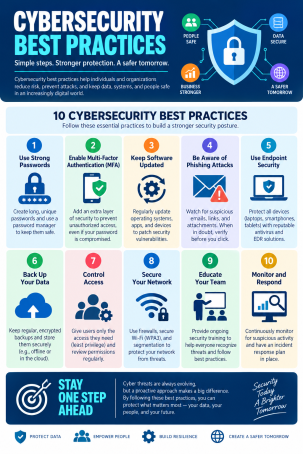
Require passwords of at least 12–16 characters, avoid reused credentials across accounts, and use a business-grade password manager to eliminate the temptation to write passwords down or reuse them.
Implement Multi-Factor Authentication (MFA)
MFA remains one of the single most effective, low-cost defenses available. Requiring a second verification step — an authenticator app, hardware key, or biometric check — blocks the vast majority of account takeover attempts, even when a password has been compromised.
Apply the Principle of Least Privilege
Give employees access only to the systems and data they need for their role. Regularly audit permissions, and immediately revoke access when someone changes roles or leaves the organization.
Employee Training and Human-Layer Security
Since most breaches trace back to human error, your workforce is either your strongest line of defense or your biggest liability, depending on how well they’re trained.
Run Regular Phishing Simulations
Simulated phishing campaigns help employees recognize red flags — urgent language, suspicious links, unexpected attachments — in a low-stakes environment before they encounter the real thing.
Build a Culture of Reporting, Not Blame
Employees should feel comfortable reporting a suspicious email or a mistaken click without fear of punishment. Fast reporting shrinks the window attackers have to move laterally through your network.
Keep Training Current
Threat tactics evolve constantly, so annual, one-and-done training sessions aren’t enough. Short, recurring refreshers keep security top of mind throughout the year.
Endpoint and Network Security Fundamentals
Beyond passwords and people, your technical infrastructure needs its own layered defenses to detect and contain threats before they spread.
Deploy Endpoint Detection and Response (EDR)
Traditional antivirus software relies on known threat signatures, which sophisticated attackers can easily evade. EDR platforms use behavioral analysis and real-time monitoring to catch and contain threats that signature-based tools miss entirely.
Keep Systems and Software Patched
Unpatched vulnerabilities remain a favorite entry point for attackers. Establish a consistent patch management schedule, and prioritize critical security updates as soon as they’re released.
Segment Your Network
Network segmentation limits how far an attacker can move if they do gain access, containing a breach to a single segment rather than allowing free movement across your entire infrastructure.
Encrypt Sensitive Data
Encrypt data both at rest and in transit, so that even if it’s intercepted or stolen, it remains unreadable without the proper decryption keys.
Building an Incident Response Plan
Even organizations with strong defenses need a plan for when something goes wrong, since prevention alone can’t guarantee zero incidents.
Document Clear Roles and Escalation Paths
Everyone on your team should know exactly who to contact and what steps to take the moment a potential incident is identified — ambiguity costs precious response time.
Maintain Tested, Offline Backups
Ransomware resilience depends heavily on reliable backups. Test your restoration process regularly, and keep at least one backup copy isolated from your primary network so it can’t be encrypted alongside everything else.
Conduct Post-Incident Reviews
After any security event, however minor, review what happened and update your defenses accordingly. Each incident is a data point that can strengthen your next response.
Quick Reference: Daily Cybersecurity Habits
- Verify sender addresses before clicking links or downloading attachments
- Lock devices whenever stepping away, even briefly
- Avoid public Wi-Fi for sensitive transactions without a VPN
- Report suspicious activity immediately rather than waiting to see what happens
- Back up critical files consistently, not just occasionally
FAQ: Cybersecurity Best Practices
1. What are the top cybersecurity best practices for small businesses?
Small businesses should prioritize multi-factor authentication, regular software patching, employee phishing training, and endpoint protection — these four measures address the most common attack vectors without requiring an enterprise-scale budget.
2. How often should cybersecurity training be updated?
Ideally, training should be refreshed quarterly with short sessions, supplemented by ongoing phishing simulations, rather than relying on a single annual session that employees quickly forget.
3. What’s the difference between antivirus and EDR?
Antivirus software typically relies on known threat signatures to block malware, while EDR (Endpoint Detection and Response) uses behavioral analysis and continuous monitoring to detect and contain threats that don’t match any known signature.
4. How important is multi-factor authentication really?
Extremely important — MFA blocks the large majority of automated account takeover attempts, making it one of the highest-impact, lowest-cost security measures any organization can implement.
5. What should be the first step in improving my organization’s cybersecurity?
Start with a security audit to identify your biggest gaps — often weak password policies, unpatched systems, or missing MFA — then prioritize fixes based on which vulnerabilities pose the greatest risk to your most sensitive data.
Put These Best Practices Into Action
Knowing the right cybersecurity best practices is only half the equation — implementing them consistently, across every device and endpoint, is what actually stops attacks. Xcitium’s advanced endpoint protection platform is built to help organizations enforce these defenses automatically, detecting and containing threats before they become costly breaches.
Request a demo today and see how Xcitium can strengthen every layer of your cybersecurity strategy.
Please give us a star rating based on your experience.


 (16 votes, average: 2.44 out of 5, rated)


