Have you ever opened an email attachment and immediately felt a knot in your stomach, wondering if you’d just let something dangerous into your system? If so, you’ve already brushed up against the core question this article answers: what does malicious mean, and why should every internet user care?
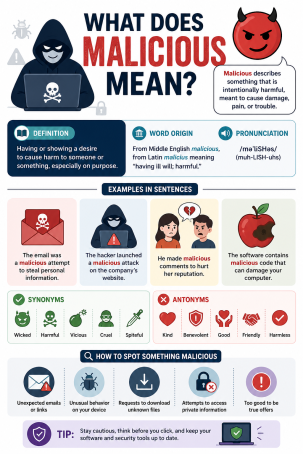
In simple terms, “malicious” describes any action, program, or intent designed to cause harm, damage, or unauthorized disruption to a system, network, or person. In the world of online security, the word shows up constantly — malicious software, malicious links, malicious actors, malicious code — and understanding what it truly means is the first step toward defending yourself and your organization. According to industry threat reports, malicious cyberattacks now occur every few seconds worldwide, making this far more than an academic definition. It’s a daily reality for businesses and individuals alike.
In this guide, we’ll break down what does malicious mean in plain language, explore the different forms malicious activity takes, and share actionable steps you can take to protect yourself.
What Does Malicious Mean in Cybersecurity?
When cybersecurity professionals ask what does malicious mean, they’re referring to any deliberate act intended to compromise the confidentiality, integrity, or availability of data or systems. A malicious act is never accidental — it always involves intent to harm, deceive, steal, or disrupt.
This is different from a system glitch or human error. If an employee accidentally deletes a file, that’s a mistake. If a hacker deletes that same file to cause damage, that’s malicious behavior. The distinction matters because it shapes how organizations respond, investigate, and build defenses.
The Legal and Technical Definition
From a technical standpoint, malicious refers to software, code, or behavior specifically engineered to exploit vulnerabilities, steal data, or damage systems without the owner’s consent. Legally, malicious intent (sometimes called “mens rea” in criminal law) is often a key factor in prosecuting cybercrime, since it proves the attacker knowingly set out to cause harm.
Common Synonyms and Related Terms
People often search for related phrases when trying to understand this concept, including “malicious intent meaning,” “malicious activity definition,” and “what is malware.” All of these terms circle back to the same root idea: harmful action taken on purpose.
Types of Malicious Software and Malicious Activity
Understanding what does malicious mean is easier when you see it in action. Below are the most common categories of malicious threats that cybersecurity teams track every day.
Malicious Software (Malware)
Malware is the umbrella term for malicious software, including viruses, worms, trojans, ransomware, and spyware. Each type is built to achieve a specific malicious goal — whether that’s locking your files for ransom, stealing credentials, or silently monitoring your activity.
Malicious Links and Phishing Attempts
A malicious link is a URL designed to redirect you to a fake website, trigger a malware download, or harvest your login credentials. Phishing emails frequently rely on these malicious links, disguising them as legitimate messages from banks, vendors, or coworkers.
Malicious Insiders
Not all threats come from outside. A malicious insider is an employee, contractor, or partner who intentionally misuses their access to steal data, sabotage systems, or leak sensitive information. Insider threats are particularly dangerous because they bypass many perimeter defenses by default.
Malicious Code Injection
Attackers often insert malicious code into websites or applications through techniques like SQL injection or cross-site scripting (XSS). This code can steal user data, redirect traffic, or give attackers backdoor access to a system.
How to Identify Malicious Behavior Before It Causes Damage
Recognizing malicious activity early can save your business significant time, money, and reputational damage. Here are practical signs and tips to watch for:
- Unusual network traffic: Sudden spikes in outbound data can signal a malicious process exfiltrating information.
- Unexpected pop-ups or redirects: These often point to malicious scripts running in the background.
- Slow system performance: Malware frequently consumes system resources, causing noticeable lag.
- Unrecognized login attempts: Multiple failed logins or access from unfamiliar locations may indicate a malicious actor probing your accounts.
- Unsolicited attachments or links: Treat any unexpected file or link, even from known contacts, with caution — their account may have been compromised.
How to Protect Yourself and Your Business from Malicious Threats
Once you understand what does malicious mean and how it manifests, the next step is building a defense strategy. Consider these actionable measures:
- Deploy layered endpoint protection. Use advanced antivirus and endpoint detection tools that can identify malicious behavior patterns, not just known signatures.
- Train employees regularly. Human error remains one of the biggest entry points for malicious attacks, so ongoing security awareness training is essential.
- Patch and update systems promptly. Unpatched software is a favorite target for attackers looking to exploit known vulnerabilities.
- Use zero-trust network architecture. Limiting access on a need-to-know basis reduces the damage a malicious insider or compromised account can cause.
- Monitor with threat intelligence. Real-time monitoring tools help security teams catch malicious activity before it escalates into a full breach.
Frequently Asked Questions About Malicious Activity
1. What does malicious mean in simple terms?
It means an action or piece of software created intentionally to cause harm, damage, or unauthorized access to a system, network, or person.
2. What is the difference between malicious and non-malicious threats?
A malicious threat involves deliberate intent to harm, while a non-malicious threat, like a system bug or accidental data loss, happens without harmful intent.
3. Is all malware considered malicious? Yes. By definition, malware (malicious software) is always designed with harmful or unauthorized intent, even if the visible impact seems minor.
4. Can malicious activity come from inside an organization?
Absolutely. Malicious insiders, such as disgruntled employees or compromised accounts, are a significant and growing source of cybersecurity incidents.
5. How can I tell if a link or email is malicious?
Look for mismatched sender addresses, urgent or threatening language, unexpected attachments, and links that don’t match the claimed destination when you hover over them.
Stay Ahead of Malicious Threats with Xcitium
Understanding what does malicious mean is only the beginning. Real protection comes from proactive, layered cybersecurity that stops malicious threats before they reach your systems. Xcitium’s advanced threat prevention technology is built to detect and contain malicious activity in real time, keeping your business safe from evolving cyber risks.
Ready to see it in action? Request a free demo today and discover how Xcitium can help protect your organization from malicious attacks.
Please give us a star rating based on your experience.


 (9 votes, average: 2.44 out of 5, rated)


