Have you ever searched your own name online and been surprised by how much personal information turned up? Now imagine a stranger with bad intentions doing that same search — and then publishing everything they find to threaten, harass, or intimidate you. That’s the real-world danger behind what is doxing, one of the fastest-growing threats in online security today.
In short, doxing is the act of researching and publicly revealing private or identifying information about a person online, usually without their consent and often with malicious intent. The term comes from “dropping docs,” internet slang for exposing someone’s personal records. Victims of this practice have had their home addresses, phone numbers, workplaces, and even family details published for the world to see, sometimes leading to harassment campaigns, stalking, or physical danger. As social media, public databases, and data broker sites make personal information easier to find than ever, understanding this threat — and how to defend against it — has become essential for anyone who cares about internet security. This guide explains what doxing is, how it happens, why it matters, and the concrete steps you can take to protect your digital footprint.
What Is Doxing? Breaking Down the Definition
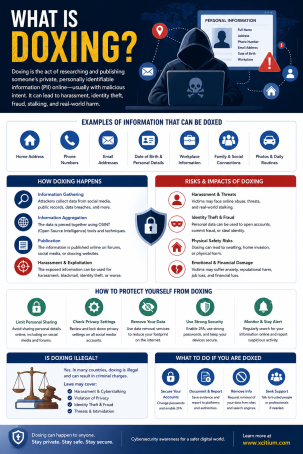
Doxing (sometimes spelled “doxxing”) refers to the practice of gathering and publishing an individual’s private information without their permission. This can include a home address, phone number, email address, workplace, financial details, social media profiles, or even photos of family members. The goal is usually to embarrass, intimidate, harass, or endanger the target.
Unlike traditional hacking, doxing rarely requires advanced technical skills. Most information used in these attacks is pieced together from publicly available sources — social media posts, old forum accounts, public records, data broker websites, and leaked databases. This is what makes doxing particularly unsettling: attackers don’t need to breach a system, they simply need to be persistent researchers.
How Does Doxing Happen?
Understanding the methods behind this tactic makes it easier to recognize and prevent. Attackers typically rely on a combination of the following techniques.
Social Media Mining
Public profiles, tagged photos, check-ins, and “about me” sections often reveal far more than users realize. A birthday post, a hometown mention, or a workplace tag can all become puzzle pieces in a larger profile.
Public Records and Data Brokers
Data broker sites compile information from property records, voter registrations, and court documents, then sell or publish it for a fee. Attackers often use these sites as a fast track to real names, addresses, and phone numbers.
IP Address Tracking
Some attackers use tools or tricks — such as sending a malicious link or image — to capture a target’s IP address, which can then be used to approximate a physical location or identify an internet service provider.
Reused Usernames and Password Leaks
People frequently reuse the same username across multiple platforms. If one account is linked to a real name, attackers can cross-reference other accounts using the same handle to build a fuller picture, especially when combined with data from previous breaches.
Why Doxing Is Dangerous
The consequences of having your private information exposed go far beyond embarrassment. Common outcomes include:
- Harassment and cyberbullying — Victims are often flooded with abusive messages once their identity is exposed.
- Stalking and physical danger — Revealing a home address can put victims and their families at real-world risk.
- Swatting — In extreme cases, attackers use exposed addresses to send false emergency reports, triggering dangerous police responses.
- Reputational and financial harm — Employers, clients, or the public may find sensitive information that damages a victim’s career or finances.
- Emotional and psychological distress — The loss of privacy and safety often causes lasting anxiety and fear.
Because the fallout can be severe, doxing is treated as a serious offense on most platforms and, depending on jurisdiction, may violate harassment or privacy laws.
How to Protect Yourself From Doxing
Strengthening your online security posture significantly reduces the risk of becoming a target. Consider these practical, actionable steps:
- Audit your social media privacy settings. Limit who can see your posts, location tags, and personal details; set profiles to private where possible.
- Remove yourself from data broker sites. Many broker platforms offer opt-out forms, or you can use a reputable removal service to automate the process.
- Use strong, unique passwords and enable multi-factor authentication (MFA). This limits the damage if one account is compromised.
- Avoid reusing the same username across platforms. Unique handles make it harder for attackers to connect your accounts.
- Use a VPN to mask your IP address, especially on public Wi-Fi or when interacting with unfamiliar links.
- Think before you post. Avoid sharing your location in real time, your workplace, or identifying details about family members.
- Set up Google Alerts for your name to catch new instances of your personal information appearing online.
- Report and document incidents immediately if you suspect you’re being targeted, including screenshots and timestamps for evidence.
What to Do If You’ve Been Doxed
If you discover that your personal information has already been exposed, act quickly:
- Report the content to the platform hosting it and request removal.
- Contact local law enforcement if you’re facing threats, harassment, or believe you’re in danger.
- Lock down your accounts by changing passwords and enabling MFA everywhere.
- Alert your network — friends, family, or employer — so they’re aware and can avoid being manipulated by attackers posing as you.
- Consider identity theft protection or monitoring services if financial information was exposed.
Frequently Asked Questions About Doxing
1. What is doxing in simple terms?
Doxing is the act of researching and publishing someone’s private information — like their home address, phone number, or workplace — online without their consent, typically to harass or intimidate them.
2. Is doxing illegal?
Laws vary by country and state, but doxing can violate harassment, stalking, or privacy laws, especially if it leads to threats, stalking, or physical harm. Many platforms also prohibit it directly in their terms of service.
3. How do people find personal information to dox someone?
Attackers commonly use social media profiles, public records, data broker websites, IP address tracking, and reused usernames to piece together a target’s identity and personal details.
4. Can doxing happen even if I have a private social media account?
Yes. Information can still be pieced together from data broker sites, public records, old posts, tagged photos from other users, or leaked databases, even if your current profile is private.
5. What should I do first if I think I’ve been doxed?
Report the exposed content to the hosting platform, change your passwords, enable multi-factor authentication, and document everything with screenshots in case you need to involve law enforcement.
Protect Your Digital Identity Before It’s Exposed
Understanding this threat is the first step, but proactive defense is what actually keeps you safe. Whether you’re an individual protecting your personal information or an organization safeguarding employees from targeted harassment, strong endpoint protection and internet security practices make all the difference.
Ready to strengthen your defenses against doxing and other online threats? Request a demo with Xcitium and see how proactive cybersecurity solutions can help keep your data and identity protected.
Please give us a star rating based on your experience.

 (157 votes, average: 1.18 out of 5, rated)


