Cyberattacks no longer knock on the front door — they slip in through a laptop, a phone, or a forgotten server, and by the time anyone notices, the damage is often already done. This is exactly why EDR, short for Endpoint Detection and Response, has become one of the most talked-about terms in cybersecurity today.
If you’ve been searching for a clear answer to “what does EDR mean,” you’re in the right place. This guide breaks down the EDR meaning in plain language, explains how it works, why it matters, and how it compares to older security tools — so you can make an informed decision about protecting your organization’s endpoints.
What is EDR? The Simple Definition
EDR (Endpoint Detection and Response) is a cybersecurity solution that continuously monitors endpoint devices — such as laptops, desktops, servers, and mobile devices — to detect, investigate, and respond to suspicious activity and cyber threats in real time.
Unlike traditional antivirus software, which relies mainly on known threat signatures, EDR uses behavioral analysis, machine learning, and threat intelligence to spot unusual patterns of activity. This means it can catch threats that have never been seen before, including zero-day exploits, fileless malware, and advanced persistent threats (APTs).
In short: EDR doesn’t just block known bad files. It watches how programs and users behave on an endpoint, flags anything abnormal, and gives security teams the tools to act fast.
Why the Term “Endpoint” Matters
An endpoint is any device that connects to a network — a company laptop, a remote employee’s home computer, a point-of-sale terminal, a virtual machine, or even an IoT device. Every one of these is a potential entry point for attackers.
As remote work, cloud adoption, and bring-your-own-device (BYOD) policies have expanded, the number of endpoints organizations must protect has exploded. Each unmonitored endpoint is essentially an open window into the network. EDR exists specifically to close that gap by giving security teams visibility and control over every device, no matter where it connects from.
How Does EDR Work?
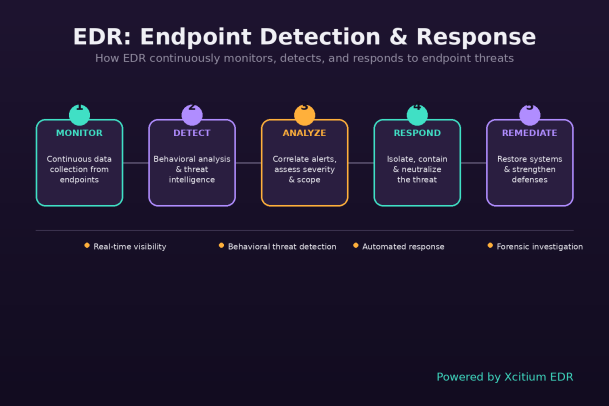
EDR platforms generally follow a continuous, five-stage cycle:
- Monitor – Lightweight agents installed on endpoints continuously collect data on processes, file changes, network connections, registry edits, and user behavior.
- Detect – The platform analyzes this data using behavioral rules, machine learning models, and threat intelligence feeds to identify indicators of compromise (IOCs) or indicators of attack (IOAs).
- Analyze – Alerts are correlated and prioritized, helping security teams distinguish real threats from false positives and understand the scope of an incident.
- Respond – Once a threat is confirmed, EDR can automatically isolate the affected endpoint, kill malicious processes, quarantine files, or trigger a predefined playbook — often within seconds.
- Remediate – After containment, the system helps restore affected files or configurations and provides forensic data so teams can strengthen defenses against similar attacks in the future.
This closed-loop approach is what separates EDR from simpler, reactive security tools. It doesn’t just alert you to a problem — it helps you understand it and shut it down.
Key Features of a Strong EDR Solution
Not all EDR tools are created equal. When evaluating a solution, look for these core capabilities:
- Continuous, real-time monitoring across all endpoints, on and off the corporate network
- Behavioral threat detection that can identify novel and fileless attacks, not just known signatures
- Automated response and remediation, including endpoint isolation and process termination
- Threat hunting tools that let analysts proactively search for hidden threats
- Detailed forensic data and timelines to understand exactly how an attack unfolded
- Centralized visibility through a single dashboard covering the entire endpoint fleet
- Integration capabilities with SIEM, SOAR, and other security tools for a unified defense strategy
EDR vs. Antivirus: What’s the Difference?
Traditional antivirus (AV) software is designed to block known malware based on signature matching. It’s effective against well-documented threats but struggles against new, disguised, or fileless attacks.
EDR takes a fundamentally different approach:
| Aspect | Antivirus | EDR |
|---|---|---|
| Detection method | Signature-based | Behavioral analysis + machine learning |
| Threat scope | Known malware | Known and unknown/zero-day threats |
| Visibility | Limited | Deep, continuous endpoint visibility |
| Response | Blocks or deletes files | Isolates, investigates, and remediates |
| Investigation | Minimal | Full forensic timeline and root-cause analysis |
Many organizations today don’t choose one over the other — they combine both, often through an integrated Endpoint Protection Platform (EPP) that layers preventive antivirus capabilities with EDR’s detection and response power.
EDR vs. XDR vs. MDR: Clearing Up the Acronyms
Since EDR entered the mainstream, several related terms have emerged, and they’re often confused:
- EDR (Endpoint Detection and Response) focuses specifically on endpoint devices.
- XDR (Extended Detection and Response) expands that visibility beyond endpoints to include networks, cloud workloads, email, and identity systems, correlating data across the entire environment for a more complete threat picture.
- MDR (Managed Detection and Response) refers to a service model where a third-party security team manages EDR or XDR tools on your behalf, providing 24/7 monitoring and expert-led response — ideal for organizations without a large in-house security team.
Understanding these distinctions helps you choose the right layer of protection — or combination of layers — for your organization’s size, resources, and risk profile.
Why EDR Matters More Than Ever
A few key trends explain why EDR has moved from “nice to have” to “essential”:
- Ransomware is evolving fast. Attackers now use double- and triple-extortion tactics, and EDR’s rapid isolation capabilities can stop ransomware from spreading before it encrypts critical systems.
- Remote and hybrid work have expanded the attack surface. Devices connecting from home networks and public Wi-Fi need the same level of scrutiny as those inside a corporate firewall.
- Attackers are living off the land. Many modern attacks use legitimate system tools (like PowerShell) to avoid detection by traditional antivirus — exactly the kind of subtle, behavior-based threat EDR is built to catch.
- Compliance requirements are tightening. Regulations across finance, healthcare, and other industries increasingly expect continuous monitoring and rapid incident response capabilities that EDR provides.
- The cost of a breach keeps rising. Faster detection and containment directly reduce the financial and reputational damage of a security incident.
Who Needs EDR?
While large enterprises were early adopters, EDR is now essential across organizations of every size. Small and mid-sized businesses are increasingly targeted precisely because attackers assume they lack strong defenses. Managed service providers (MSPs) also rely heavily on EDR to protect the many client environments they oversee.
If your organization handles sensitive data, relies on remote employees, or simply can’t afford extended downtime from an attack, EDR should be part of your core security stack.
How to Choose the Right EDR Solution
When comparing EDR platforms, consider:
- Detection accuracy – Low false-positive rates save analysts time and reduce alert fatigue.
- Response speed – Look for automated containment that acts in seconds, not minutes.
- Ease of deployment and management – Lightweight agents and an intuitive dashboard matter, especially for lean IT teams.
- Scalability – The solution should grow with your endpoint count and infrastructure complexity.
- Vendor support and threat intelligence – Strong backing from a security research team improves detection of emerging threats.
Final Thoughts
At its core, the EDR meaning comes down to this: it’s a proactive, intelligent layer of defense that watches every endpoint, catches the threats that slip past traditional tools, and empowers your team to respond before an incident becomes a crisis. As cyber threats grow more sophisticated, EDR isn’t just an upgrade to your security stack — it’s a necessity.
Choosing the right EDR partner can make the difference between a contained incident and a full-blown breach. That’s where a proven, comprehensive platform comes in.
Ready to See EDR in Action?
Don’t wait for a breach to find out your endpoints aren’t protected. See firsthand how advanced endpoint detection and response can safeguard your business against today’s most sophisticated cyber threats.
Please give us a star rating based on your experience.

 (19 votes, average: 2.05 out of 5, rated)


