If you work anywhere near IT infrastructure, you’ve probably heard the word “topology” tossed around in design meetings, vendor documentation, or troubleshooting tickets. But what is topology, exactly, and why does it matter so much for networking professionals? This guide breaks down the concept in plain language, walks through the major topology types, and explains how the right topology choice affects performance, security, and resilience.
What is Topology?
In networking, topology refers to the arrangement of devices, connections, and data pathways within a network. Think of it as the blueprint that shows how computers, switches, routers, servers, and other endpoints are physically or logically connected to one another.
There are two ways to look at topology:
- Physical topology describes the actual, real-world layout of cables, devices, and hardware. It’s what you’d see if you traced every wire in a server room or office.
- Logical topology describes how data actually flows between devices, regardless of how the physical wiring looks. Two networks can share the same physical layout but move traffic in completely different ways.
Understanding both layers matters because a network can look simple on paper but behave in complex ways once traffic starts flowing. That distinction is often the first thing that trips up newer network administrators.
Why Topology Matters for Networking Professionals
Choosing a topology isn’t just an academic exercise. It has real, measurable consequences for the systems you manage every day:
- Performance: Some topologies handle heavy traffic better than others, while some introduce bottlenecks as the network scales.
- Reliability: Certain designs eliminate single points of failure, while others leave the entire network vulnerable if one device goes down.
- Cost: More redundant designs generally require more cabling, ports, and hardware, which raises upfront costs.
- Scalability: Some topologies make it easy to add new devices; others require significant rework as the network grows.
- Security: The way a network is structured directly affects how attackers can move laterally once they gain a foothold, and how easily a security team can monitor and segment traffic.
Because of these tradeoffs, network architects rarely pick a topology at random. The decision is driven by the size of the organization, the criticality of uptime, budget constraints, and future growth plans.
The Main Types of Network Topology
Let’s walk through the topologies you’re most likely to encounter or design around.
1. Bus Topology
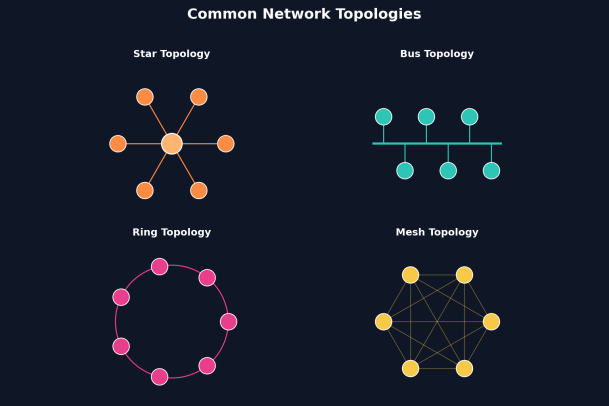
In a bus topology, every device connects to a single central cable, often called the backbone. Data travels along this shared cable, and each device checks whether a message is intended for it.
- Pros: Simple, inexpensive, and easy to set up for small networks.
- Cons: If the backbone cable fails, the entire network goes down. Performance also degrades as more devices are added, since all traffic shares the same medium.
Bus topology is largely a legacy design today, though understanding it helps explain how modern shared-medium technologies evolved.
2. Star Topology
In a star topology, every device connects to a central hub or switch. All communication passes through that central point.
- Pros: Easy to install, easy to troubleshoot (problems are usually isolated to one device or cable), and a single device failure doesn’t take down the whole network.
- Cons: The central hub or switch becomes a critical point of failure. If it goes down, every connected device loses connectivity.
Star topology is one of the most common designs in modern offices and homes, largely because of its simplicity and ease of maintenance.
3. Ring Topology
In a ring topology, each device connects to exactly two other devices, forming a closed loop. Data travels around the ring, usually in one direction, until it reaches its destination.
- Pros: Data flow is predictable, and performance can be more consistent than bus topology under certain traffic patterns.
- Cons: A single broken connection can disrupt the entire ring, unless the design includes a secondary counter-rotating ring for redundancy (as seen in some fiber-optic network designs).
4. Mesh Topology
In a mesh topology, devices connect directly to multiple other devices, sometimes to every other device on the network (a “full mesh”) or to a select few (a “partial mesh”).
- Pros: Extremely resilient. Since there are multiple paths for data to travel, the failure of one connection or device rarely brings down the network.
- Cons: Expensive and complex to implement, since the number of connections grows quickly as more devices are added.
Mesh topology is common in mission-critical environments, backbone networks, and increasingly in wireless mesh deployments for large campuses or smart buildings.
5. Tree Topology
A tree topology combines elements of star and bus designs. Groups of star-configured networks are connected to a central backbone, forming a hierarchical structure that resembles branches on a tree.
- Pros: Scalable and organized, making it a good fit for larger organizations with multiple departments or floors.
- Cons: If the backbone connection fails, entire branches of the network can lose connectivity.
6. Hybrid Topology
Most real-world networks today aren’t purely one topology type. A hybrid topology blends two or more designs to balance cost, performance, and redundancy. For example, a company might use star topology within individual departments while connecting those departments through a mesh backbone for resilience.
Physical vs. Logical Topology in Practice
It’s worth revisiting this distinction with a concrete example. A modern office network might be physically wired in a star configuration, with every device connecting to a central switch. But logically, that network might behave like a bus if all traffic is broadcast to every device on the same VLAN. Alternatively, with proper switching and VLAN segmentation, the logical topology can look very different from the physical wiring, allowing for more controlled and secure traffic flow.
This is why network professionals need to think beyond the cabling diagram. Understanding logical topology is essential for tasks like traffic segmentation, access control, and troubleshooting intermittent performance issues that don’t show up in a simple physical map.
How Topology Impacts Network Security
Topology decisions ripple directly into your security posture. A poorly segmented network, regardless of physical layout, can allow an attacker who compromises one device to move freely across the entire environment. This is often called lateral movement, and it’s one of the most common ways breaches escalate from a minor incident into a full-scale compromise.
A few ways topology choices affect security:
- Flat networks (where every device can talk to every other device without restriction) are easier to build but far riskier, since there are no natural chokepoints for monitoring or containment.
- Segmented topologies, using VLANs, subnets, or zero-trust microsegmentation, limit how far an attacker can travel even after an initial compromise.
- Redundant topologies like mesh designs can also complicate security monitoring, since traffic may take multiple unpredictable paths, requiring more sophisticated visibility tools.
For networking professionals, this means topology design and security design should never happen in isolation. The two need to be planned together from the start.
Best Practices for Choosing a Network Topology
When evaluating which topology fits your environment, consider the following:
- Define your priorities: Is uptime more important than cost? Is scalability a bigger concern than simplicity?
- Plan for growth: Choose a design that can expand without a complete redesign.
- Build in redundancy where it matters most: Critical systems (data centers, core switches) benefit from mesh or partial mesh designs, even if the rest of the network uses simpler star configurations.
- Document both physical and logical layouts: Keep diagrams updated as the network evolves, since outdated documentation is one of the most common sources of troubleshooting delays.
- Align topology with your security architecture: Build segmentation and monitoring into the design rather than adding it as an afterthought.
Final Thoughts
So, what is topology? At its core, it’s the structural foundation of every network you manage; the arrangement that determines how devices talk to each other, how resilient your systems are to failure, and how exposed you are to security threats. Whether you’re designing a small office network or managing a sprawling enterprise environment, understanding the strengths and weaknesses of each topology type helps you make smarter, more informed infrastructure decisions.
As networks grow more complex and hybrid designs become the norm, visibility and security across every layer of your topology become non-negotiable. That’s where the right endpoint protection and network security tools make all the difference.
Ready to strengthen the security of your network topology?
Please give us a star rating based on your experience.

 (151 votes, average: 1.18 out of 5, rated)


