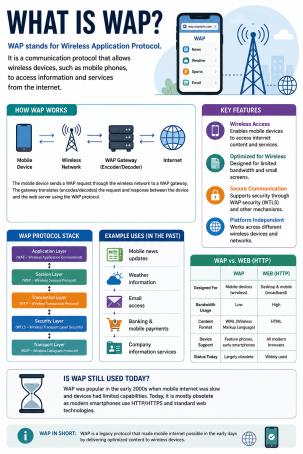
Before smartphones put the full internet in your pocket, an entirely different technology quietly connected mobile phones to the web. So, what is WAP, and why does it still show up in cybersecurity discussions decades later? WAP, short for Wireless Application Protocol, was the standard that first let mobile devices browse basic websites, check email, and send messages over cellular networks in the late 1990s and early 2000s. While WAP has largely faded from everyday use, understanding what WAP is remains important for online security professionals, since legacy protocols like this one often reveal foundational lessons about wireless vulnerabilities, encryption gaps, and how internet security has evolved to protect today’s mobile users.
In this guide, we’ll answer what is WAP in plain terms, break down how it worked, examine its known security weaknesses, and explain why the lessons from WAP still shape modern internet security practices.
What is WAP? A Quick Definition
WAP stands for Wireless Application Protocol, an open technical standard developed in 1997 by a consortium that included Nokia, Ericsson, Motorola, and Unwired Planet. WAP was designed to deliver internet-based content, such as web pages, email, and simple applications, to early mobile phones over wireless networks like GSM and CDMA.
At its core, answering what is WAP comes down to this: it was the wireless equivalent of TCP/IP, built specifically for devices with small screens, limited processing power, and slow, unreliable network connections. Instead of rendering full HTML web pages, WAP used a lightweight markup language so that mobile phones with minimal memory could still access online content.
How Does WAP Work? Understanding the Architecture
To truly grasp what WAP is, it helps to look at how data traveled from a mobile phone to a website and back. WAP relied on several key components working together.
The WAP Gateway
When a mobile user requested a page, the device sent an encoded request through the wireless network to a WAP gateway. This gateway translated the WAP request into a standard HTTP request, forwarded it to the target web server, and then converted the server’s response back into a WAP-compatible format for the phone’s micro-browser to display. This gateway model made WAP efficient, but as we’ll see, it also introduced a significant security concern.
Wireless Markup Language (WML)
Because early phones couldn’t handle full HTML, WAP used Wireless Markup Language (WML), an XML-based language optimized for tiny screens and low bandwidth. Developers wrote WAP sites in WML the way modern developers use HTML today.
WAP Protocol Stack Layers
The WAP protocol stack consisted of several layers, each handling a specific function:
- Wireless Application Environment (WAE): managed the browser and application layer
- Wireless Session Protocol (WSP): handled session setup and suspension
- Wireless Transaction Protocol (WTP): managed transaction-based communication over UDP
- Wireless Transport Layer Security (WTLS): provided encryption and authentication
- Wireless Datagram Protocol (WDP): offered a consistent data format across different wireless networks
This layered structure allowed WAP to function across multiple carrier networks and device types, which was a major achievement for its time.
Is WAP Secure? Understanding WTLS and Known Vulnerabilities
Anyone researching what is WAP from a cybersecurity angle quickly runs into its most discussed weakness: security. WAP was never designed with the same rigorous protections found in today’s internet security standards, and its architecture introduced real risks.
The WAP Gateway Security Gap
The biggest issue was the WAP gateway itself. Because the gateway translated encrypted WTLS traffic from the phone into encrypted SSL/TLS traffic for the web server, there was a brief moment where the data existed in plaintext on the gateway. This meant that instead of true end-to-end encryption, WAP relied on the gateway operator to be fully trustworthy — creating what security researchers call a “man-in-the-middle by design” problem. Sensitive transactions, like banking details, could theoretically be exposed at that translation point.
WTLS Limitations
Wireless Transport Layer Security (WTLS) was meant to mirror the protections of SSL/TLS on the wired internet, but it had known cryptographic weaknesses, including vulnerabilities in certain cipher implementations and key exchange methods. These gaps made WAP a poor fit for highly sensitive services, and security experts of the era specifically warned against using WAP for banking or other confidential transactions without additional safeguards.
WAP vs Modern Mobile Internet
Understanding what WAP is also means understanding why it eventually disappeared. As 3G, 4G, and eventually 5G networks matured, phones gained enough processing power and bandwidth to browse the full internet using standard HTTP and TLS, just like a desktop computer. Modern smartphones no longer need a translation gateway or a simplified markup language, which eliminated the core security gap that made WAP risky.
| Feature | WAP | Modern Mobile Internet |
|---|---|---|
| Markup Language | WML | HTML5 |
| Encryption | WTLS (gateway-based) | End-to-end TLS |
| Bandwidth Needs | Very low | High-speed (4G/5G) |
| Security Model | Gateway trust required | Direct encrypted connection |
Why WAP Still Matters for Internet Security Today
Even though WAP itself is largely obsolete, its story remains a valuable case study in cybersecurity education. It illustrates why end-to-end encryption matters, why intermediary systems (like gateways or proxies) introduce risk, and why legacy protocols can linger in unexpected places, such as older IoT devices, embedded systems, or legacy telecom infrastructure that still supports WAP-based push notifications and billing systems.
Security teams evaluating older network infrastructure should treat any residual WAP support as a potential attack surface, since outdated encryption standards like WTLS are far weaker than what current threat actors are equipped to exploit.
Actionable Tips for Managing Legacy Wireless Protocol Risks
- Audit legacy systems. Identify any devices, kiosks, or embedded systems in your environment still relying on WAP or WAP-based push services.
- Disable unnecessary WAP push functionality. If a device supports WAP push messaging and it isn’t required, disable it to reduce exposure to spoofed or malicious push notifications.
- Enforce end-to-end encryption standards. Ensure all modern wireless and mobile traffic uses current TLS protocols rather than legacy WTLS-style intermediaries.
- Segment outdated infrastructure. Isolate any systems still dependent on older wireless protocols from your core network to limit lateral movement in case of compromise.
- Educate your security team. Understanding historical protocols like WAP helps analysts recognize similar architectural weaknesses in newer technologies.
Final Thoughts
So, what is WAP? It’s the Wireless Application Protocol — the pioneering standard that first brought internet-like services to mobile phones, built on a gateway-based architecture with WTLS encryption. While WAP has been replaced by faster, more secure mobile internet standards, its security shortcomings offer lasting lessons for anyone working in online security: intermediary trust points and outdated encryption are risks worth eliminating wherever they still exist.
Whether you’re auditing legacy infrastructure or building a modern defense strategy, having the right visibility into your network is essential. See how Xcitium helps identify and defend against outdated and emerging network risks. Request a demo today to strengthen your organization’s security posture.
Frequently Asked Questions (FAQ)
1. What is WAP in simple terms?
WAP (Wireless Application Protocol) is an early standard that allowed mobile phones to access simplified internet content, such as web pages and email, over wireless networks before modern smartphones existed.
2. Is WAP still used today?
WAP is largely obsolete for everyday browsing, replaced by 4G/5G and HTML5-based mobile internet, though remnants of WAP-based push technology may still exist in some legacy telecom and IoT systems.
3. Why is WAP considered insecure?
WAP relied on a gateway that briefly decrypted and re-encrypted data when translating between WTLS and SSL/TLS, creating a potential point of exposure rather than true end-to-end encryption.
4. What is the difference between WAP and HTTP?
WAP used its own lightweight protocol stack and markup language (WML) designed for low-bandwidth wireless networks, while HTTP is the standard protocol used for full web browsing on modern high-speed connections.
5. Should businesses worry about WAP-related security risks?
Most organizations no longer need to worry about WAP directly, but they should audit any legacy or embedded systems that may still rely on outdated wireless protocols, since these can represent overlooked attack surfaces.
Please give us a star rating based on your experience.

 (282 votes, average: 1.06 out of 5, rated)


