Ever wondered how a video call stays in sync, or how your online banking session doesn’t scramble your data mid-transfer? The answer lies in a foundational piece of internet architecture most people never think about. So, what is TCP protocol, and why does it matter so much for cybersecurity and internet security?
TCP, or Transmission Control Protocol, is one of the core communication protocols of the internet. It works alongside the Internet Protocol (IP) — together forming what’s known as TCP/IP — to ensure that data sent across a network arrives complete, in order, and error-free. Every time you load a website, send an email, or transfer a file, TCP is quietly working behind the scenes to make sure that data gets where it needs to go reliably. Studies show that TCP/IP still underpins the vast majority of global internet traffic today, making it one of the most important protocols in modern networking.
In this guide, we’ll answer what is TCP protocol in plain terms, explain how it works, compare it to other protocols, and share practical tips for keeping TCP-based communications secure.
What Is TCP Protocol and How Does It Work?
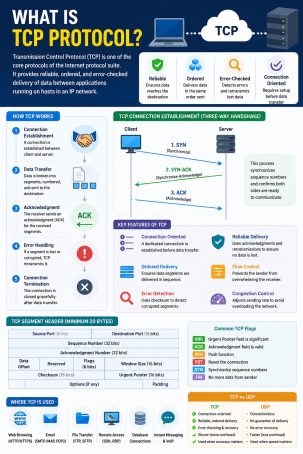
At its core, TCP protocol is a connection-oriented communication standard that governs how data is broken into packets, transmitted, and reassembled between devices. Unlike simpler protocols, TCP guarantees delivery — if a packet is lost or corrupted in transit, TCP automatically detects the issue and resends it.
The Three-Way Handshake
Before any data transfer begins, TCP establishes a connection using a process called the three-way handshake:
- SYN: The sending device requests a connection.
- SYN-ACK: The receiving device acknowledges the request.
- ACK: The sending device confirms, and the connection is established.
This handshake ensures both devices are ready to communicate, reducing the chance of data being sent into a void or intercepted mid-setup.
TCP vs. UDP: What’s the Difference?
A common follow-up question to what is TCP protocol is how it compares to UDP (User Datagram Protocol). TCP is reliable and ordered, making it ideal for web browsing, email, and file transfers. UDP, on the other hand, is faster but doesn’t guarantee delivery, which makes it better suited for real-time applications like video streaming or online gaming where speed matters more than perfect accuracy.
Why TCP Protocol Matters for Network Security
Understanding what is TCP protocol isn’t just a networking fundamental — it’s also essential for cybersecurity professionals. Because TCP handles so much of the internet’s traffic, it’s also a frequent target for attackers.
Common TCP-Based Threats
- SYN Flood Attacks: Attackers exploit the three-way handshake by sending massive volumes of SYN requests without completing the connection, overwhelming servers in a denial-of-service (DoS) attack.
- TCP Session Hijacking: Malicious actors intercept an active TCP session to impersonate a legitimate user and steal data.
- Port Scanning: Cybercriminals scan open TCP ports to identify vulnerable services on a network.
Why Reliable Delivery Doesn’t Mean Guaranteed Security
It’s a common misconception that because TCP protocol ensures reliable delivery, it also ensures secure delivery. In reality, TCP itself doesn’t encrypt data — that’s the job of protocols layered on top, like TLS/SSL (used in HTTPS). Without these additional layers, data sent via TCP can still be intercepted or read by attackers.
Actionable Tips to Secure TCP-Based Network Traffic
If your organization relies on TCP protocol for daily operations — which almost all do — here are practical steps to reduce risk:
- Use TLS/SSL encryption on top of TCP connections to protect data in transit, especially for web traffic (HTTPS) and email.
- Configure firewalls to monitor TCP handshakes, helping detect and block SYN flood attempts before they overwhelm servers.
- Close unused TCP ports to reduce your network’s attack surface and limit opportunities for port scanning.
- Implement intrusion detection systems (IDS) that can flag abnormal TCP session behavior, such as hijacking attempts.
- Regularly audit network traffic logs to spot unusual connection patterns tied to TCP-based reconnaissance or attacks.
Frequently Asked Questions About TCP Protocol
1. What is TCP protocol used for?
TCP protocol is used to establish reliable, ordered communication between devices over a network, supporting applications like web browsing, email, and file transfers.
2. Is TCP protocol secure by default?
No. TCP ensures reliable delivery of data but does not encrypt it. Security is added through additional protocols like TLS/SSL.
3. What is the difference between TCP and IP?
IP handles addressing and routing of data packets across networks, while TCP manages the reliable delivery, ordering, and error-checking of those packets.
4. Can TCP protocol be exploited by hackers?
Yes. Attackers can exploit TCP through techniques like SYN flood attacks, session hijacking, and port scanning to disrupt services or steal data.
5. Why is TCP called connection-oriented?
Because it establishes a dedicated connection between sender and receiver through the three-way handshake before any data is transmitted, unlike connectionless protocols such as UDP.
Protect Your Network Where TCP Traffic Flows
Now that you know what is TCP protocol and why it’s central to internet communication, the next step is making sure your network traffic is protected from the threats that target it. Xcitium’s advanced network security solutions monitor and defend TCP-based traffic in real time, helping stop SYN floods, session hijacking, and other protocol-level attacks before they cause damage.
Ready to strengthen your network security? Request a free demo today and see how Xcitium keeps your TCP traffic protected.
Please give us a star rating based on your experience.


 (20 votes, average: 2.35 out of 5, rated)


