Every time you send an email, stream a video, join a video call, or back up a file to the cloud, you’re relying on something most people never stop to think about: a network. Networks are the invisible infrastructure that make modern digital life possible, yet the concept can feel abstract if you’ve never had it broken down clearly.
This guide answers the question “what is network” in plain language, then goes further—covering the types of networks, how they work, why they matter for security, and what both beginners and IT professionals need to know to work with them confidently.
What is a Network
A network is a group of two or more connected computers, devices, or systems that can share data, resources, and information with each other. The connection can be physical (like an Ethernet cable) or wireless (like Wi-Fi or Bluetooth).
At its core, a network exists to let devices communicate. That communication can be as simple as two laptops sharing a printer at home, or as complex as millions of servers across the globe exchanging data to power the internet.
Every network, no matter its size, is built from three basic components:
- Nodes – the devices connected to the network (computers, servers, phones, printers, IoT devices)
- Links – the physical or wireless connections between nodes (cables, radio waves, fiber optics)
- Protocols – the agreed-upon rules that define how data is formatted, transmitted, and understood (such as TCP/IP, HTTP, or DNS)
Without protocols, devices could be connected but wouldn’t be able to “speak the same language,” so no meaningful communication could happen.
Why Networks Matter
Networks are the backbone of nearly every modern business function: file sharing, internet access, email, cloud computing, remote work, video conferencing, and more. For organizations, a well-designed network means:
- Faster, more reliable communication between employees and systems
- Centralized access to shared resources like printers, storage, and applications
- The ability to scale operations as the business grows
- A foundation for implementing cybersecurity controls that protect sensitive data
For individuals, networks simply make daily digital life possible—streaming, browsing, gaming, and staying connected with the world.
Types of Networks
Not all networks are built the same way or serve the same purpose. Understanding the different types helps clarify which one applies to a given situation.
1. LAN (Local Area Network)
A LAN connects devices within a limited physical area, such as a single home, office, or building. LANs are typically fast, private, and easy to manage, making them the most common network type for small businesses and households.
2. WAN (Wide Area Network)
A WAN spans a much larger geographic area—often connecting multiple LANs across cities, countries, or continents. The internet itself is the largest example of a WAN.
3. MAN (Metropolitan Area Network)
A MAN covers a city or a large campus, sitting between a LAN and a WAN in scale. Universities and city governments often use MANs to connect multiple buildings.
4. PAN (Personal Area Network)
A PAN connects devices within a very short range, typically around a single person—think Bluetooth headphones paired with a smartphone.
5. WLAN (Wireless Local Area Network)
A WLAN is essentially a LAN that uses wireless technology (Wi-Fi) instead of physical cables to connect devices.
6. VPN (Virtual Private Network)
A VPN creates a secure, encrypted connection over a public network (like the internet), allowing remote users to access private network resources as if they were physically on-site.
How Does a Network Work?
Understanding how a network works starts with understanding how data actually moves from one device to another. Here’s a simplified breakdown:
- Data creation – A device (like your laptop) generates data, such as a request to load a website.
- Data segmentation – The data is broken into smaller units called packets, each containing a portion of the information along with addressing details.
- Routing – Network devices like routers and switches determine the best path for each packet to travel toward its destination.
- Transmission – Packets travel across physical links (cables) or wireless signals to reach other network devices.
- Reassembly – Once packets arrive at the destination, they are reassembled into the original data.
- Response – The receiving device processes the request and sends a response back through the same general process.
This entire process typically happens in milliseconds, which is why we experience the internet as instantaneous even though it involves multiple hops across various pieces of hardware.
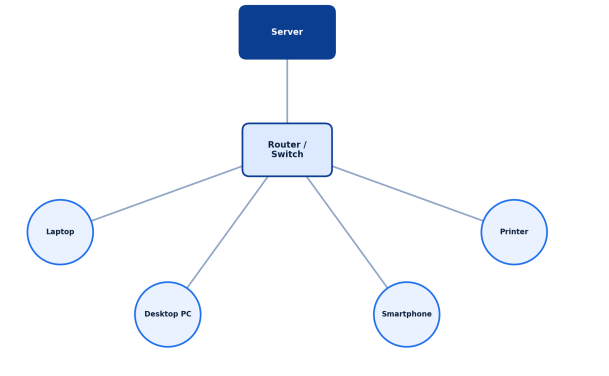
Below is a simplified visual of how a basic local network is structured, with multiple devices connecting through a central router or switch:
Key Networking Devices and Components
To build and maintain a network, several core pieces of hardware and software work together:
- Router – Directs data between networks and connects a local network to the internet
- Switch – Connects multiple devices within the same network and directs traffic between them
- Modem – Converts signals between your local network and your internet service provider
- Firewall – Monitors and controls incoming and outgoing network traffic based on security rules
- Access Point – Extends wireless connectivity to a wired network
- Network Interface Card (NIC) – Allows a device to physically connect to a network
Each of these plays a specific role, and in professional environments, they’re often combined with monitoring and security tools to keep the network both functional and safe.
Network Topologies
A network topology describes the physical or logical arrangement of devices within a network. Common topologies include:
- Bus topology – All devices share a single central cable
- Star topology – All devices connect to a central hub or switch (the most common setup today)
- Ring topology – Devices are connected in a circular data path
- Mesh topology – Devices are interconnected, with multiple paths between them for redundancy
- Hybrid topology – A combination of two or more topology types
Choosing the right topology affects network performance, cost, and resilience against failure.
Networking Protocols You Should Know
Protocols are the rules that make communication between devices possible. A few of the most foundational ones include:
- TCP/IP – The fundamental suite of protocols that powers the internet, handling data transmission and addressing
- HTTP/HTTPS – Used for transferring web page data, with HTTPS adding encryption for security
- DNS (Domain Name System) – Translates human-readable domain names (like a website address) into IP addresses
- DHCP (Dynamic Host Configuration Protocol) – Automatically assigns IP addresses to devices on a network
- FTP (File Transfer Protocol) – Used to transfer files between computers on a network
For IT professionals, understanding these protocols in depth is essential for troubleshooting, configuring, and securing network infrastructure.
Network Security: A Critical Consideration
As networks have become the backbone of business operations, they’ve also become a primary target for cyberattacks. A network is only as strong as its weakest security control, which is why network security has become a discipline of its own.
Common network security practices include:
- Firewalls to filter malicious or unauthorized traffic
- Intrusion detection and prevention systems (IDS/IPS) to identify suspicious activity
- Endpoint protection to secure the individual devices connected to the network
- Network segmentation to limit the spread of a breach if one occurs
- Zero Trust architecture, which assumes no device or user should be automatically trusted, even inside the network perimeter
- Regular patching and updates to close vulnerabilities before attackers can exploit them
For businesses of any size, investing in strong network security isn’t optional—it’s a fundamental requirement for protecting sensitive data, maintaining customer trust, and ensuring operational continuity.
Networks for Beginners vs. Professionals: What’s the Difference?
If you’re new to networking, the goal is simply to understand core concepts: what a network is, the common types, and the basic hardware involved. That foundation is enough to troubleshoot a home Wi-Fi issue or understand how your office internet works.
For IT professionals, networking goes much deeper—covering advanced routing protocols, network design and architecture, capacity planning, compliance requirements, and increasingly, the integration of security tools directly into network infrastructure. Modern professionals are also expected to understand how networks intersect with cloud environments, remote workforces, and endpoint security, since traditional network perimeters have largely dissolved.
Final Thoughts
Networks are the foundation of nearly everything we do online, whether you’re a home user checking email or an IT professional managing infrastructure for a global enterprise. Understanding what a network is, how it works, and how to secure it isn’t just useful knowledge—it’s essential in a world where connectivity and cybersecurity go hand in hand.
As networks grow more complex and cyber threats grow more sophisticated, having the right security strategy in place is no longer optional. Businesses need visibility, control, and protection across every device connected to their network.
Ready to Strengthen Your Network’s Security?
See how Xcitium’s advanced protection can help safeguard your network against modern cyber threats.
Please give us a star rating based on your experience.


 (26 votes, average: 2.31 out of 5, rated)


