If you’ve worked in IT, operations, sales, or finance for more than a week, you’ve almost certainly opened, exported, or emailed a .CSV file. It’s one of the oldest and most widely used data formats in computing — and yet, for something so common, most people can’t explain exactly what it is, how it works, or why it still matters in a world of cloud databases and APIs.
This guide breaks down what a CSV file actually is, how it’s structured, why businesses rely on it, and — just as importantly — the security risks IT leaders need to manage when CSVs move through their organization.
What Does CSV Stand For?
CSV stands for Comma-Separated Values. It’s a plain-text file format used to store tabular data — think rows and columns, like a simplified spreadsheet — where each value in a row is separated by a comma.
A CSV file typically ends in the .csv extension and can be opened by almost any spreadsheet application (Excel, Google Sheets, Numbers), text editor, or database tool. Unlike proprietary formats such as .xlsx or .xlsm, a CSV contains no formulas, macros, formatting, or embedded objects — just raw data.
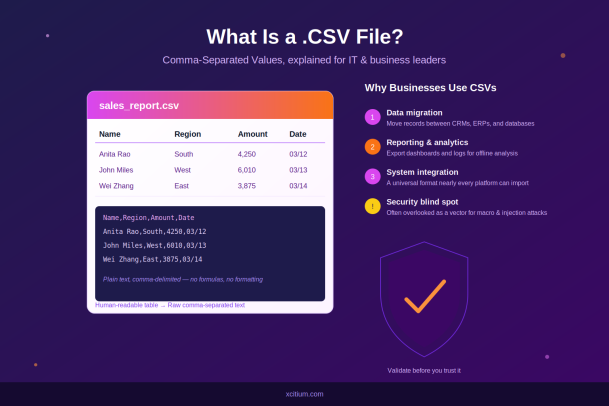
Here’s a simple example of what’s happening under the hood. A spreadsheet that looks like this:
| Name | Region | Amount | Date |
|---|---|---|---|
| Anita Rao | South | 4250 | 03/12 |
| John Miles | West | 6010 | 03/13 |
Is actually stored as plain text like this:
Name,Region,Amount,Date
Anita Rao,South,4250,03/12
John Miles,West,6010,03/13
Each line represents a row, and each comma marks the boundary between columns. That’s the entire format — no hidden complexity, no binary encoding. Its simplicity is exactly why it has survived for decades.
A Brief History of the CSV Format
The CSV format predates modern computing conventions. It emerged in the early days of business computing, when systems needed a lightweight, universal way to exchange tabular data between programs that otherwise had nothing in common. Because it’s just plain text, a CSV file created by a mainframe in the 1970s can, in principle, still be opened by a modern laptop today.
There’s no single official standard body governing CSV, though RFC 4180 offers a widely accepted (if loosely followed) specification. This lack of strict standardization is part of why CSV files can behave slightly differently depending on the software that created or opens them — a detail that matters more than most people realize, especially for IT teams managing data pipelines.
How Is a CSV File Structured?
Understanding CSV structure helps explain both its usefulness and its quirks:
- Rows represent individual records (e.g., one customer, one transaction, one log entry).
- Columns are separated by a delimiter — usually a comma, though semicolons, tabs, or pipes are sometimes used depending on region or system.
- The first row often (but not always) contains column headers, such as “Name,” “Email,” or “Order ID.”
- Quotation marks are used to wrap values that contain the delimiter itself — for example,
"Miles, John"when a comma appears inside a name. - No data types are enforced. Everything in a CSV is technically text; it’s up to the receiving application to interpret a value as a number, date, or string.
That last point is worth remembering. A CSV file has no built-in concept of “this column is a date” or “this column is currency.” Every value is just a string of characters until something — Excel, a database import script, a business intelligence tool — decides how to interpret it.
Why Businesses Still Rely on CSV Files
Given the rise of APIs, cloud databases, and structured formats like JSON and XML, it’s fair to ask why CSV hasn’t disappeared. The answer comes down to a few durable advantages.
1. Universal Compatibility
Nearly every piece of business software — CRMs, ERPs, accounting platforms, marketing tools, and databases — can import and export CSV files. When two systems that were never designed to talk to each other need to exchange data, CSV is often the lowest-friction path.
2. Human Readability
Unlike binary formats, a CSV file can be opened in a plain text editor and understood at a glance. This matters when troubleshooting a failed data import or verifying that an export contains the expected fields.
3. Lightweight File Size
Because CSVs carry no formatting, styling, or embedded logic, they’re typically far smaller than equivalent spreadsheet files — useful when moving large datasets between systems or storing historical exports.
4. Simplicity for Automation
Scripts and automated workflows can generate or parse CSV files with minimal code. Nearly every programming language has built-in or widely available libraries for reading and writing CSVs, making them a common choice for scheduled reports, batch jobs, and data pipelines.
Common Business Use Cases
- Data migration — moving customer records from one CRM to another
- Reporting and analytics — exporting dashboards or logs for offline review
- Bulk uploads — adding hundreds of products, contacts, or employee records at once
- System integration — passing data between platforms that don’t share an API
- Backups and archiving — storing lightweight snapshots of database tables
CSV vs. Excel (.XLSX): What’s the Difference?
This is one of the most common points of confusion for business users. While CSV files and Excel workbooks can both display tabular data, they aren’t the same thing:
| Feature | CSV | XLSX |
|---|---|---|
| Formatting (colors, fonts) | No | Yes |
| Multiple sheets | No | Yes |
| Formulas | No | Yes |
| Macros/scripts | No | Yes (can carry risk) |
| File size | Small | Larger |
| Compatibility | Nearly universal | Requires compatible software |
Interestingly, this comparison also matters for security, which brings us to a point IT leaders can’t afford to overlook.
The Security Angle: Why IT Leaders Should Pay Attention to CSVs
Because CSV files are plain text with no macros or executable code, they’re often treated as inherently “safe” — far safer than an .xlsm or .docm file that can carry malicious macros. In most respects, that’s true. A properly formed CSV file cannot execute code on its own.
However, this perceived safety has led to a specific and well-documented attack technique: CSV injection (sometimes called Formula Injection). Here’s how it works: an attacker inserts a value into a CSV file — often through a web form that later gets exported to CSV — that begins with a character like =, +, -, or @. When that file is later opened in a spreadsheet application, the program can interpret the cell as a formula rather than plain text, potentially triggering unwanted commands, links to external resources, or exploitation of macro functionality.
For example, a seemingly harmless field like a customer’s name or comment could contain:
=cmd|'/c calc'!A1When opened in a vulnerable spreadsheet configuration, this can lead to unintended command execution.
This matters more than it might seem, because CSV files move through organizations constantly — exported from web forms, help desk tickets, marketing sign-up pages, and customer feedback tools — often without the same scrutiny applied to executable attachments or macro-enabled documents.
Practical Steps for IT Teams
- Sanitize exports. Escape or strip leading characters (
=,+,-,@) from any user-supplied data before it’s written to a CSV. - Validate on import. Treat inbound CSV files, especially from external sources, with the same caution as any other untrusted file type.
- Educate end users. Many employees assume CSVs are automatically safe simply because they aren’t “real” spreadsheets — this assumption is worth correcting.
- Use endpoint protection that inspects file behavior, not just file type, since threats increasingly rely on how a file is opened and processed rather than what extension it carries.
Best Practices for Working with CSV Files in Business
Whether you’re an IT administrator managing data pipelines or a business leader relying on exports for reporting, a few habits go a long way:
- Always check the delimiter. Files created in different regions may use semicolons instead of commas, which can break imports if not accounted for.
- Watch for encoding issues. Special characters, accented letters, or non-English text can appear garbled if the file’s character encoding (e.g., UTF-8) doesn’t match what the receiving system expects.
- Don’t assume data types. Leading zeros in ZIP codes or ID numbers are a classic CSV pitfall — spreadsheet software often strips them, assuming the value is a number.
- Version and back up exports. Since CSVs are so easy to overwrite, keeping dated copies of key exports prevents accidental data loss.
- Apply the same security scrutiny you would to any file type. Simplicity doesn’t mean immunity from risk.
Final Thoughts
The CSV file has remained a cornerstone of business data exchange for decades, and it isn’t going anywhere. Its simplicity is precisely why it works so well across countless systems, teams, and use cases — but that same simplicity is also why it can be exploited if organizations treat it as a “safe by default” file type.
For business leaders, understanding what a CSV file is helps clarify why data migrations and integrations rely on it so heavily. For IT leaders, the deeper takeaway is this: any file format that moves data in and out of your systems deserves a security policy — even one as unassuming as a plain-text list of comma-separated values.
Protect Every File Type That Moves Through Your Organization
CSV files are just one of many formats attackers can exploit to move malicious payloads through your business — often without triggering traditional defenses. Xcitium’s endpoint protection goes beyond file-extension checks, using containment and behavioral analysis to stop threats before they ever execute, regardless of the file type they arrive in.
Request a Demo with Xcitium to see how proactive endpoint security can close the gaps that traditional antivirus tools miss.
Please give us a star rating based on your experience.

 (15 votes, average: 2.07 out of 5, rated)


