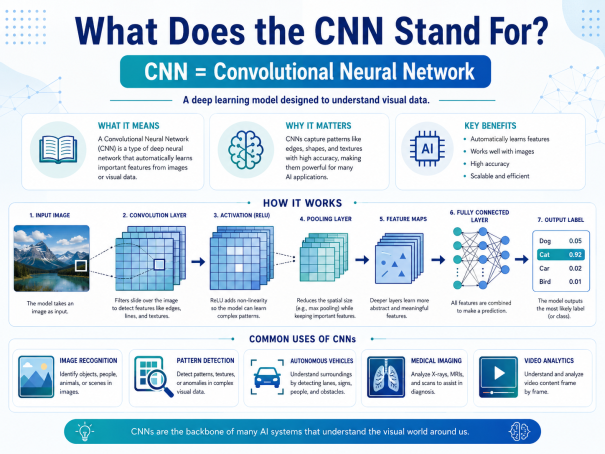
Ever come across the term “CNN” in a security report or an antivirus datasheet and wondered if it had anything to do with cable news? You’re not alone. In the world of online security, what does CNN stand for is actually one of the most searched questions among IT teams, students, and business owners trying to understand how modern threat detection works. In cybersecurity and artificial intelligence, CNN stands for Convolutional Neural Network — a type of deep learning model that helps security systems “see” patterns in data the same way the human eye recognizes shapes in a photograph. Today, CNNs quietly power some of the most advanced malware detection, intrusion prevention, and threat-hunting tools on the market, including technologies used by companies like Xcitium.
In this guide, we’ll break down what CNN stands for, how it works, why it matters for internet security, and how organizations can use it to stay ahead of evolving cyber threats.
What Does CNN Stand For? A Quick Definition
So, what does CNN stand for exactly? CNN stands for Convolutional Neural Network, a specialized class of artificial neural network designed to process structured data such as images, code patterns, and network traffic. The term “convolutional” refers to the mathematical operation — convolution — that the network uses to scan input data and detect meaningful features, such as edges in an image or suspicious byte patterns in a malware sample.
Unlike a general-purpose neural network, a Convolutional Neural Network is built specifically to recognize spatial relationships in data. This makes it exceptionally good at tasks like image recognition, facial recognition, and — increasingly — cybersecurity applications where malicious files or network behavior can be converted into a visual or structural pattern for analysis.
In short, whenever someone in a security context asks what does CNN stand for, the answer almost always points back to this powerful branch of deep learning rather than the news network of the same acronym.
How Does a Convolutional Neural Network Work?
To fully grasp what CNN stands for in practice, it helps to understand its architecture. A Convolutional Neural Network is built from several layers that work together to transform raw data into a security decision — such as “malicious” or “safe.”
Convolutional Layers
The first stage applies filters (also called kernels) across the input data. These filters slide over the data to detect small, localized patterns — for example, a specific sequence of bytes commonly found in ransomware code. Each filter produces a “feature map” that highlights where that pattern appears.
Pooling Layers
After convolution, pooling layers reduce the size of the feature maps while preserving the most important information. This step makes the CNN more efficient and less sensitive to minor variations, which is critical when malware authors slightly alter code to evade detection.
Fully Connected Layers
Finally, the extracted features are passed into fully connected layers, which combine everything the network has learned to make a final classification. In a cybersecurity context, this is where the system decides whether a file, URL, or network packet is a genuine threat.
Together, these layers allow a Convolutional Neural Network to automatically learn what malicious code, phishing pages, or abnormal network traffic look like — without a human analyst manually writing detection rules for every new threat.
Why CNN Matters in Cybersecurity
Now that we’ve answered what does CNN stand for at a technical level, let’s look at why it matters for online security. Cyberattacks are growing in both volume and sophistication, and traditional signature-based antivirus tools often struggle to keep up with new or modified malware strains.
Malware Detection with CNNs
One of the most effective uses of a Convolutional Neural Network is malware detection. Security researchers convert malware binaries into grayscale or color images, where each byte of code becomes a pixel. The CNN is then trained to recognize visual patterns associated with known malware families. Because CNNs excel at spotting subtle structural similarities, they can often identify new variants of malware even when the code has been altered to dodge traditional signature-based scanners.
Network Intrusion Detection
CNNs are also applied to intrusion detection systems (IDS), where network traffic is transformed into structured data that the model can analyze for anomalies. This allows security platforms to flag unusual login attempts, data exfiltration, or command-and-control communication in near real time, strengthening overall internet security posture.
Phishing and Threat Classification
Beyond malware, Convolutional Neural Networks are increasingly used to classify phishing websites by analyzing visual layout, logos, and page structure — helping security tools catch fraudulent sites that closely mimic legitimate brands.
CNN vs Traditional Detection Methods
Traditional cybersecurity tools typically rely on signature databases — lists of known malware fingerprints that must be constantly updated. This approach struggles against zero-day threats and polymorphic malware that changes its code with every infection.
A Convolutional Neural Network takes a different approach: instead of matching exact signatures, it learns the underlying patterns and characteristics of malicious behavior. This means CNN-based systems can often detect previously unseen threats by recognizing similarities to malware families they were trained on, rather than requiring an exact match. For businesses focused on proactive online security, this predictive capability is a significant advantage over legacy detection methods.
Benefits and Limitations of CNNs in Security
Like any technology, Convolutional Neural Networks bring both strengths and trade-offs to cybersecurity:
Benefits:
- Faster identification of new and evolving malware variants
- Reduced reliance on manually updated threat signatures
- Strong performance in image-based and pattern-based classification tasks
- Scalable across large volumes of files and network traffic
Limitations:
- Requires large, high-quality datasets for training
- Can be resource-intensive to run at scale
- May be vulnerable to adversarial manipulation if not properly hardened
- Results can be harder to interpret than traditional rule-based detections
Understanding both sides helps security teams set realistic expectations when adopting CNN-powered tools as part of a broader, layered defense strategy.
Actionable Tips: How to Leverage CNN-Based Security Effectively
If you’re evaluating security solutions that use Convolutional Neural Networks, keep these practical tips in mind:
- Pair CNN detection with layered defenses. No single model catches everything — combine CNN-based malware detection with firewalls, endpoint protection, and behavioral monitoring.
- Choose vendors with continuous model training. Threats evolve daily, so the CNN behind your security tool should be regularly retrained on fresh threat data.
- Prioritize explainability. Ask vendors how their CNN-based alerts are validated, since black-box decisions can slow down incident response.
- Monitor for adversarial evasion attempts. Because attackers are aware of AI-based detection, ensure your provider actively tests for adversarial manipulation.
- Start with a proof of concept. Test CNN-driven detection against your existing security stack before a full rollout to measure real-world accuracy gains.
Final Thoughts
So, what does CNN stand for? In the context of online and internet security, it stands for Convolutional Neural Network — a deep learning architecture that has become a cornerstone of modern malware detection, intrusion prevention, and threat classification. As cyber threats grow more sophisticated, CNN-powered tools give security teams a faster, smarter way to identify malicious activity before it causes damage.
Understanding what CNN stands for is just the first step. The next is making sure your organization is protected by security solutions that actually put this technology to work.
Ready to see AI-driven threat detection in action? Request a demo with Xcitium today and discover how advanced detection technology can help safeguard your business from evolving cyber threats.
Frequently Asked Questions (FAQ)
1. What does CNN stand for in cybersecurity?
CNN stands for Convolutional Neural Network, a deep learning model used to detect patterns in data such as malware code, network traffic, and phishing pages.
2. Is CNN the same as artificial intelligence?
Not exactly. A Convolutional Neural Network is a specific type of machine learning model that falls under the broader field of artificial intelligence and deep learning.
3. How does CNN help detect malware?
CNNs analyze malware by converting code into image-like data and identifying visual patterns associated with known malicious behavior, allowing them to detect new variants of existing malware families.
4. Can CNN replace traditional antivirus software?
CNN-based detection works best as part of a layered security strategy rather than a full replacement — combining it with firewalls, endpoint protection, and behavioral analysis provides stronger overall coverage.
5. Why is CNN important for online security today?
Because cyber threats constantly evolve, CNN’s ability to recognize patterns rather than rely solely on exact signatures makes it valuable for catching new and modified malware faster than traditional methods alone.
Please give us a star rating based on your experience.


 (16 votes, average: 2.81 out of 5, rated)


