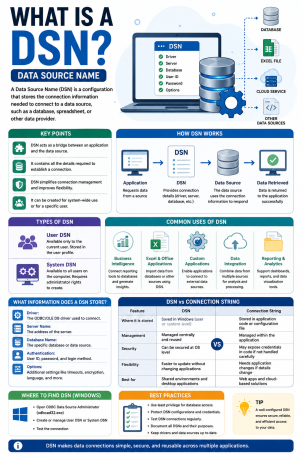
Ever tried to connect an application to a database and wondered how the system actually “knows” where to go? That’s exactly where a DSN comes in. So, what is a DSN? A Data Source Name (DSN) is a stored configuration that contains the connection details an application needs to reach a specific database — things like the server address, database name, driver type, and sometimes authentication credentials. Instead of typing this information manually every time, a DSN lets systems, applications, and reporting tools connect consistently and securely.
For IT administrators, developers, and cybersecurity professionals, understanding what a DSN is isn’t just a technical nicety — it’s essential for building reliable, secure, and efficient database connections. A poorly configured DSN can slow down troubleshooting, break integrations, or even open the door to security risks. In this guide, we’ll walk through what a DSN is, how it works, the different types available, and best practices for keeping your database connections secure.
What Is a DSN and How Does It Work?
At its core, a DSN acts like a digital address card for your database. When an application needs to retrieve or store data, it doesn’t need to know every technical detail about the database server — it simply references the DSN, which holds all the necessary connection parameters.
A typical DSN includes:
- Driver name – specifies which ODBC (Open Database Connectivity) driver to use
- Server address – the location of the database (hostname or IP address)
- Database name – which specific database to connect to
- Authentication details – username and password, or a reference to secure credential storage
- Port number – the network port used for the connection
Once configured, applications can call the DSN by name instead of hardcoding connection details into the software itself — making updates, maintenance, and security management significantly easier.
Types of DSNs You Should Know
Not all Data Source Names are created equal. Depending on how and where they’re stored, DSNs fall into three main categories.
1. User DSN
A User DSN is available only to the specific user account that created it, on the specific machine where it was configured. This type is common for individual workstations or personal reporting tools.
2. System DSN
A System DSN is accessible to any user or service running on the same machine, including background processes and system services. This makes it useful for applications like web servers that need consistent database access regardless of who is logged in.
3. File DSN
A File DSN stores connection information in a portable text file rather than the system registry. This makes it easy to share the same configuration across multiple machines — though it requires careful handling, since the file can contain sensitive connection details.
Why DSNs Matter for Cybersecurity and Internet Security
While DSNs are primarily a database connectivity tool, they carry real implications for cybersecurity and internet security that IT teams shouldn’t overlook.
They Can Expose Credentials if Misconfigured
Some DSNs store database usernames and passwords in plain text, particularly in File DSNs. If these files aren’t properly secured, attackers who gain access to a system could extract credentials and move laterally into connected databases.
They Can Widen the Attack Surface
Because DSNs often connect applications directly to sensitive data stores, an improperly permissioned System DSN can allow unauthorized services or users to query databases they shouldn’t have access to.
They Play a Role in Secure Application Architecture
Well-managed DSNs support the principle of least privilege by allowing administrators to control exactly which credentials and permissions are tied to each connection — a foundational concept in modern internet security practices.
How to Set Up and Secure a DSN: Actionable Best Practices
Configuring a DSN correctly the first time saves hours of troubleshooting — and helps close off unnecessary security gaps. Here’s how to do it right:
- Use System DSNs for shared applications. If multiple users or services need the same database connection, a System DSN keeps configuration consistent and easier to audit.
- Avoid storing plain-text credentials. Where possible, use integrated authentication or a secure credential vault instead of embedding passwords directly in the DSN.
- Limit database permissions. Configure the database account tied to the DSN with only the access it actually needs — never use administrator-level credentials for routine application connections.
- Restrict File DSN access. If you must use a File DSN, store it in a protected directory with strict file permissions to prevent unauthorized viewing.
- Audit DSN configurations regularly. Periodically review which DSNs exist on your systems, who can access them, and whether they’re still in active use.
- Encrypt connections where supported. Enable SSL/TLS encryption on the database connection itself to protect data in transit, in addition to securing the DSN configuration.
Common DSN Errors and How to Troubleshoot Them
Even a correctly conceptualized DSN can run into connectivity issues. Common problems include:
- “Data source name not found” – usually means the DSN wasn’t configured on the machine running the application, or the driver architecture (32-bit vs. 64-bit) doesn’t match.
- Authentication failures – often caused by outdated or incorrect credentials stored in the DSN.
- Driver mismatch errors – occur when the required ODBC driver isn’t installed or is an incompatible version.
Checking the ODBC Data Source Administrator tool (on Windows) or the relevant driver manager (on Linux/macOS) is typically the fastest way to diagnose these issues.
Final Thoughts: Why Understanding DSNs Strengthens Your IT Environment
So, what is a DSN? It’s far more than a technical configuration detail — it’s a foundational piece of how applications securely and reliably connect to the databases they depend on. Whether you’re an IT admin managing enterprise systems, a developer building data-driven applications, or a cybersecurity professional auditing access controls, understanding how DSNs work — and how to secure them — helps prevent avoidable errors and reduces your organization’s attack surface.
DSNs make database connections easier. Making sure the rest of your environment is just as secure takes the right cybersecurity partner.
Want to close the security gaps that misconfigured connections and credentials can create? Request a demo with Xcitium today and see how proactive endpoint and network protection keeps your systems secure from the inside out.
Frequently Asked Questions About DSNs
1. What does DSN stand for?
DSN stands for Data Source Name. It’s a stored configuration that tells an application how to connect to a specific database, including the driver, server, and authentication details.
2. What’s the difference between a User DSN and a System DSN?
A User DSN is only accessible to the specific user account that created it on that machine. A System DSN is accessible to any user or service on the same machine, making it better suited for shared applications like web servers.
3. Is a DSN the same as a database connection string?
They’re closely related but not identical. A DSN is a named, stored configuration that can be referenced by name, while a connection string typically includes all connection parameters written out directly in application code.
4. Can a DSN be a security risk?
Yes, if misconfigured. DSNs that store plain-text credentials or grant excessive database permissions can expose sensitive data if a system is compromised. Following best practices like least-privilege access and encrypted connections reduces this risk.
5. Do I need a DSN to connect to a database?
Not always. Some applications use direct connection strings instead of DSNs. However, DSNs are often preferred in enterprise environments because they centralize and simplify connection management across multiple applications.
Please give us a star rating based on your experience.


 (18 votes, average: 2.28 out of 5, rated)