If you’ve rolled out multi-factor authentication (MFA) anywhere in your organization, chances are you’ve already run into Duo Mobile. It’s one of the most widely deployed authenticator apps in the enterprise world, sitting quietly on millions of employee phones and approving logins with a single tap. But for IT and cybersecurity leaders responsible for identity security at scale, “it’s an MFA app” isn’t a complete answer. You need to understand how it actually works, where it fits into a broader identity strategy, and where its coverage ends.
This guide breaks down what Duo Mobile is, how it functions, why organizations adopt it, and what leaders should keep in mind when evaluating it as part of a layered security stack.
What Is Duo Mobile?
Duo Mobile is a free authenticator app built by Cisco Duo (formerly Duo Security, acquired by Cisco in 2018). It’s available on iOS and Android, and its core job is simple: verify that the person logging into a protected system is who they claim to be, using a second factor beyond just a password.
Instead of relying on a password alone — which can be phished, guessed, reused, or leaked in a breach — Duo Mobile adds a second layer of proof tied to a physical device the user already carries. When someone logs into a company application, VPN, or remote desktop, Duo can send a request to their phone. The user approves it with a tap, a fingerprint, or a face scan, and access is granted.
It’s part of the larger Cisco Duo platform, which handles the policy engine, device trust checks, admin dashboards, and integrations. Duo Mobile is the piece employees actually see and interact with every day.
How Duo Mobile Works
The workflow is intentionally frictionless for end users while still being rigorous on the backend. A typical login looks like this:
- User enters credentials. The employee logs into a protected resource — email, a VPN, an internal app, or an SSO portal — with their normal username and password.
- Duo sends a verification prompt. Depending on how the organization has configured policies, this might be a push notification, a request for a biometric scan, or a one-time passcode.
- The user approves the request. With Duo Push, this is a single tap confirming “yes, this is me.” No codes to type, no waiting for a text message.
- Duo evaluates context and risk. Behind the scenes, Duo can check the health of the device, the user’s location, and other risk signals before finalizing the decision.
- Access is granted or denied. If everything checks out, the user is in. If something looks off — an unrecognized device, an unusual location — Duo can step up authentication requirements or block the attempt outright.
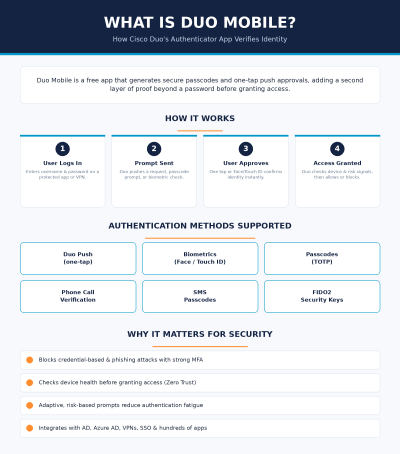
The image below summarizes this flow along with the supported authentication methods and the core reasons IT teams adopt the platform.
Authentication Methods Supported
One reason Duo Mobile has been adopted so broadly is its flexibility. It doesn’t force every organization or every user into a single authentication method. Supported options typically include:
- Duo Push – a one-tap approval sent directly to the app, the fastest and most common method.
- Biometrics – Face ID or Touch ID confirmation on supported devices.
- Passcodes (TOTP) – time-based one-time codes generated inside the app, useful when there’s no internet connection.
- Phone call verification – an automated call that asks the user to confirm access, often used as a fallback.
- SMS passcodes – text-message-based codes for devices or situations where push isn’t practical.
- FIDO2 security keys – hardware-based, phishing-resistant authentication for higher-assurance use cases.
This range lets security teams tailor policy by user group, application sensitivity, or compliance requirement — for example, requiring hardware keys for admins while allowing push notifications for general staff.
Why IT and Cybersecurity Leaders Deploy Duo Mobile
From an enterprise security standpoint, Duo Mobile (and the broader Duo platform behind it) solves a specific and persistent problem: passwords alone are not enough. Here’s why it keeps showing up on shortlists for identity security tooling.
It directly addresses credential-based attacks. Stolen, reused, and phished passwords remain one of the most common initial access vectors in breaches. Adding a second factor tied to a physical device meaningfully raises the bar for attackers, even when a password has already been compromised.
It supports Zero Trust initiatives. Beyond just confirming identity, Duo can evaluate device posture — checking whether a device is up to date, encrypted, or managed — before granting access to sensitive resources. That aligns with the “never trust, always verify” principle central to Zero Trust architectures.
It reduces authentication friction and fatigue. Adaptive, risk-based policies mean users aren’t hit with unnecessary prompts every time they log in from a trusted, low-risk context. This matters operationally: MFA fatigue and prompt-bombing attacks (where attackers spam push notifications hoping a user approves one by mistake or exhaustion) have become real threats, and thoughtful policy configuration helps mitigate that risk.
It integrates broadly. Duo connects with Active Directory, Azure AD, Google Workspace, popular VPNs, SSO platforms, and hundreds of business applications. For IT teams managing a sprawling identity ecosystem, that interoperability reduces the burden of stitching together custom authentication logic for every system.
It’s fast to deploy. Self-service enrollment and a straightforward mobile app mean organizations can roll out MFA across a workforce without a heavy, drawn-out IT project. For teams under pressure to close security gaps quickly — often driven by an audit, insurance requirement, or a near-miss incident — that speed matters.
Common Use Cases Across Industries
Duo Mobile’s flexibility means it shows up in very different environments:
- Education – protecting faculty and student portals, often across BYOD environments with limited centralized device management.
- Healthcare – securing access to electronic health records and clinical systems in ways that align with HIPAA expectations.
- Financial services – supporting compliance frameworks like PCI-DSS while enabling secure remote access for distributed teams.
- SaaS and technology companies – embedding MFA into CI/CD pipelines and developer tooling, not just end-user logins.
- Remote and hybrid workforces – enabling secure access to company resources without requiring a traditional VPN for every connection.
What Duo Mobile Doesn’t Do
This is the part that’s easy to overlook, but it matters for anyone building a security architecture rather than just checking a box.
Duo Mobile verifies identity at the point of login. It does not inspect network traffic, detect malware on an endpoint, stop a phishing email from landing in an inbox, or respond to an active intrusion once an attacker is inside a trusted session. It’s an authentication control — a critical one — but it’s one layer in what should be a multi-layered defense.
Organizations that treat MFA as a complete security strategy, rather than one piece of it, often discover the gap only after an incident: a compromised endpoint, a session hijack, or malware that operates entirely after a legitimate login has already occurred. Strong authentication reduces the odds of unauthorized access — it doesn’t eliminate every threat that follows.
Where Duo Mobile Fits in a Broader Security Strategy
For IT and cybersecurity leaders, the practical takeaway is straightforward: Duo Mobile is a strong, well-integrated tool for solving the authentication problem. It should sit alongside — not instead of — endpoint protection, network monitoring, threat detection, and containment capabilities that cover what happens before and after that login moment.
That’s the layer where many organizations still have exposure: a device can pass every authentication check and still be running malware, or a verified user’s session can still be hijacked mid-flow. Closing that gap means pairing strong identity controls like Duo Mobile with endpoint security that can detect, contain, and neutralize threats that authentication alone was never designed to catch.
If you’re evaluating how your current authentication setup fits into your broader endpoint and network security posture — or looking for the layer that picks up where MFA leaves off — it’s worth seeing what that looks like in practice.
See the Full Picture of Your Security Stack
Duo Mobile secures the login. What happens on the device and across the network afterward is a different challenge entirely — and one that Xcitium is built to solve with proactive endpoint containment and threat prevention.
Request a Demo with Xcitium to see how layered protection can close the gaps that authentication alone can’t cover.
Please give us a star rating based on your experience.


 (18 votes, average: 2.50 out of 5, rated)


