If you’ve been comparing hosting options for your website, application, or internal systems, you’ve almost certainly run into the term VPS. It sits between cheap shared hosting and expensive dedicated servers, and for a huge number of businesses, it’s the sweet spot.
But what is a VPS, exactly? How does it work under the hood, and — more importantly for security leaders — what does it mean for your risk posture? This guide breaks it all down in plain language, without the marketing fluff.
What Is a VPS?
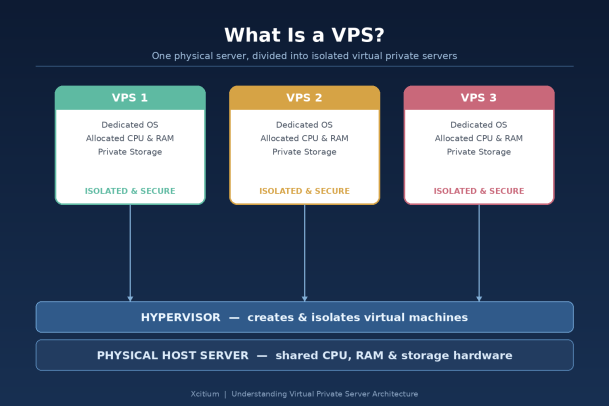
VPS stands for Virtual Private Server. It’s a hosting model where a single physical server is divided into multiple isolated virtual environments using a technology layer called a hypervisor. Each of these virtual environments — each VPS — behaves like its own independent server, complete with a dedicated operating system, allocated CPU, RAM, storage, and root or administrator access.
In simple terms: you’re not sharing a single environment with strangers (like on shared hosting), and you’re not paying for an entire physical machine all to yourself (like dedicated hosting). You get your own private slice of a server, walled off from every other tenant on that same piece of hardware.
The image below illustrates the basic architecture: a physical host machine runs a hypervisor, and that hypervisor creates and isolates multiple virtual private servers on top of it.
How Does a VPS Actually Work?
A VPS relies on virtualization — the same underlying concept used in enterprise data centers and cloud computing generally. Here’s the process at a high level:
- A physical server is provisioned. This machine has its own CPU cores, RAM, storage drives, and network connections.
- A hypervisor is installed. The hypervisor (examples include KVM, Xen, VMware ESXi, and Hyper-V) is software that partitions the physical hardware into multiple virtual machines.
- Each virtual machine becomes a VPS. Every VPS is allocated a fixed share of the physical resources — a certain number of CPU cores, a set amount of RAM, and a defined chunk of storage.
- Each VPS runs its own operating system. Customers can typically choose their OS (various Linux distributions, Windows Server, etc.) and install any software stack they need.
- Isolation is enforced by the hypervisor. Processes, file systems, and memory in one VPS cannot be accessed by another VPS on the same physical machine, even though they share the underlying hardware.
Because each VPS is functionally independent, you can reboot, reconfigure, or even crash your own VPS without affecting any other tenant on the same physical server — a major improvement over shared hosting environments.
VPS vs. Shared Hosting vs. Dedicated Servers vs. Cloud Servers
It helps to see a VPS in context against the other common options:
Shared Hosting Multiple websites or applications run on the same operating system instance, sharing the same resource pool with no strict isolation. It’s the cheapest option, but performance and security are heavily dependent on your “neighbors” on that server. A resource-hungry or compromised neighbor can degrade your performance or, in worse cases, expose you to cross-contamination risk.
Virtual Private Server (VPS) You get a dedicated OS instance and guaranteed resource allocation, isolated from other tenants at the hypervisor level. It’s significantly more secure and predictable than shared hosting, at a fraction of the cost of a dedicated server.
Dedicated Server An entire physical machine is allocated to a single customer. No virtualization, no shared hardware, maximum control and performance — but also the highest cost and the most operational overhead to manage.
Cloud Server (e.g., AWS EC2, Azure VMs) Conceptually similar to a VPS but delivered through large-scale, distributed cloud infrastructure with elastic, on-demand scaling, pay-as-you-go pricing, and a broader ecosystem of managed services. Many cloud servers are, technically, VPS instances running at massive scale.
For most small-to-mid-size businesses, and even many enterprise workloads, a VPS represents the best balance of cost, control, and performance.
Why Businesses Choose VPS Hosting
1. Predictable Performance Because your resources are reserved rather than shared on a first-come-first-served basis, you don’t experience the sudden slowdowns common with budget shared hosting when a neighboring site spikes in traffic.
2. Root/Admin Access and Full Customization A VPS gives you administrative control over your environment. You can install custom software, configure firewalls, set up specific runtime environments, and tune performance settings that shared hosting simply won’t allow.
3. Cost Efficiency You get most of the isolation and control benefits of a dedicated server without paying for an entire physical machine. This makes VPS hosting attractive for growing businesses that need more than shared hosting but aren’t ready for dedicated infrastructure spend.
4. Scalability Most VPS providers let you scale CPU, RAM, and storage up (or down) as your needs change, often with minimal downtime — useful for businesses anticipating growth or seasonal traffic spikes.
5. Better Isolation Than Shared Hosting Because each VPS runs its own OS kernel and is walled off by the hypervisor, a security issue or performance problem on another tenant’s VPS is far less likely to spill over into yours, compared to shared hosting.
What Security Leaders Need to Know About VPS
A VPS is not a “set it and forget it” security solution — it shifts more responsibility onto your organization, not less. This is the part many businesses underestimate.
You own the OS-level security. Unlike shared hosting where the provider often manages OS patching, a VPS typically puts you in charge of operating system updates, security patches, firewall configuration, and hardening. An unmanaged or poorly maintained VPS is a common entry point for attackers.
Hypervisor-level isolation is strong, but not infinite. While the hypervisor separates tenants effectively in the vast majority of cases, virtualization vulnerabilities (sometimes called VM escape vulnerabilities) have historically been discovered and exploited in various hypervisor technologies. Reputable providers patch these quickly, but it underscores that “isolated” doesn’t mean “unbreachable.”
Root access is a double-edged sword. Full administrative control means you can configure anything you need — but it also means misconfiguration risk sits entirely with your team. Open ports, weak SSH credentials, outdated software, and unmanaged services are frequent causes of VPS compromise.
Shared physical hardware still matters for compliance. For businesses under regulatory frameworks like HIPAA, PCI-DSS, or SOC 2, it’s worth confirming exactly how your provider architects tenant isolation, where data physically resides, and what auditing and logging capabilities are available on your VPS plan.
Endpoint and workload protection is essential. Because a VPS is, functionally, a full server under your control, it needs the same caliber of protection you’d apply to any endpoint or server in your environment — real-time threat detection, firewall management, patch management, and ideally a Zero Trust approach that assumes any component could be a target.
Common Use Cases for a VPS
- Hosting business websites, e-commerce stores, or web applications with moderate-to-high traffic
- Running custom software, APIs, or backend services that need dedicated resources
- Development, staging, and testing environments isolated from production
- Email servers and communication infrastructure
- Game servers and other latency-sensitive applications
- VPN endpoints and remote access infrastructure
- Backup and disaster recovery targets
Choosing the Right VPS: What to Evaluate
When comparing VPS providers or plans, look beyond price and consider:
- Resource guarantees — Is CPU/RAM truly dedicated, or “burstable” and potentially oversold?
- Managed vs. unmanaged — Will the provider handle OS patching and security updates, or is that entirely on your team?
- Security tooling and support — Does the provider (or your own stack) offer firewalls, DDoS protection, malware scanning, and monitoring?
- Backup and snapshot capabilities — How easily can you restore your VPS if something goes wrong?
- Scalability path — Can you upgrade resources without a full migration?
- Geographic location — Does it align with your compliance and latency requirements?
The Bottom Line
A VPS gives businesses a genuinely useful middle ground: dedicated resources, administrative control, and solid isolation, without the cost and complexity of a fully dedicated server. It’s an excellent fit for growing companies, development teams, and any workload that has outgrown shared hosting.
But that control comes with responsibility. A VPS is only as secure as the practices your team applies to it — patching, configuration, monitoring, and threat detection all matter just as much on a virtual server as they would on physical infrastructure sitting in your own data center.
For security leaders, the real question isn’t just “what is a VPS” — it’s “how do we make sure every VPS, cloud instance, and endpoint in our environment is protected against the threats actively targeting infrastructure like this today?”
Ready to Strengthen the Security of Your Servers and Endpoints?
Whether you’re running a single VPS or managing infrastructure across hundreds of endpoints, Xcitium’s advanced threat prevention and Zero Trust security platform helps ensure nothing malicious ever executes undetected.
Please give us a star rating based on your experience.

 (18 votes, average: 2.11 out of 5, rated)


