Every request your employees make to the internet, whether it is opening a SaaS dashboard, downloading a file, or calling an API, travels across a network path you are responsible for securing. One of the oldest and most useful tools for controlling that path is the proxy. Yet many organizations deploy proxies without fully understanding what they do, where they fit in a modern security stack, and where their limits are.
So, what is a proxy? This guide breaks it down in plain terms for cybersecurity and IT leaders: how proxies work, the main types, the security benefits they deliver, the risks they introduce, and how to decide whether your organization needs one.
What is a Proxy? A Simple Definition
A proxy, or proxy server, is an intermediary system that sits between a client (such as a user’s laptop or an application) and a destination server (such as a website or cloud service). Instead of connecting directly to the internet, the client sends its request to the proxy. The proxy then forwards that request on the client’s behalf, receives the response, and passes it back.
Think of it like a building receptionist. Visitors don’t wander straight into offices; they check in at the front desk, which verifies who they are, decides whether they’re allowed in, and directs them accordingly. A proxy does the same thing for network traffic.
Because all traffic passes through this single checkpoint, a proxy gives IT teams a powerful place to enforce policy, inspect content, hide internal details, and improve performance.
How Does a Proxy Server Work?
At a high level, a proxy follows a simple cycle:
- The client sends a request. A user types a URL or an application calls an external service. Rather than going straight out, the request is routed to the proxy, either through explicit configuration (browser or system settings) or transparently at the network level.
- The proxy evaluates the request. It checks the request against security and access policies. Is the destination allowed? Is the user authorized? Does the URL match a known malicious category?
- The proxy forwards the request. If approved, the proxy connects to the destination using its own IP address, not the client’s.
- The destination responds. The web server sends its response back to the proxy.
- The proxy inspects and returns the response. Before handing the content back, the proxy can scan it for malware, strip risky elements, cache it for future use, and log the transaction.
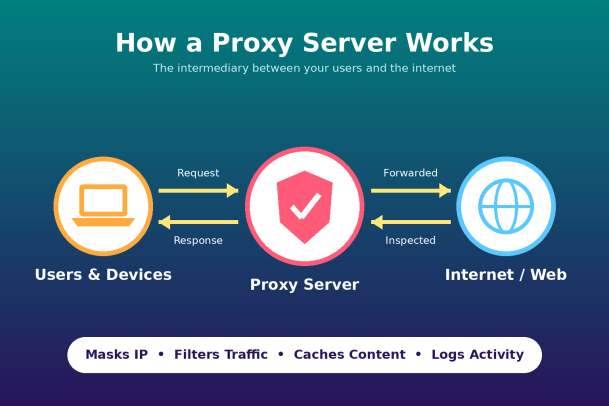
The result is that the outside world sees the proxy, not your internal endpoints, and your security team sees every transaction flowing through it.
Types of Proxies Every IT Leader Should Know
Not all proxies serve the same purpose. Understanding the main categories helps you choose the right tool for the right problem.
Forward Proxy
A forward proxy sits in front of internal users and handles their outbound requests to the internet. This is the classic corporate web proxy. It is used to enforce acceptable-use policies, block malicious sites, and monitor browsing activity.
Reverse Proxy
A reverse proxy sits in front of your servers and handles inbound requests from external users. It shields your web applications from direct exposure, distributes load across multiple backend servers, terminates TLS connections, and often works alongside a web application firewall (WAF). Content delivery networks and load balancers commonly function as reverse proxies.
Transparent Proxy
A transparent proxy intercepts traffic without requiring any configuration on the user’s device. Users often don’t know it is there. Organizations, schools, and ISPs use transparent proxies for content filtering and caching. The tradeoff is less granular user identification unless paired with additional authentication.
Anonymous and High-Anonymity Proxies
These proxies hide the client’s IP address from the destination. Anonymous proxies identify themselves as proxies but conceal the original IP, while high-anonymity (elite) proxies hide both. Security researchers use them legitimately, but attackers also use them to mask their origin, which is why your threat detection should account for traffic arriving through anonymizing services.
SOCKS Proxy
SOCKS proxies operate at a lower level than HTTP proxies and can handle almost any type of traffic, including email, file transfers, and gaming. SOCKS5 adds authentication support. They are flexible but don’t understand application-layer content, so they offer less inspection capability.
SSL/TLS Inspection Proxy
Since the vast majority of web traffic is now encrypted, a proxy that can’t see inside HTTPS is largely blind. SSL inspection proxies decrypt traffic, inspect it, and re-encrypt it before sending it on. This is essential for catching threats hidden in encrypted sessions but requires careful handling of privacy, certificates, and compliance.
Cloud (Secure Web Gateway) Proxy
With remote and hybrid work now standard, many organizations have moved proxy functionality to the cloud. A cloud-delivered secure web gateway protects users wherever they connect, without backhauling traffic through a central data center.
Proxy vs. VPN vs. Firewall: What’s the Difference?
These three tools are often confused, but they solve different problems.
A firewall controls which traffic is allowed in and out of a network based on rules such as ports, protocols, and IP addresses. Traditional firewalls make allow-or-deny decisions but don’t typically act on a user’s behalf.
A VPN creates an encrypted tunnel between a device and a network, protecting data in transit and giving remote users access to internal resources. It encrypts everything but doesn’t inherently filter or inspect content.
A proxy acts as an intermediary for specific application traffic, most commonly web traffic. It can filter, inspect, cache, and anonymize requests at the application layer.
In a mature security architecture, these tools complement rather than replace one another. Next-generation firewalls and SASE platforms increasingly combine all three capabilities in a single service.
Why Proxies Matter for Cybersecurity
For security leaders, a proxy is far more than a traffic router. It is a control point that supports several core security objectives.
Threat prevention. A proxy can block access to known malicious domains, phishing pages, and command-and-control servers before a connection is ever made. When combined with real-time threat intelligence, it stops many attacks at the first step.
Malware scanning. By inspecting downloads and web content, proxies can catch malicious files before they reach the endpoint, adding a layer of defense in front of endpoint protection.
Data loss prevention. Outbound inspection helps detect sensitive data, such as customer records, credentials, or intellectual property, being uploaded to unauthorized destinations.
Visibility and auditing. Proxy logs provide a detailed record of who accessed what and when. This is invaluable for incident response, forensic investigations, and compliance reporting under frameworks such as HIPAA, PCI DSS, and GDPR.
Reduced attack surface. By hiding internal IP addresses and server details, proxies make reconnaissance harder for attackers. Reverse proxies prevent direct exposure of backend infrastructure.
Policy enforcement. Proxies make it easy to apply consistent acceptable-use policies across the organization, limiting shadow IT and risky browsing behavior.
Operational Benefits Beyond Security
Proxies also deliver practical IT benefits. Caching frequently accessed content reduces bandwidth consumption and speeds up page loads. Reverse proxies balance load across servers, improving uptime and performance. Centralized control simplifies management, since policies are updated in one place instead of on every device.
The Risks and Limitations of Proxies
A proxy is not a silver bullet, and IT leaders should understand its weaknesses before relying on it.
Single point of failure. If all traffic depends on the proxy and it goes down, productivity stops. High availability and redundancy are essential.
Performance bottlenecks. SSL inspection in particular is computationally heavy. An undersized proxy can introduce latency that frustrates users.
Encrypted traffic blind spots. Without TLS inspection, a proxy can’t see threats inside encrypted sessions. With it, you take on certificate management and privacy considerations.
Bypass risks. Users or malware may route around a proxy using personal hotspots, unauthorized VPNs, or anonymizing services. Remote devices off the corporate network may not be covered at all unless you use a cloud-based approach.
Misconfigured or malicious proxies. An open or poorly secured proxy can be abused by attackers to relay traffic or launch attacks that appear to come from your organization. Free public proxies may log, inject, or steal data.
Limited endpoint protection. Most importantly, a proxy only sees network traffic. It can’t stop a threat that arrives through a USB drive, a malicious attachment opened offline, or an exploit already running on the device. That gap is why proxies must be paired with strong endpoint security.
Best Practices for Deploying Proxies
To get maximum value from a proxy, start by defining clear goals, whether that is threat prevention, compliance, performance, or all three. Choose a deployment model that matches your workforce; cloud-delivered proxies suit distributed teams far better than on-premises appliances alone. Enable TLS inspection where legally and ethically appropriate, with clear exceptions for sensitive categories such as banking and healthcare. Integrate proxy logs with your SIEM so security analysts can correlate web activity with other events. Build in redundancy to avoid downtime. And finally, treat the proxy as one layer in a defense-in-depth strategy, combining it with endpoint protection, identity controls, and Zero Trust principles.
The Future of Proxies: Zero Trust and SASE
The traditional perimeter has dissolved. Users work from anywhere, applications live in the cloud, and attackers exploit every gap. In response, proxy technology is evolving into broader frameworks such as Secure Access Service Edge (SASE) and Zero Trust Network Access (ZTNA). In these models, every request is verified based on identity, device posture, and context, and the proxy becomes a policy enforcement point within a larger, identity-aware architecture.
For IT leaders, the lesson is clear: proxies remain valuable, but they are most effective when they are part of a unified security strategy that protects users, devices, and data wherever they are.
Final Thoughts
So, what is a proxy? It is an intermediary that gives your organization control, visibility, and protection over network traffic. Used well, it blocks threats, enforces policy, protects privacy, and improves performance. Used alone, it leaves dangerous gaps, especially at the endpoint, where most breaches ultimately land.
The strongest security strategies combine network-level controls like proxies with endpoint protection that can stop unknown threats before they do damage. That is where a Zero Trust approach to the endpoint makes all the difference.
Ready to Close the Gaps Your Proxy Can’t See?
Xcitium’s Zero Trust platform protects your endpoints from known and unknown threats, containing malicious activity before it can cause harm, so your organization stays secure even when attacks slip past the network edge. See how it fits into your security stack today.
Please give us a star rating based on your experience.


 (24 votes, average: 2.29 out of 5, rated)