Every time you open a website, send an email, or connect to a cloud app, your data passes through a gateway. It is the quiet checkpoint between your internal network and the outside world, and it decides what gets in and what goes out.
Yet many business leaders and even IT teams treat the gateway as plumbing rather than a security priority. That is a costly mistake. Attackers know that the gateway is the front door to your organization, and they probe it constantly.
So, what is a gateway, exactly? In this guide, we explain how gateways work, the main types you will encounter, why they matter for cybersecurity, and how to protect these critical network entry points.
What is a Gateway?
A gateway is a network node that connects two networks that use different protocols, data formats, or architectures. Think of it as a translator and a border checkpoint rolled into one. It receives data from one network, converts it into a form the other network understands, and forwards it to the right destination.
The term comes from the idea of a gate: a single, controlled point of passage. In most homes and offices, the gateway is the device that links the local area network (LAN) to the internet, often built into a router or modem.
What separates a gateway from simpler devices is its ability to work across many layers of the OSI model. Routers mostly operate at Layer 3 (network), and switches at Layer 2 (data link). A gateway can operate at any layer, up to Layer 7 (application), which lets it understand and translate the actual content of traffic, not just its address.
In short, a gateway is the entry and exit point for traffic moving between networks, and because of that position, it is also one of the most important places to enforce security.
How Does a Gateway Work?
When a device on your network wants to reach a resource outside it, the traffic follows a predictable path:
- The device checks the destination. If the address is not on the local network, the device sends the packet to its configured default gateway.
- The gateway receives the packet. It reads the header and, depending on its type, may inspect the payload too.
- The gateway translates if needed. It converts protocols, data formats, or addresses, for example using Network Address Translation (NAT) to swap a private IP for a public one.
- The gateway applies policy. Security-focused gateways filter traffic, block known threats, and log activity.
- The gateway forwards the packet. The traffic moves to the next network, and replies come back through the same gateway in reverse.
Gateway vs. Router vs. Switch vs. Firewall
These terms are often used interchangeably, but they describe different jobs:
| Device | Main job | OSI layer | Translates protocols? |
|---|---|---|---|
| Switch | Connects devices within one network | Layer 2 | No |
| Router | Directs traffic between networks using the same protocol | Layer 3 | No |
| Firewall | Allows or blocks traffic based on security rules | Layers 3–7 | No |
| Gateway | Connects networks with different protocols and controls entry | Layers 1–7 | Yes |
In practice, a single appliance often combines several of these roles. A modern home router, for instance, acts as a switch, router, firewall, and gateway at once.
Common Types of Gateways
Gateways come in many forms, each built for a specific kind of traffic or environment.
- Default gateway: The device a computer sends traffic to when the destination is outside its local subnet. It is usually your router’s internal IP address.
- Internet or network gateway: Links a private network to the public internet, typically handling NAT and basic filtering.
- Cloud gateway: Connects on-premises systems to cloud storage or services, translating between local protocols and cloud APIs.
- API gateway: Sits in front of microservices and manages requests, authentication, rate limiting, and routing for applications.
- IoT gateway: Aggregates data from sensors and smart devices that use protocols like Zigbee or MQTT, then forwards it to the cloud.
- Email gateway: Scans inbound and outbound email for spam, phishing, and malicious attachments before delivery.
- VoIP gateway: Converts voice traffic between traditional phone lines and IP networks.
- Secure web gateway (SWG): Inspects web traffic to enforce acceptable-use policies and block malware, risky sites, and data leaks.
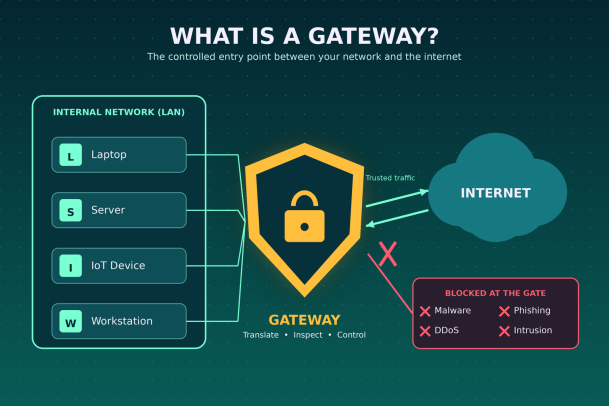
A gateway sits between your internal devices and the internet, passing trusted traffic and blocking threats at the entry point.
Why Gateways Matter for Network Security
Because nearly all external traffic flows through it, the gateway is a natural choke point. That makes it a powerful place to defend, and an attractive place to attack. If an attacker compromises the gateway, they can intercept data, redirect users, or move deeper into the network.
Common threats aimed at gateways include:
- Unpatched vulnerabilities: Gateway firmware and VPN appliances are frequent targets, and a single unpatched flaw can open the door to remote code execution.
- Default or weak credentials: Many gateways ship with factory passwords that attackers can find online in seconds.
- Man-in-the-middle attacks: A compromised or spoofed gateway lets attackers read and alter traffic in transit.
- DDoS attacks: Flooding the gateway with traffic can knock an entire organization offline.
- Malware and phishing: Without inspection at the gateway, malicious files and links reach users unchecked.
- Encrypted threats: Most web traffic is now encrypted, and attackers hide malware inside it, knowing many gateways do not inspect it.
The lesson is simple: a gateway that only routes traffic is not enough. It must also verify, inspect, and control it.
Best Practices for Securing Network Gateways
Protecting your gateway does not require exotic tools. It requires discipline and layered controls.
- Patch promptly. Track vendor advisories and apply firmware updates as soon as they are tested. Gateway exploits are often weaponized within days of disclosure.
- Replace default credentials. Use strong, unique passwords and enable multi-factor authentication for every admin interface.
- Disable unused services. Turn off remote management, UPnP, and open ports you do not need. Every open service is an attack surface.
- Inspect encrypted traffic. Use TLS inspection where policy allows, so threats cannot hide inside HTTPS.
- Segment your network. Separate guest, IoT, and business systems so a breach in one zone cannot spread freely.
- Monitor and log everything. Feed gateway logs into your SIEM or XDR platform to spot unusual patterns early.
- Back up configurations. Keep secure copies of gateway settings so you can restore quickly after a failure or attack.
- Review rules regularly. Old firewall and access rules pile up over time. Audit them at least quarterly and remove what you no longer need.
Gateways in a Zero Trust World
The traditional model treated the gateway as a castle wall: everything outside was untrusted, everything inside was safe. Remote work, cloud apps, and personal devices have broken that model. Users and data now live far beyond the perimeter.
Zero Trust security responds by trusting nothing by default. Every user, device, and request must be verified, wherever it comes from. The gateway still plays a role, but it becomes one layer among many rather than the only line of defense.
That is why endpoint protection matters so much. If a threat slips past the gateway, through an encrypted channel, a USB drive, or a laptop on public Wi-Fi, the endpoint is the last place to stop it. Solutions that contain unknown files before they can do harm close the gap that perimeter defenses leave open.
Frequently Asked Questions
1. What is a gateway in simple terms? It is a device or software that connects two different networks and controls the traffic passing between them.
2. Is my router a gateway? Usually, yes. Most home and small-office routers act as the default gateway to the internet.
3. How do I find my default gateway? On Windows, run ipconfig in Command Prompt. On macOS or Linux, run netstat -nr or ip route in Terminal.
4. Is a gateway the same as a firewall? No. A firewall enforces security rules, while a gateway connects networks. Many gateways include firewall features.
Conclusion: Secure the Gateway, Then Go Further
Now you know the answer to “what is a gateway?” It is the entry point that connects your network to the world, translating traffic and deciding what passes through. That central role makes it one of the most valuable assets in your infrastructure, and one of the most targeted.
Hardening your gateway with patching, strong authentication, traffic inspection, and constant monitoring is essential. But in a world of remote users and encrypted threats, the gateway cannot carry the load alone. You need protection that follows every endpoint and stops unknown threats before they execute.
Xcitium’s Zero Trust platform does exactly that, combining patented auto-containment with endpoint detection and response to neutralize threats that slip past the perimeter, without disrupting your users.
Ready to close the gaps your gateway can’t cover? Request a Demo with Xcitium and see how complete, Zero Trust protection keeps every entry point secure.
Please give us a star rating based on your experience.


 (22 votes, average: 2.55 out of 5, rated)


