If you’ve ever downloaded a software update from a company’s website, uploaded a website’s files to a hosting provider, or sent a large batch of documents to a client, there’s a good chance an FTP server was doing the work behind the scenes. It’s one of the oldest pieces of internet infrastructure still in daily use — and also one of the most misunderstood, especially when it comes to security.
This guide breaks down what an FTP server actually is, how the protocol behind it works, where it’s still used today, and why so many IT teams are moving away from it in favor of more secure alternatives.
What is an FTP Server
FTP stands for File Transfer Protocol, and an FTP server is simply a computer (or a piece of software running on one) that stores files and makes them available to other computers — called FTP clients — over a network. The client connects to the server, authenticates itself, and then can upload, download, rename, or delete files depending on what permissions it has been given.
FTP was introduced in 1971, long before the modern web existed, and it was purpose-built for one job: moving files reliably between two machines. Decades later, that core job hasn’t changed, even though the tools around it have.
How an FTP Server Works
An FTP session actually uses two separate connections rather than one, which is a detail that trips a lot of people up:
- The control channel (port 21) — used to send commands like “log in,” “list this directory,” or “get this file,” and to receive the server’s responses.
- The data channel (port 20 in active mode) — used to actually transfer the file contents themselves.
Splitting commands and data across two channels made sense in the early days of networking, but it’s also the reason FTP has a reputation for being awkward with firewalls — network admins have to account for two connections instead of one.
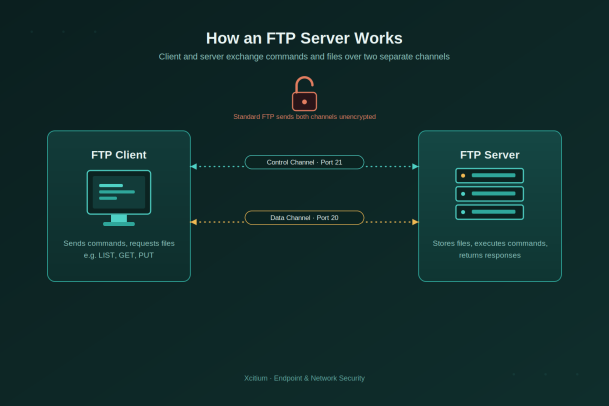
Active mode vs. passive mode
There are two ways the data channel can be opened. In active mode, the server initiates the data connection back to the client, which often gets blocked by client-side firewalls. In passive mode, the client initiates both connections, which plays far more nicely with modern firewalls and NAT setups — it’s why most FTP clients default to passive mode today.
Anonymous FTP vs. Authenticated FTP
Not every FTP server requires a personal login. There are two common access models:
- Anonymous FTP — the client logs in with the username “anonymous” and typically any (or no) password, often used for publicly distributing software, drivers, or documents.
- Authenticated FTP — the client logs in with a real username and password, giving the server a way to enforce specific permissions per user or group.
Anonymous access is convenient, but it also means anyone who finds the server’s address can browse and often download whatever has been made public — which is worth remembering before pointing an anonymous FTP server at anything sensitive.
FTP vs. SFTP vs. FTPS
This is where most of the confusion happens, because the three names look almost identical but describe very different levels of protection.
| Protocol | Full name | Encryption | Typical port |
|---|---|---|---|
| FTP | File Transfer Protocol | None — commands and files sent in plaintext | 21 (control), 20 (data) |
| FTPS | FTP over SSL/TLS | Encrypts the connection using SSL/TLS certificates | 21 or 990 |
| SFTP | SSH File Transfer Protocol | Encrypts everything via SSH, single connection | 22 |
Plain FTP transmits usernames, passwords, and file contents in the clear. FTPS wraps that same protocol in a TLS layer, similar to how HTTPS wraps HTTP. SFTP isn’t related to FTP at all under the hood — it’s a completely different protocol that runs over SSH and encrypts the whole session by default, which is a big part of why it’s become the more common recommendation for new deployments.
What FTP Servers Are Still Used For
Despite its age, FTP hasn’t disappeared. It’s still commonly used for:
- Hosting providers distributing website files to customers
- Software vendors publishing installers, drivers, and firmware updates
- Backing up large files between internal systems
- Automated batch transfers between business systems, such as nightly data exports
- Legacy enterprise workflows that were built around FTP years ago and never migrated
In many cases, organizations keep FTP running not because it’s the best option, but because replacing it means touching scripts, integrations, and vendor relationships that have quietly worked for years.
The Security Risks Nobody Should Ignore
Here’s the part that matters most for anyone responsible for protecting a network: standard FTP was never designed with security in mind, and its weaknesses are well understood by attackers.
Plaintext credentials. Because FTP doesn’t encrypt its control channel, usernames and passwords travel across the network in plain text — anyone capturing packets on that path can read them.
- Man-in-the-middle attacks — an attacker sitting on the network path can intercept or alter files in transit without either side noticing.
- Credential theft — captured login credentials are often reused elsewhere, turning one exposed FTP session into a much bigger breach.
- Exposed anonymous servers — misconfigured anonymous FTP servers are routinely scanned for and exploited by automated bots looking for sensitive files.
- No integrity checking — plain FTP has no built-in way to verify a file wasn’t tampered with during transfer.
- Outdated FTP software — many FTP server applications are old and unpatched, making them an easy foothold for attackers once discovered.
A file transfer protocol is only as trustworthy as the weakest link in its connection — and for standard FTP, that weak link is the complete lack of encryption.
Best Practices for Safer File Transfers
If your organization still relies on FTP, a few steps go a long way toward reducing exposure:
- Move to SFTP or FTPS wherever possible, rather than running plain, unencrypted FTP.
- Disable anonymous access unless you specifically intend to publish files publicly.
- Enforce strong, unique credentials and rotate them regularly, especially for shared or service accounts.
- Restrict access by IP address or VPN so the server isn’t reachable from the open internet.
- Keep FTP server software patched and retire unsupported versions promptly.
- Monitor and log access so unusual transfer activity gets flagged quickly rather than discovered after the fact.
Frequently Asked Questions
1. Is FTP still used today?
Yes, though its share of the market has shrunk considerably. Many hosting providers, software vendors, and legacy enterprise systems still run FTP servers, often because migrating away means rewriting scripts and integrations that have worked reliably for years. That said, most new file-transfer deployments now default to SFTP or a managed file transfer platform instead.
2. What port does FTP use?
Standard FTP uses port 21 for the control channel and port 20 for the data channel in active mode. In passive mode, the data channel uses a port negotiated dynamically by the server, which is one reason passive mode tends to work better through firewalls.
3. Is FTP the same as FTPS or SFTP?
No. FTP is the original, unencrypted protocol. FTPS adds a layer of SSL/TLS encryption on top of that same protocol. SFTP is a different protocol entirely, built on SSH, that encrypts the whole session by default. If security matters — and it almost always does — SFTP or FTPS should be the default choice over plain FTP.
4. Can an FTP server be hacked?
Yes, and it’s a well-documented attack path. Unencrypted credentials, unpatched server software, and misconfigured anonymous access are the most common ways FTP servers get compromised. Regular audits, patching, and moving to an encrypted protocol substantially reduce that exposure.
The Bottom Line
An FTP server is, at its core, a straightforward tool for moving files between machines — but “straightforward” and “secure” have never been the same thing where FTP is concerned. Understanding how the protocol works, where its channels are exposed, and why alternatives like SFTP and FTPS exist puts you in a much better position to decide whether it belongs in your environment at all, and how to lock it down if it does.
File transfer is just one entry point among many that attackers look for. Endpoints, networks, and the servers moving data between them all need to be watched, hardened, and protected as part of the same strategy.
Not sure how exposed your file transfers really are?
Xcitium’s endpoint and network security experts can show you where FTP, legacy protocols, and other overlooked entry points might be putting your organization at risk — and how to close those gaps.
Please give us a star rating based on your experience.

 (143 votes, average: 1.09 out of 5, rated)


