If you’ve ever wondered how a single physical server can run dozens of “computers” at once — each with its own operating system, applications, and resources — the answer comes down to one piece of technology: the hypervisor. It’s the quiet engine behind cloud computing, data center consolidation, and modern IT security architecture, yet most people outside of infrastructure teams have never heard of it.
In this article, we’ll break down exactly what a hypervisor is, how it works, the different types available, and why it has become the backbone of virtualization for businesses of every size.
What is a Hypervisor?
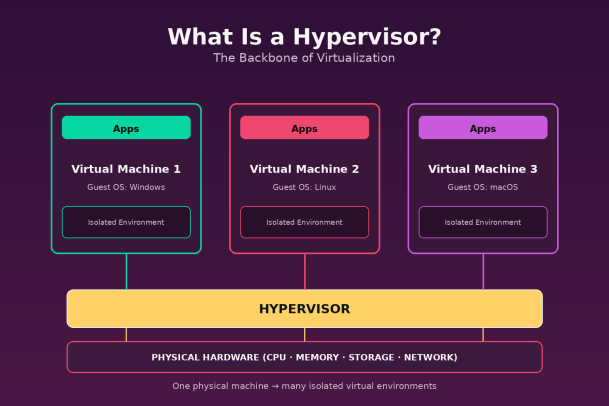
A hypervisor, also known as a virtual machine monitor (VMM), is software (or firmware) that creates and manages virtual machines (VMs). It sits between physical hardware and one or more guest operating systems, allocating CPU, memory, storage, and network resources to each virtual machine while keeping them isolated from one another.
In simple terms, a hypervisor lets a single physical machine act like many independent machines. Each virtual machine believes it has its own dedicated hardware, when in reality that hardware is being shared and managed intelligently by the hypervisor underneath.
This capability is the foundation of virtualization — the process of creating a virtual (rather than physical) version of something, whether that’s a server, storage device, or network resource.
Why Hypervisors Matter
Before virtualization became mainstream, organizations typically ran one operating system per physical server. This led to massive inefficiencies: servers sitting at 10-15% utilization, high hardware costs, and sprawling data centers that were expensive to power and cool.
Hypervisors changed that equation entirely. By allowing multiple virtual machines to run on a single physical host, businesses could:
- Consolidate infrastructure and reduce hardware costs
- Improve resource utilization across servers
- Isolate workloads for better security and stability
- Spin up or tear down environments in minutes instead of days
- Enable disaster recovery and backup strategies that were previously impractical
This efficiency is exactly why hypervisors underpin nearly every cloud platform in existence today, from private data centers to public cloud providers like AWS, Azure, and Google Cloud.
How Does a Hypervisor Work?
At a technical level, a hypervisor abstracts physical hardware resources and presents them to guest operating systems as if they were dedicated resources. It handles several critical functions:
- Resource allocation — dividing CPU cycles, memory, storage, and network bandwidth among virtual machines.
- Isolation — ensuring that a failure, crash, or security breach in one VM does not affect others running on the same host.
- Scheduling — determining which virtual machine gets access to physical resources and when, especially important when multiple VMs compete for the same hardware.
- Hardware emulation — translating instructions from guest operating systems into a form the physical hardware can execute.
Because of this abstraction layer, you can run entirely different operating systems side by side on the same physical machine — for example, a Windows Server VM and a Linux VM running simultaneously without either one being aware of the other.
Types of Hypervisors
Not all hypervisors are built the same way. Broadly, they fall into two categories: Type 1 and Type 2.
Type 1 Hypervisor (Bare-Metal)
A Type 1 hypervisor runs directly on the physical hardware, without an underlying host operating system. Because it interacts with hardware directly, it tends to be more efficient, secure, and better suited for enterprise and data center environments.
Common examples include VMware ESXi, Microsoft Hyper-V (in its bare-metal deployment), and Citrix Hypervisor. Type 1 hypervisors are the standard choice for production environments, cloud infrastructure, and any scenario where performance and security are top priorities.
Advantages:
- Higher performance due to direct hardware access
- Reduced attack surface since there’s no host OS to compromise
- Better scalability for enterprise workloads
Type 2 Hypervisor (Hosted)
A Type 2 hypervisor runs on top of a conventional operating system, just like any other application. The host OS manages hardware access, and the hypervisor requests resources through it.
Examples include Oracle VirtualBox, VMware Workstation, and Parallels Desktop. These are popular for development, testing, and personal use cases where a developer might want to run a different operating system on their laptop for testing purposes.
Advantages:
- Easier to install and use
- Ideal for testing, development, and desktop virtualization
- Doesn’t require dedicated hardware
While Type 2 hypervisors are convenient, they generally introduce more performance overhead and a larger attack surface, since a compromised host OS can potentially expose every virtual machine running on top of it.
Hypervisors and Security: A Double-Edged Sword
Hypervisors offer strong isolation between virtual machines, which is a major security benefit — a compromised VM typically cannot directly access another VM’s data or resources. This isolation is one of the reasons virtualization is so widely used for multi-tenant cloud environments.
However, hypervisors themselves are not immune to attack. A vulnerability in the hypervisor layer — sometimes called a “hyperjacking” attack — could theoretically allow an attacker to gain control over every virtual machine running on that host. Because the hypervisor operates below the guest operating systems, traditional endpoint security tools running inside a VM often have no visibility into what’s happening at the hypervisor level.
This is precisely why modern cybersecurity strategies must extend visibility and protection beyond the guest OS and into the virtualization layer itself. As organizations shift more of their infrastructure into virtualized and cloud-native environments, the hypervisor becomes a high-value target — and a critical layer to defend.
Hypervisors in the Cloud Era
Every major public cloud provider relies on hypervisor technology to deliver virtual compute instances to customers. When you spin up a cloud server, you’re really requesting a virtual machine that’s provisioned and isolated by a hypervisor running on shared physical infrastructure behind the scenes.
This model is what makes cloud computing economically viable: providers can serve thousands of customers from the same physical hardware pool, dynamically allocating resources as demand changes. Without hypervisors, the elastic, pay-as-you-go nature of cloud computing simply wouldn’t exist.
Beyond public cloud, hypervisors are also central to:
- Private cloud infrastructure in enterprise data centers
- Disaster recovery solutions that replicate VMs across sites
- DevOps and testing pipelines where isolated environments need to be created and destroyed rapidly
- Desktop virtualization (VDI), allowing employees to access a virtual desktop from any device
Choosing the Right Hypervisor for Your Business
When evaluating hypervisor options, organizations typically consider:
- Performance requirements — Type 1 hypervisors for production workloads; Type 2 for development or testing
- Licensing and cost — open-source options like KVM versus commercial platforms like VMware
- Ecosystem and support — integration with existing management tools, backup solutions, and cloud platforms
- Security posture — how well the hypervisor supports isolation, monitoring, and threat detection at the virtualization layer
Because the hypervisor sits at such a foundational layer of IT infrastructure, the decision isn’t one to take lightly. A poorly secured or poorly managed hypervisor environment can undermine the security of every workload running on top of it.
Common Hypervisor Platforms at a Glance
To put the concepts above into context, here’s how some of the most widely used hypervisors compare:
- VMware ESXi — A Type 1, enterprise-grade hypervisor known for stability, strong management tooling (vCenter), and wide adoption in large data centers.
- Microsoft Hyper-V — Built into Windows Server and available as a standalone bare-metal product; popular with organizations already invested in the Microsoft ecosystem.
- KVM (Kernel-based Virtual Machine) — An open-source Type 1 hypervisor built into the Linux kernel, widely used by cloud providers and organizations that prefer open-source infrastructure.
- Citrix Hypervisor (formerly XenServer) — A Type 1 hypervisor often paired with Citrix’s virtual desktop and application delivery products.
- Oracle VirtualBox — A free, cross-platform Type 2 hypervisor commonly used for local development, testing, and running alternate operating systems on a personal machine.
- VMware Workstation / Fusion — Commercial Type 2 hypervisors aimed at power users and IT professionals who need robust desktop virtualization.
Each platform has its own strengths, licensing model, and ideal use case, so the “best” hypervisor really depends on the workload, budget, and existing technology stack an organization is working with.
Frequently Asked Questions
1. Is a hypervisor the same as a virtual machine? No. The hypervisor is the software layer that creates and manages virtual machines; the virtual machine itself is the emulated computer running on top of it, complete with its own operating system and applications.
2. Can a hypervisor run different operating systems at the same time? Yes. One of the biggest advantages of virtualization is that a single hypervisor can host virtual machines running completely different operating systems — for example, Windows, Linux, and BSD — simultaneously on the same physical hardware.
3. Do I need a hypervisor to use cloud computing? You don’t need to manage one yourself, but hypervisors are working behind the scenes at your cloud provider. Every virtual server you provision in the cloud is ultimately a virtual machine managed by a hypervisor running on the provider’s physical infrastructure.
4. Are hypervisors secure by default? Hypervisors provide strong isolation between virtual machines, but the hypervisor layer itself can be targeted by attackers. Because it operates below the guest operating system, it requires dedicated security monitoring and hardening — not just the standard protections applied inside each VM.
Final Thoughts
The hypervisor may not be something end users ever see or think about, but it’s the invisible backbone that makes modern IT — from cloud computing to enterprise data centers — possible. By enabling multiple isolated virtual machines to share a single physical infrastructure, hypervisors have transformed how businesses deploy, scale, and secure their technology.
As virtualization environments continue to expand, so does the importance of securing them properly — from the guest operating system all the way down to the hypervisor layer itself. Organizations that overlook this layer leave a critical gap in their overall security strategy.
Ready to see how comprehensive endpoint and infrastructure protection can safeguard your virtualized environment?
Please give us a star rating based on your experience.


 (24 votes, average: 2.33 out of 5)


