Have you ever launched a website, only to watch it crawl during the first wave of visitors? Slow first loads frustrate users and can leave gaps that attackers exploit. Knowing how to preload a server solves both problems. When you preload a server, you load the data, cache, and configurations it needs before real traffic arrives, so performance is smooth and your security controls are already active from the first request.
In this guide, you’ll learn what server preloading is, why it matters for internet security, and how to do it safely.
What Does It Mean to Preload a Server?
To preload a server means preparing it ahead of demand. Instead of building caches, opening database connections, and loading application code when the first user shows up, the server does that work in advance. This is often called cache warming or server warm-up.
Preloading usually covers:
- Application code and libraries loaded into memory
- Frequently used data stored in a cache layer
- Database connections opened and pooled
- Security rules and configurations applied before the server goes live
Preloading vs. Prefetching vs. Caching
These terms are related but different. Caching stores data for reuse. Prefetching predicts what a user needs next. Preloading prepares the server itself so it is ready on the first request.
Why Preloading a Server Matters for Cybersecurity
Speed is the usual reason to preload a server, but there are security benefits too.
Better Performance Under Load
A cold server struggles during traffic spikes. Slow responses and timeouts can look like an outage, and a server already under strain is easier to overwhelm in a denial-of-service (DoS) attack. A preloaded server absorbs sudden demand more gracefully.
Security Controls Active From the Start
When firewall rules, access policies, and encryption settings are loaded before launch, there is no window where the server runs unprotected. This supports a stronger security posture and a smaller attack surface.
More Consistent User Experience
Reliable, fast pages build trust. Visitors who see delays or errors may suspect a compromised site and leave.
How to Preload a Server: Step-by-Step
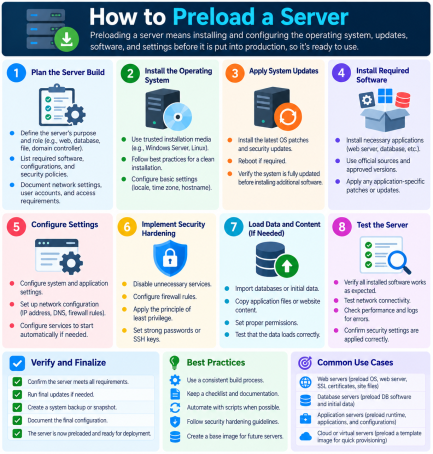
Here are the practical steps for how to preload a server, whether it’s a web, application, or database server.
Step 1: Harden the Server First
Never warm up a server that isn’t secure. Before you preload anything:
- Apply the latest operating system and software patches
- Disable unused ports, services, and default accounts
- Enforce strong authentication and least-privilege access
- Enable TLS/SSL encryption for all traffic
Step 2: Identify What to Preload
Review your analytics and server logs to find your most requested pages, API endpoints, images, and database queries. Focus on high-traffic content, since preloading everything wastes memory.
Step 3: Warm Up the Cache
Send automated requests to your key URLs so the cache fills before visitors arrive. You can do this with:
- A simple script using
curlorwget - Your CDN’s cache preload or “purge and prime” feature
- A caching tool such as Redis, Memcached, or Varnish
Step 4: Preload Application Code and Connections
Most application servers (such as PHP-FPM with OPcache, Java-based servers, or Node.js process managers) can load code into memory at startup. Also configure connection pools so the database connection handshake doesn’t slow your first users.
Step 5: Use Preload Headers for Critical Resources
On the web side, the HTTP Link: rel=preload header and the HTML <link rel="preload"> tag tell browsers to fetch critical fonts, scripts, and stylesheets early. Only preload resources you are sure the page needs.
Step 6: Automate and Schedule the Process
Build preloading into your deployment pipeline so every restart, update, or scale-up event warms the server automatically. Automation removes human error and keeps security settings consistent.
Step 7: Test, Monitor, and Log
After you preload a server, confirm the results:
- Check response times and cache hit ratios
- Review logs for unusual requests during warm-up
- Run vulnerability scans before sending live traffic
Security Risks to Avoid When You Preload a Server
Preloading can introduce problems if done carelessly.
- Caching sensitive data: Never preload pages containing personal or session data. A misconfigured cache can expose one user’s information to another.
- Outdated cached content: Stale content can serve old, vulnerable scripts. Set sensible expiry times.
- Unprotected warm-up scripts: Scripts that run with admin privileges are a target. Store credentials in a secrets manager, not in plain text.
- Over-preloading: Loading too much drains memory and can degrade performance.
Best Practices for Preloading a Server
- Preload only high-value, non-sensitive content
- Keep software, plugins, and caching tools updated
- Segment your network and restrict who can trigger warm-up jobs
- Use endpoint and network security tools to watch for suspicious activity
- Re-run preloading after every major update or traffic event
- Document your process so your team can repeat it reliably
Frequently Asked Questions (FAQs)
1. What is the purpose of preloading a server?
The goal is to have the server ready before users arrive, so the first visitors get fast responses instead of waiting for caches and connections to build.
2. Is it safe to preload a server?
Yes, if you harden the server first and avoid caching sensitive data. Always apply patches, use encryption, and limit access to warm-up scripts.
3. How often should I preload a server?
Preload after every restart, deployment, cache purge, or scaling event. For high-traffic sites, schedule periodic warm-ups as well.
4. What is the difference between preloading and caching?
Caching stores data so it can be reused later. Preloading fills the cache and prepares the server in advance, so the cache is useful from the start.
5. Can preloading a server prevent cyberattacks?
Not by itself. It improves resilience and ensures security settings are active at launch, but you still need firewalls, monitoring, and endpoint protection.
Conclusion: Get Your Servers Fast and Secure
Now you know how to preload a server: harden it, choose what to load, warm the cache, automate the process, and monitor the results. Done right, preloading improves speed and reliability, and it helps keep your security controls in place from the very first request.
Speed alone isn’t enough, though. Every server needs protection against ransomware, malware, and zero-day threats.
Ready to secure your servers with Zero Trust protection? Request a free demo of Xcitium today and see how our technology stops threats before they cause damage.
Please give us a star rating based on your experience.


 (16 votes, average: 2.38 out of 5, rated)


