If you manage a network of any real size — routers, switches, firewalls, servers, printers, wireless access points — you need a way to see what all of those devices are doing without physically logging into each one. That is exactly the problem SNMP (Simple Network Management Protocol) was built to solve.
SNMP has been the backbone of network monitoring for over three decades, and despite newer alternatives like streaming telemetry and NETCONF, it remains one of the most widely deployed protocols in enterprise IT. But its age is also its weakness: SNMP has a documented history of security gaps that attackers actively exploit. For IT teams, understanding SNMP is table stakes. For cybersecurity teams, understanding how it can be abused is just as important.
This guide breaks down what SNMP is, how it works, its different versions, common use cases, and — critically — the security risks every organization should know about.
What is SNMP?
SNMP, or Simple Network Management Protocol, is a standardized protocol used to collect information from, and configure, network devices. It operates at the application layer of the OSI model and allows a central system to monitor the health, performance, and status of devices spread across a network — regardless of vendor or device type.
Instead of manually checking CPU load, interface status, temperature, or bandwidth usage on every device, SNMP lets a single management platform pull that data automatically, at scale, on a schedule. It is used to monitor routers, switches, firewalls, load balancers, servers, UPS units, printers, and even IoT devices.
SNMP was first introduced in 1988 as a simple, lightweight way to manage the growing complexity of TCP/IP networks. It succeeded because it was easy to implement and vendor-agnostic — almost every piece of network hardware built since then supports it in some form.
The Core Components of SNMP
To understand SNMP, you need to understand four building blocks that work together.
1. SNMP Manager (Network Management Station / NMS) This is the central system — often network monitoring software like SolarWinds, PRTG, Nagios, or a custom dashboard — that requests information from devices and displays it to administrators.
2. SNMP Agent A small piece of software running on the monitored device (a router, switch, server, etc.) that collects local data and responds to requests from the manager.
3. Management Information Base (MIB) A structured, hierarchical database that defines what information is available on a device and how it is organized. Think of the MIB as a map that tells the manager what data points exist and where to find them.
4. Object Identifiers (OIDs) Each specific piece of data in a MIB — like CPU utilization or interface status — is identified by a unique numeric string called an OID. When the manager wants a specific metric, it requests it by OID.
How Does SNMP Work?
SNMP communication happens between the manager and the agents through a small set of simple operations:
- GET – The manager requests a specific value from an agent (e.g., “What is the current bandwidth on interface 3?”).
- GETNEXT – Used to walk through a MIB tree, retrieving the next object in sequence.
- SET – The manager changes a configuration value on the device (e.g., updating a threshold or setting).
- GET-RESPONSE – The agent’s reply to a GET or SET request, containing the requested data or confirmation.
- TRAP – An unsolicited alert sent from the agent to the manager when something significant happens, such as an interface going down or a device rebooting — without waiting to be asked.
Most SNMP traffic runs over UDP, using port 161 for standard queries and port 162 for traps. UDP was chosen deliberately for speed and low overhead, since network monitoring often involves large volumes of small, frequent messages.
Here’s a simplified view of that request-response cycle:
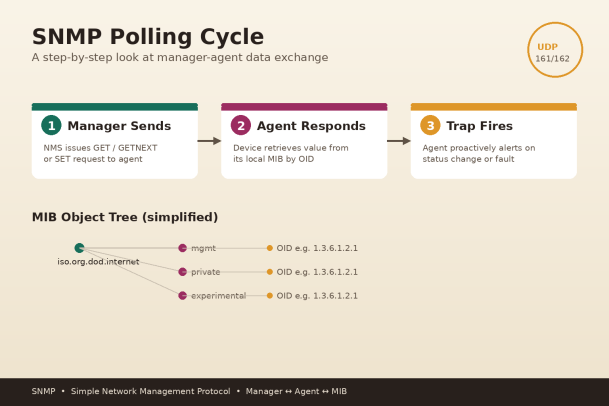
As the diagram shows, the manager polls the agent for data, the agent replies (or proactively sends a trap), and all of that data is organized and retrieved through the device’s MIB using OIDs.
SNMP Versions: SNMPv1, SNMPv2c, and SNMPv3
Not all SNMP is created equal, and the version in use has major security implications.
SNMPv1 (1988) The original version. It introduced the basic GET/SET/TRAP model but has almost no real security — authentication is handled through a plaintext “community string” that functions like a shared password sent in the clear.
SNMPv2c (1996) Added performance improvements like GETBULK (retrieving large amounts of data efficiently) and better error handling, but retained the same weak community-string authentication as v1. This is still the most commonly deployed version in many organizations, largely due to legacy compatibility — and it is a serious risk.
SNMPv3 (2002 – current standard) The first version to take security seriously. SNMPv3 introduced:
- Authentication — verifying the identity of the manager and agent
- Encryption (privacy) — encrypting the payload so data can’t be read in transit
- Message integrity — ensuring data hasn’t been tampered with
If your organization is still running SNMPv1 or v2c anywhere in the environment, migrating to SNMPv3 should be a priority.
Common Use Cases for SNMP
- Performance monitoring – tracking bandwidth, CPU, memory, and disk usage across network hardware
- Fault detection – receiving real-time traps when interfaces go down, hardware fails, or thresholds are breached
- Configuration management – pushing standardized configuration changes to many devices at once
- Inventory and asset tracking – automatically discovering devices and cataloging their specifications
- Capacity planning – analyzing historical trends to anticipate when infrastructure needs upgrading
Why SNMP Matters to Cybersecurity Teams
SNMP isn’t just an IT operations tool — it’s a genuine part of the attack surface, and security teams need to treat it that way. Here’s why it shows up repeatedly in penetration tests and real-world breaches:
1. Default and weak community strings Many devices ship with default community strings like “public” (read-only) and “private” (read-write). If these are never changed, anyone who can reach the device on UDP 161 can potentially read sensitive configuration data — or, in the worst case, reconfigure the device entirely.
2. Plaintext transmission (v1/v2c) Because SNMPv1 and v2c send community strings and data in plaintext, an attacker positioned on the network (via ARP spoofing, a compromised switch, or a rogue access point) can sniff traffic and capture credentials.
3. Information disclosure SNMP can reveal a surprising amount about a network: device models, running software versions, routing tables, ARP caches, and interface details. This is exactly the kind of reconnaissance data attackers use to plan lateral movement.
4. Denial-of-service and amplification attacks SNMP has historically been abused in reflection/amplification DDoS attacks, where an attacker spoofs a victim’s IP address and sends small SNMP requests to many devices, which then flood the victim with large responses.
5. Unauthorized configuration changes If SET operations are exposed with weak or default credentials, an attacker could alter routing behavior, disable logging, or redirect traffic — all through a protocol that many teams assume is “just for monitoring.”
SNMP Security Best Practices
To reduce SNMP-related risk, security and IT teams should:
- Upgrade to SNMPv3 wherever hardware and software support it, and enable both authentication and encryption.
- Change default community strings immediately on every device — never leave “public” or “private” active.
- Restrict SNMP access using access control lists (ACLs) so only authorized management systems can query devices.
- Disable SNMP entirely on devices and interfaces where it isn’t actively needed.
- Segment management traffic onto a dedicated VLAN or out-of-band management network.
- Monitor and log SNMP traffic for unusual polling patterns, failed authentication attempts, or traffic from unexpected sources.
- Regularly audit which devices have SNMP enabled and which version they’re running, since shadow IT and forgotten legacy hardware are common blind spots.
Final Thoughts
SNMP remains one of the most useful — and most overlooked — protocols in enterprise networking. It gives IT teams visibility into infrastructure health at scale, but when left misconfigured or running on outdated versions, it also hands attackers an easy foothold for reconnaissance, credential theft, and disruption.
The takeaway for both IT and cybersecurity professionals is the same: SNMP isn’t something to “set and forget.” It needs the same scrutiny, hardening, and monitoring as any other protocol touching your network infrastructure.
Modern threats move fast, and legacy protocols like SNMP are frequently the quiet entry point attackers rely on because defenders assume they’re low-risk. Closing that gap requires visibility into exactly what’s running on your network, how it’s configured, and whether it’s being actively exploited.
Ready to close the gaps attackers are counting on?
Xcitium helps IT and security teams gain complete visibility and control over their network infrastructure — stopping threats before they can exploit misconfigured protocols, legacy systems, or unmonitored devices.
Please give us a star rating based on your experience.


 (88 votes, average: 1.25 out of 5, rated)


