If you’ve been in IT or security for any length of time, you’ve probably seen a phishing simulation go wrong. A “gotcha” test lands in every inbox, a chunk of the staff clicks, a few people feel humiliated, and the only lasting result is a round of complaints to HR and a quieter distrust of the security team. Understandably, a lot of leaders walk away from that experience wondering whether simulated phishing is worth doing at all.
It’s a fair question, and it deserves a data-driven answer rather than a sales pitch. The short version: phishing simulations work — but only when they’re run as an ongoing training program rather than a one-time trap. The difference between a program that measurably lowers your risk and one that just annoys people comes down to a handful of design choices. This piece walks through what a simulation actually is, how the effective ones work, what the research says about results, and the mistakes that cause the whole exercise to backfire.
What Is a Phishing Simulation?
A phishing simulation is a controlled, safe, fake phishing email sent to your own employees to test how they respond and to train them in the moment. The message looks like a real attack — a spoofed login prompt, a fake invoice, an urgent request from “IT” — but the links and attachments are harmless. Instead of stealing credentials or dropping malware, the simulation records who clicked, who entered information, and who reported the message, then delivers a short lesson to anyone who took the bait.
Two distinctions matter here. First, a simulation is not a real attack, and it is not penetration testing of your technical defenses; it measures human behavior, not firewall configuration. Second, a simulation is not the same as a “training only” program. Sitting employees down for an annual slideshow on phishing conveys information, but it doesn’t test whether that information changes behavior under realistic pressure. Simulations close that gap by putting people in a low-stakes version of the exact situation they’ll face when a genuine attacker comes knocking. The goal isn’t to catch people out — it’s to build a reflex.
How Phishing Simulations Work, Step by Step
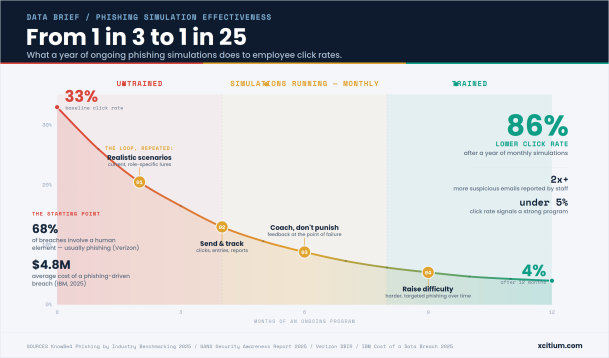
Effective programs follow a consistent loop: design a believable scenario, send and measure it, coach at the point of failure, and raise the difficulty over time.
Designing Realistic Scenarios
The quality of a simulation lives or dies on how believable the lure is. Generic templates that no attacker would actually use (“Congratulations, you’ve won a prize”) teach employees to spot simulations, not phishing. The strongest scenarios are built around current, real-world tactics and are tailored to the organization — the tools your staff actually use, the vendors they actually work with, and the threats actively targeting your industry. A school district sees different lures than a manufacturer; a finance team sees different lures than a warehouse. Scenario design that reflects those differences produces training that transfers to the real thing.
Sending and Tracking
Once a campaign goes out, the platform captures a few core metrics: the click rate (how many people clicked the link), the credential submission rate (how many went a step further and entered information on the fake login page), and the reporting rate (how many recognized the message and flagged it to security). That third number is easy to overlook but is arguably the most important — a rising reporting rate is the clearest sign that employees aren’t just avoiding bad clicks, they’re actively becoming part of your defense. Sending is usually staggered rather than blasted all at once, both to avoid the “hey, watch out for that email” word-of-mouth effect and to measure behavior cleanly.
Instant Feedback at the Point of Failure
The single most valuable moment in a phishing simulation is the second right after someone clicks. That’s when a person is most receptive to learning, because they’ve just experienced the mistake firsthand rather than reading about it in the abstract. Good platforms intercept that click with an immediate, short explanation: here’s the email you just interacted with, here are the specific red flags you missed, and here’s what would have happened if this were real. This “point of failure” coaching turns a mistake into the most memorable lesson an employee will get all year — no scheduling, no classroom, no delay.
Progressive Difficulty Over Time
A program that sends the same easy template forever produces a click rate that looks great and means nothing. Mature programs increase difficulty as employees improve, moving from obvious mass-phishing toward more convincing, targeted spear-phishing. A realistic lure that gets an 8% click rate and a 60% report rate tells you far more about your true exposure than an easy one that nobody fails. Ramping difficulty keeps the training honest and keeps employees sharp against the more sophisticated attacks — increasingly, AI-generated ones — that they’ll actually encounter.
Does the Data Show Results?
This is where the skepticism meets the evidence, and the evidence is fairly consistent: sustained simulation programs produce large, measurable reductions in how often employees fall for phishing.
The most widely cited benchmark comes from KnowBe4’s 2025 Phishing by Industry Benchmarking Report, one of the largest datasets of its kind. It found that across thousands of organizations, roughly one in three untrained employees — a global average of about 33% — will interact with a phishing simulation before any training. In North America, that baseline is even higher, closer to 37%. After twelve months of ongoing simulated phishing combined with awareness training, that figure drops to around 4%, an improvement of roughly 86%. In other words, an organization can go from one in three employees at risk to fewer than one in twenty.
The key variable is frequency. According to the SANS 2025 Security Awareness Report, simulation cadence has a direct effect on results, with monthly campaigns driving on the order of a 75% reduction in click rate over a year. This is why one-off simulations consistently underperform. Research on skill retention has long shown that awareness gained in a single training session erodes within months without reinforcement. A once-a-year test captures a snapshot and then lets the learning fade; a quarterly or monthly rhythm keeps the reflex alive and steadily compounds the gains. Reporting behavior tends to improve even faster than click rates decline — some platform data shows threat reporting more than doubling among trained users — which means the organization gets earlier warning of real attacks as the program matures.
It’s worth putting these numbers against the cost of the problem they address. Verizon’s Data Breach Investigations Report has consistently found that a large share of breaches — around two-thirds — involve a human element, frequently a phishing email, and that the median user who’s going to click does so within about a minute of opening the message. IBM’s 2025 Cost of a Data Breach report pegged phishing as one of the most common initial attack vectors, tied to breaches averaging in the neighborhood of $4.8 million. Against a potential multi-million-dollar loss, cutting employee susceptibility by 80% or more is not a soft “nice to have” — it’s one of the highest-leverage risk reductions available.
Common Mistakes That Make Simulations Backfire
The reason so many leaders are skeptical is that plenty of programs are run badly. Almost every failure traces back to one of these:
- Punitive framing. Publicly naming, shaming, or disciplining employees who click destroys trust and teaches people to hide mistakes rather than report them. When employees fear the security team, they stop flagging suspicious emails — the exact opposite of what you want. Research has repeatedly linked punitive, high-consequence simulations to employee backlash.
- Scenarios that are too obvious or too cruel. Templates so easy that no real attacker would send them produce meaningless “success,” while manipulative lures — fake bonuses, fake layoffs, personal-emergency bait — feel like entrapment and poison morale without improving security. The sweet spot is realistic and challenging, not emotionally exploitative.
- No follow-up coaching. Telling someone they failed without showing them what they missed or how to do better wastes the most teachable moment you’ll get. A click with no lesson attached is a punishment; a click with immediate, constructive feedback is training.
- Testing with no training foundation. Launching hard simulations before employees have had any baseline education sets people up to fail and frames the whole program as a trap. Establish a foundation first, then test against it.
Best Practices for Running an Effective Phishing Simulation Program
The organizations that see the 80%-plus reductions in the data tend to do the same handful of things well:
- Run simulations quarterly at minimum, ideally monthly. Cadence beats intensity. Frequent, rotating campaigns outperform a single annual blast every time, because they turn awareness into a maintained habit rather than a one-day event.
- Coach, don’t punish. Treat every click as a learning opportunity and pair it with immediate, supportive feedback. Recognize and reward the people who report phishing rather than only tracking the people who fail. Culture is the whole game.
- Vary scenario types and difficulty. Rotate email, and where appropriate voice and text lures, and raise the challenge as your teams improve. Compare campaigns of equivalent difficulty so your trend line reflects real progress, not easier tests.
- Report at the department level. Aggregate results by business unit and role so you can direct extra help where it’s actually needed and give leaders accountability, without singling out individuals in a way that shames them.
- Watch the metrics that matter. Track your reporting rate and your repeat-clicker rate — the small group of people who fail multiple campaigns in a rolling 90-day window — as closely as the headline click rate. Below a 5% click rate is a solid, mature program; below 2% is excellent. But treat any of these as a trend instrument, not a single-campaign scorecard.
FAQs
How often should phishing simulations be run? At least quarterly, and monthly if you can sustain it. The research is clear that frequency drives results — monthly programs are associated with roughly a 75% click-rate reduction over a year, while annual “check the box” tests let learning fade between sessions. Consistency matters far more than any single dramatic campaign.
What’s a good click rate benchmark? Expect a high baseline before training — industry data puts the untrained average around one in three employees. As a program matures, a click rate under 5% indicates a strong, well-trained workforce, and under 2% is excellent. Just remember that click rate is only meaningful against your own baseline and at a consistent difficulty level; a low rate on easy templates is a vanity metric. Pair it with your reporting rate for a truer picture.
Should employees be told simulations are happening? Yes — tell them the program exists, but not the timing. The consensus best practice, and in some regions the legal expectation, is transparency about the fact that periodic simulations are part of your security program, combined with clear communication about their educational purpose and what data is and isn’t tracked. What you don’t announce is the schedule of any specific campaign, since that would invalidate the test. Notably, when programs are run this way, surveys find the overwhelming majority of employees view simulations as helpful rather than adversarial. Transparency builds the trust that makes the whole thing work.
See what a real phishing simulation looks like. If you’re weighing whether simulated phishing belongs in your security program, the best way to judge is to see one in action rather than take a benchmark’s word for it. Request a demo or try the tool to see how realistic scenarios, point-of-failure coaching, and department-level reporting come together in practice.
Please give us a star rating based on your experience.
 (1 votes, average: 5.00 out of 5, rated)


