Every day, employees download files, click links, and install software they believe is safe. Most of the time, it is. But hidden among the legitimate downloads is one of the oldest and most effective tricks in the cybercriminal playbook: the Trojan. If you’ve ever asked, “What is a Trojan virus?”, you’re asking one of the most important questions in modern cybersecurity, because understanding this threat is the first step to stopping it.
This guide explains what a Trojan virus is, how it works, the types you’re most likely to encounter, how to spot an infection, and what organizations can do to build real cybersecurity readiness.
What Is a Trojan Virus?
A Trojan virus, more accurately called a Trojan horse or simply a Trojan, is a type of malicious software that disguises itself as a legitimate, harmless program to trick users into installing it. Once inside a system, it carries out hidden actions the user never agreed to, such as stealing data, opening a backdoor for attackers, or downloading additional malware.
The name comes from the ancient Greek story of the Trojan War. After a long, failed siege, the Greeks built a giant wooden horse, hid soldiers inside, and left it at the gates of Troy as a “gift.” The Trojans pulled it into their city, and that night the hidden soldiers opened the gates to the Greek army. Trojan malware follows the exact same logic: it gets invited in because it looks trustworthy.
Is a Trojan Really a Virus?
Technically, no. The term “Trojan virus” is widely used, but it’s a slight misnomer. A true computer virus attaches itself to other files and self-replicates, spreading from program to program. A Trojan does not replicate on its own. Instead, it relies entirely on deception and user action to get installed. Worms, by contrast, spread automatically across networks without any user involvement.
That distinction matters because it shapes defense strategy. Since Trojans depend on people making a trusted choice, stopping them requires both technical controls and an approach that doesn’t blindly trust files just because a user opened them.
How Does a Trojan Virus Work?
Most Trojan attacks follow a predictable lifecycle, even though the disguises and payloads vary widely.
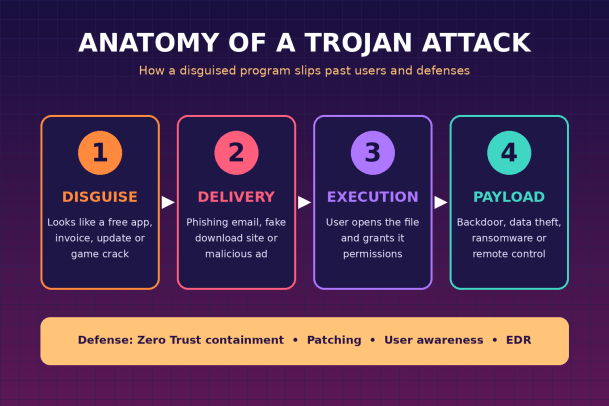
1. Disguise. The attacker packages malicious code inside something appealing or routine: a free utility, a cracked version of paid software, a game mod, a PDF invoice, a shipping notification, or a fake software update.
2. Delivery. The Trojan reaches its target through phishing emails, malicious attachments, compromised or look-alike websites, malvertising (malicious online ads), fake app store listings, or even infected USB drives.
3. Execution. The user opens the file or runs the installer. Often the program appears to work normally, or displays a convincing error message, so nothing seems wrong. Meanwhile, the hidden code runs in the background, frequently asking for elevated permissions that the user grants without a second thought.
4. Payload. Once active, the Trojan performs its real mission. It may quietly harvest passwords, record keystrokes, give an attacker remote control of the device, join the machine to a botnet, or download ransomware that encrypts the entire network.
Many modern Trojans are also designed to persist. They modify startup settings, hide in system folders, and communicate with command-and-control servers so attackers can update them or issue new instructions over time.
Common Types of Trojan Viruses
Trojans are a category, not a single threat. Here are the types security teams encounter most often.
Backdoor Trojans create a hidden entry point into a system, allowing attackers to access the device remotely whenever they want. They are often the foundation for larger attacks.
Remote Access Trojans (RATs) give attackers full control of an infected machine, including the ability to view the screen, access files, activate webcams or microphones, and move laterally across a network.
Banking Trojans target financial information. They can inject fake login forms into banking websites, capture credentials, and intercept transactions. Zeus is one of the most notorious historical examples, and its source code inspired many later variants.
Downloader and Dropper Trojans exist mainly to install other malware. Their initial footprint is small, but they open the door for ransomware, spyware, or additional Trojans. Emotet, which began as a banking Trojan, became infamous as a delivery service for other malware families.
Infostealer Trojans collect sensitive data such as saved browser passwords, session cookies, cryptocurrency wallets, and system details, then send it back to attackers, where it’s often sold on criminal marketplaces.
Ransomware Trojans encrypt files or lock systems and demand payment for their release. Many ransomware attacks begin with a Trojan that gained initial access weeks earlier.
Rootkit Trojans hide deep within the operating system to conceal malicious activity from users and security tools, making detection and removal particularly difficult.
Fake Antivirus (Rogue Security) Trojans display alarming fake infection warnings and pressure users into paying for “protection” that is itself malicious.
Mobile and SMS Trojans target smartphones, often hiding in unofficial apps. They may send premium-rate text messages, intercept one-time passcodes, or steal banking credentials.
DDoS Trojans enlist infected devices into botnets that flood websites and services with traffic to knock them offline.
Signs Your Device May Be Infected With a Trojan
Trojans are built to stay hidden, but they often leave clues. Watch for these warning signs:
- Noticeably slower performance, frequent crashes, or unusually high CPU and memory usage
- Unfamiliar programs, browser extensions, or toolbars you don’t remember installing
- Security software that has been disabled or won’t update
- Unexpected pop-ups, redirects, or changes to your browser homepage
- Unusual network activity, especially when the device should be idle
- Password reset emails or login alerts you didn’t trigger
- Files that are missing, renamed, or encrypted
- Contacts receiving strange messages or emails from your accounts
None of these signs alone proves an infection, but any combination deserves immediate investigation, particularly on business devices connected to sensitive systems.
Why Trojans Are a Serious Business Risk
For organizations, a single Trojan infection is rarely a single-device problem. Attackers use Trojans to gain an initial foothold, then escalate privileges, steal credentials, and spread across the network. The consequences can include data breaches, regulatory penalties, ransomware downtime, financial fraud, and lasting reputational damage.
Trojans are also constantly evolving. Attackers repackage and obfuscate code so each new sample looks different, which means signature-based antivirus tools that only recognize known threats can miss brand-new variants. The gap between when a new Trojan appears and when it’s added to a detection database is exactly where many breaches happen.
How to Protect Against Trojan Viruses
Building cybersecurity readiness against Trojans requires layered defenses that address both people and technology.
Adopt a Zero Trust approach to unknown files. Rather than allowing any file to run until it’s proven malicious, Zero Trust security treats unknown executables as untrusted by default. Isolating and containing unverified files means that even a brand-new Trojan can’t damage the system while it’s being analyzed.
Deploy advanced endpoint protection. Modern endpoint detection and response (EDR) solutions monitor behavior, not just signatures, spotting suspicious activity like unauthorized privilege changes or unusual outbound connections.
Keep systems and applications patched. Many Trojans exploit known vulnerabilities. Regular updates to operating systems, browsers, and software close those gaps.
Train employees continuously. Since Trojans rely on deception, security awareness training is essential. Teach staff to recognize phishing emails, verify unexpected attachments, and download software only from official sources.
Enforce least-privilege access. Limit administrative rights so that if a Trojan does run, it can’t easily make system-wide changes or spread.
Filter email and web traffic. Email security gateways and DNS or web filtering block many malicious attachments and links before they reach users.
Use multi-factor authentication (MFA). MFA reduces the value of stolen passwords, blunting the impact of infostealer and banking Trojans.
Maintain secure, tested backups. Offline or immutable backups ensure you can recover if a Trojan delivers ransomware.
What to Do If You Suspect a Trojan Infection
If you believe a device is infected, act quickly:
- Disconnect the device from the network to prevent spread and data exfiltration.
- Alert your IT or security team immediately rather than attempting a quiet fix.
- Run a full scan with trusted, up-to-date security software, ideally from a clean environment or safe mode.
- Remove or quarantine any detected threats and unfamiliar programs.
- Change passwords for all accounts accessed from the device, using a separate, clean device.
- Investigate the scope to determine whether other systems or accounts were affected.
- Restore from clean backups if files were damaged, and in severe cases, reimage the device entirely.
Final Thoughts
So, what is a Trojan virus? It’s malware that wins by looking trustworthy, relying on human trust instead of technical tricks to slip past your defenses. As Trojans become more sophisticated and harder to detect with traditional tools, cybersecurity readiness depends on a proactive, layered strategy: educated users, strong access controls, reliable backups, and security technology that refuses to trust unknown files by default.
The organizations that stay safe aren’t the ones that simply react faster. They’re the ones that make it impossible for a disguised threat to cause harm in the first place.
Stop Trojans Before They Can Do Damage
Xcitium’s Zero Trust architecture automatically contains unknown files, so even never-before-seen Trojans can’t harm your endpoints, data, or network. Protect your business with prevention-first security built for today’s threats.
Please give us a star rating based on your experience.


 (21 votes, average: 2.48 out of 5, rated)


