How to Build a Security Awareness Program That Actually Changes Behavior
Here’s an uncomfortable truth most security leaders already suspect: your organization probably has “some” security awareness training in place, and it probably isn’t working.
You run the annual video. Completion sits at 95%. Everyone clicks through, passes the quiz, and gets their certificate. And then the next phishing simulation goes out and the click rate looks almost identical to last year’s. The training happened. The behavior didn’t change.
That gap is the whole problem. Completion is an activity metric. Behavior change is the outcome you actually care about. A program that optimizes for the first while ignoring the second gives you excellent audit documentation and a workforce that’s still one convincing email away from a breach.
The good news is that the difference between a program that checks a box and one that measurably reduces risk isn’t budget or headcount. It’s design. Below is a practical, seven-step framework for building a security awareness program that moves the numbers that matter — grounded in how people actually learn and change habits, not in how compliance calendars are structured.
Step 1: Start With a Baseline
You cannot improve what you haven’t measured, and “we feel like people are getting better” is not a measurement.
Before you roll out a single training module, run an unannounced baseline phishing simulation against your whole organization. This gives you a starting click rate — the percentage of employees who clicked a simulated malicious link or handed over credentials. That single number becomes the anchor for everything that follows. It tells you where you actually stand, and it gives you an honest reference point to measure progress against six and twelve months later.
A few things make a baseline useful rather than theatrical. Send it before any communication about a new program, so you’re capturing real behavior instead of primed behavior. Use a realistic lure rather than an obviously fake one — an inflated baseline that makes your team look good defeats the purpose. And segment the results from day one: capture click rates by department, seniority, and role so you can see where the risk actually concentrates.
Expect the first number to be higher than leadership wants it to be. That’s fine. A high baseline isn’t an indictment of your people; it’s the evidence you’ll use to justify the program and, later, to prove it worked.
Step 2: Make Training Role- and Risk-Based
Generic, one-size-fits-all training is one of the biggest reasons programs stall. The threats that target your finance team look almost nothing like the threats aimed at your engineers, yet most programs feed everyone the same content.
Think about the real attack surface by role. Finance and HR are prime targets for business email compromise (BEC) — fake vendor invoices, urgent wire-transfer requests, W-2 and payroll-data phishing, and executive impersonation. Engineering and DevOps face a different set of lures: malicious dependencies, credential harvesting disguised as CI/CD or cloud-provider alerts, fake GitHub or package-registry notifications, and social engineering aimed at repository access. Executives get spearphished with highly tailored, high-value pretexts. Frontline and customer-facing staff face social engineering over phone and chat, not just email.
When you tailor simulations and lessons to the scenarios each group will realistically encounter, two things happen. The training feels relevant, so people actually pay attention instead of tuning out. And you’re building the specific pattern-recognition each role needs, rather than a vague, general sense that “phishing is bad.” Relevance is what converts passive completion into applied judgment.
You don’t need dozens of tracks to start. Even three or four risk-based groupings — finance/HR, technical staff, executives, and everyone else — is a dramatic improvement over a single universal module.
Step 3: Keep Training Short and Frequent, Not Long and Annual
The single 60-minute annual training video is a compliance artifact pretending to be an education strategy. It fails for reasons that have nothing to do with the quality of the content and everything to do with how memory works.
People forget. Information delivered in one dense sitting decays quickly, and a lesson someone watched in January is functionally gone by March. Research on microlearning and spaced repetition points consistently in the same direction: shorter lessons delivered more often, spread out over time, produce far better retention than a single long session. Bite-sized learning respects the reality that attention is finite and that reinforcement is what moves knowledge into long-term memory and, eventually, into habit.
Practically, this means trading the annual marathon for a steady drumbeat: short modules of a few minutes each, delivered monthly or quarterly, each reinforcing a focused concept. A two-to-four-minute lesson on spotting invoice fraud, followed weeks later by a short refresher and a matching simulation, will outperform an hour-long omnibus video every time.
Frequency also keeps security top of mind. Awareness isn’t a state you achieve once; it’s a level you maintain. A little, often, is how you maintain it.
Step 4: Simulate Real Attacks, Not Generic Ones
Your simulations are only as valuable as they are realistic. A phishing test that looks like a phishing test teaches employees to spot phishing tests — not the sophisticated, well-crafted attacks that actually land.
Two design choices raise the quality of your simulations dramatically. First, make them industry- and threat-current. A healthcare organization should simulate the lures healthcare actually sees; a fintech should mirror the pretexts aimed at financial firms. Tie simulations to what’s happening right now — the seasonal tax-fraud wave, the current wave of MFA-fatigue attacks, the fake-invoice campaigns making the rounds. Attackers use current events and industry context, so your simulations should too.
Second, build in progressive difficulty. Start with relatively obvious lures so people can build confidence and learn the basics without feeling ambushed. Then, over successive rounds, make them subtler: cleaner formatting, plausible sender addresses, contextually accurate pretexts, and fewer of the tell-tale red flags. This mirrors how real attacks escalate and prevents employees from getting complacent with a static level of difficulty. A team that only ever sees clumsy lures will be blindsided by a good one.
The goal isn’t to trick people for the sake of it, and it isn’t to run up a “gotcha” scoreboard. It’s to progressively stretch judgment so that when a genuinely convincing attack arrives, the muscle memory is already there.
Step 5: Coach at the Moment of Failure
When someone clicks a simulated phishing link, you have a narrow, precious window. In that moment, they’re paying attention, slightly embarrassed, and genuinely curious about what they missed. That is the teachable moment — and it closes fast.
This is why instant, in-context feedback beats a quarterly newsletter by a wide margin. If the person who just clicked immediately lands on a short, non-punitive page that shows them exactly which red flags they missed — the mismatched sender domain, the manufactured urgency, the slightly-off logo — the lesson attaches directly to their own mistake. It’s specific, it’s personal, and it’s timed to the exact moment their brain is primed to absorb it. A generic reminder emailed weeks later, disconnected from any personal experience, carries almost none of that weight.
The psychology here is straightforward. We learn best when feedback follows action closely and connects to something we personally did. Delay the feedback, or detach it from the individual’s own behavior, and it becomes abstract advice that’s easy to ignore.
One caution: keep the tone corrective, not humiliating. The purpose of moment-of-failure coaching is to teach, and people who feel shamed disengage or, worse, hide their mistakes. The employee who clicks and then quietly deletes the email is a bigger risk than the one who clicks and reports it. Design the moment to build confidence and reporting habits, not fear.
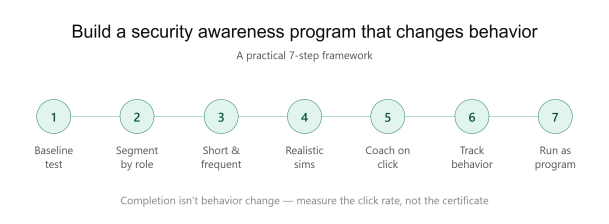
Step 6: Report on Behavior, Not Just Completion
If your program dashboard only shows completion percentages, you’re reporting on effort, not effectiveness. To manage the actual risk, you need to track behavior over time.
Three metrics matter most. Click rate tells you how many people fell for simulations — the number you baselined in Step 1, now trending over time. Report rate tells you how many people recognized a suspicious message and actually reported it through the proper channel; this is arguably the more important number, because a workforce that reports threats is an active early-warning system. And repeat-offender patterns show you the small group of individuals who click again and again, and who may need targeted, one-on-one intervention rather than more of the same broadcast training.
Just as important, report these at the department level, not just organization-wide. Department-level visibility creates accountability — leaders can see how their own teams compare and take ownership of improving them. It turns security awareness from an abstract IT concern into something managers feel responsible for. It also helps you direct your energy where the risk actually concentrates, rather than spreading effort evenly across teams that need very different amounts of attention.
Watch the trend line, not any single data point. A one-off spike in clicks after a particularly nasty simulation isn’t a failure; a click rate that refuses to fall over two or three quarters is a signal that something in the program needs to change.
Step 7: Treat It as a Program, Not a Project
Everything above only works if it’s continuous. A project has an end date; a program has a cadence. Security awareness that’s rolled out once and considered “done” will decay right back to the baseline, because the threats keep evolving and human memory keeps fading. New employees join. New attack techniques emerge. Last year’s confident team becomes this year’s rusty one.
A real program runs on an ongoing rhythm — regular simulations, steady microlearning, continuous measurement, and periodic reassessment of what the current threat landscape demands. It’s owned, resourced, and maintained rather than launched and forgotten.
Two ingredients make that sustainable. The first is executive sponsorship. When leadership visibly participates — including getting phished in simulations and talking openly about it — the program gains legitimacy and budget, and it stops looking like an IT compliance chore. The second is culture. The end goal isn’t a workforce that fears clicking; it’s a workforce where noticing and reporting something suspicious is normal, expected, and even a little bit rewarded. When security becomes a shared habit rather than an imposed rule, behavior change sticks — because people are protecting the organization on purpose, not just passing a test.
A Simple Checklist to Get Started
Use this to translate the framework into action:
- Baseline first. Run an unannounced phishing simulation before any training to establish your starting click rate, segmented by department and role.
- Segment by role and risk. Tailor content and simulations to real threats each group faces — BEC for finance/HR, code- and cloud-related lures for engineering, spearphishing for executives.
- Go short and frequent. Replace the annual marathon with brief microlearning delivered monthly or quarterly, reinforced over time.
- Simulate real, current attacks. Use industry-specific, threat-current lures and increase difficulty progressively over successive rounds.
- Coach at the moment of failure. Deliver instant, specific, non-punitive feedback the moment someone clicks.
- Report on behavior. Track click rate, report rate, and repeat offenders — at the department level — and watch the trend, not single points.
- Run it as a program. Maintain an ongoing cadence, secure executive sponsorship, and build a reporting-positive culture.
If you’re doing even four or five of these consistently, you’re already ahead of most organizations — and, more importantly, you’ll have the data to prove your click rate is actually falling.
Please give us a star rating based on your experience.
 (1 votes, average: 5.00 out of 5, rated)