Phishing remains one of the most effective ways for attackers to gain unauthorized access to business systems. However, the familiar claim that “more than 90% of breaches start with phishing” is not supported by current authoritative breach data.
A more defensible statistic comes from Verizon’s 2025 Data Breach Investigations Report: the human element was involved in approximately 60% of breaches, with credential abuse and social engineering tactics such as phishing among the major contributors. The report analyzed more than 22,000 security incidents and over 12,000 confirmed breaches.
Modern attackers do not always need to hack through sophisticated security controls. They can simply convince an employee to reveal a password, approve a login, open a malicious attachment, scan a QR code, or send money to the wrong account.
In 2026, these attacks are becoming harder to identify. Criminals can use publicly available information, compromised email accounts, automated phishing kits, and AI-generated writing to create convincing messages with fewer of the spelling and grammar mistakes employees were once taught to expect.
Here are 10 phishing tactics employees should understand—and the warning signs that can help stop them.
Why Phishing Still Works in 2026
Phishing works because it targets human reactions instead of technical vulnerabilities.
Attackers frequently create a sense of urgency, authority, fear, curiosity, or financial opportunity. A message might appear to come from a senior executive, trusted vendor, bank, delivery company, government department, or internal IT team.
The recipient is then pressured to act before thinking:
- “Pay this invoice immediately.”
- “Your account will be suspended today.”
- “Review the attached confidential document.”
- “Reset your password within 30 minutes.”
- “Do not discuss this request with anyone else.”
These messages are designed to interrupt normal decision-making. When an employee feels rushed or believes that a senior leader is waiting, they may bypass the verification procedures they would normally follow.
Awareness therefore involves more than memorizing technical warning signs. Employees must learn to pause whenever a message tries to create an unusually strong emotional response or asks them to ignore an established process.
1. Executive Impersonation
Executive impersonation occurs when an attacker pretends to be a CEO, CFO, director, or another senior leader. The attacker may spoof the executive’s display name, register a similar-looking domain, or use a personal email address while claiming to be away from the office.
For example, an employee might receive a message that appears to come from the CEO:
“I’m entering a confidential meeting. Purchase ten gift cards for a client event and send me the codes. Please handle this immediately and do not call.”
The request uses authority, urgency, and secrecy to prevent verification.
Employees should be suspicious when an executive suddenly requests gift cards, passwords, payroll information, sensitive documents, or an urgent payment through email. The sender’s full email address should be checked, and unusual requests should be confirmed using a known phone number or approved internal channel.
2. Vendor and Invoice Fraud
Vendor fraud targets employees who process invoices, purchase orders, or supplier payments. Attackers study business relationships and send messages that resemble normal vendor correspondence.
A fake supplier may claim that its bank details have changed and ask for all future payments to be sent to a new account. In other cases, the attacker sends an unexpected invoice containing a malicious link or attachment.
The most convincing attacks may come from a genuine vendor account that has already been compromised. That means a correct sender address does not automatically make a payment request safe.
Every request to change banking information should be independently verified through an established vendor contact. Employees should call a previously confirmed number rather than one supplied in the suspicious email. Unexpected invoices should also be compared with purchase orders and receiving records before payment.
3. Urgency-Based Manipulation
Urgency-based phishing tells employees that something bad will happen unless they act immediately. Common claims include account suspension, an overdue payment, a failed delivery, unusual account activity, or an expiring password.
A message might say:
“We detected unauthorized access to your mailbox. Verify your identity within 15 minutes to avoid permanent suspension.”
The deadline is intended to make the recipient click before examining the sender or destination.
Legitimate organizations may send time-sensitive notifications, so urgency alone does not prove that a message is fraudulent. Nevertheless, extreme deadlines and threats should trigger additional verification. Instead of using the link in the message, employees should open the organization’s official website or application independently. If the warning is genuine, the same notification will usually appear inside the account.
4. Credential-Harvesting Pages
Credential harvesting uses a fake login page to steal usernames, passwords, authentication codes, or other account information. The page may closely imitate Microsoft 365, Google Workspace, a bank, a payroll platform, or an internal employee portal.
The victim usually arrives through a link claiming to provide access to a shared document, security alert, voicemail, or password reset. After the victim enters their credentials, the attacker captures them and may redirect the browser to the real service to reduce suspicion.
Employees should inspect the destination domain—not merely the page design or company logo. Password managers can provide another warning because they generally will not automatically fill credentials on an unfamiliar domain.
Multifactor authentication remains important, but some advanced phishing kits can capture session information or authentication codes. Employees must report suspicious login pages even if MFA is enabled.
5. Malicious Attachments Disguised as Invoices or Resumes
Attackers frequently disguise harmful attachments as documents employees expect to receive, such as invoices, resumes, shipping notices, purchase orders, tax forms, or legal documents.
The file may contain malware, send the victim to a credential-stealing site, or ask them to enable macros or other active content. Common disguises include double extensions such as invoice.pdf.exe, password-protected archives, HTML files, and documents that claim the user must “enable content” to view them.
Microsoft’s analysis of a major phishing-as-a-service platform found that phishing lures used formats including PDF, HTML, SVG and DOCX files, sometimes with embedded QR codes or scripts.
Employees should treat unexpected attachments cautiously, even when the message appears relevant to their role. If a document was not expected, verify it with the sender before opening it.
6. QR Code Phishing—or “Quishing”
QR code phishing hides a malicious link inside a scannable image. An email may ask the employee to scan a QR code to review payroll information, listen to a voicemail, reauthenticate an account, or enable multifactor authentication.
Because the code is an image, users cannot hover over it to inspect the destination. Scanning it also moves the interaction from a managed work computer to a mobile device, where the smaller screen makes suspicious domains harder to notice.
Microsoft reported blocking as many as three million QR phishing attempts per day at the tactic’s peak. QR phishing and related evasion methods continued to appear in threat activity during early 2026.
Employees should be cautious whenever an unsolicited email requires a QR code to complete a security or account-related action. Use the organization’s official application or manually enter its known website instead.
7. SMS Phishing—or “Smishing”
Smishing delivers phishing messages through SMS, WhatsApp, or another messaging service. Common lures include unpaid tolls, delivery problems, bank alerts, tax refunds, job opportunities, and messages supposedly sent by senior executives.
A typical message might read:
“Your company account has been locked. Confirm your identity immediately at the link below.”
Employees may trust text messages more than email, and mobile screens can hide the full destination address. Personal and work communications may also be mixed on the same device, making unusual requests feel less formal and less risky.
Phishing awareness training should therefore cover mobile channels rather than focusing exclusively on email. Employees should avoid tapping unexpected links and verify work-related requests through the company’s official communication system. CISA also recognizes SMS phishing simulations as part of organizational preparedness.
8. Business Email Compromise
Business email compromise, or BEC, is a targeted fraud in which an attacker impersonates or takes control of a trusted business account. Unlike many traditional phishing emails, a BEC message might contain no malicious attachment or suspicious link.
Instead, the attacker uses a believable conversation to request a wire transfer, reroute a payment, change direct-deposit information, release sensitive data, or purchase high-value items.
The attacker may monitor a compromised mailbox and enter an existing invoice conversation at the right moment. This makes the message difficult to detect using technical filters alone.
The FBI describes BEC as one of the most financially damaging forms of online crime and recommends independently verifying payment requests and changes to account details.
Organizations should require secondary approval and out-of-band verification for financial changes, regardless of who appears to have sent the request.
9. Fake IT and Helpdesk Requests
Fake IT messages exploit the fact that employees are accustomed to password resets, software updates, security notifications, and support requests.
An attacker may claim that the employee’s password is expiring, their mailbox has exceeded its storage limit, or their computer must be updated. The employee is directed to a fraudulent login page or asked to install remote-access software.
In another variation, the attacker contacts the real helpdesk while impersonating an employee. They may use personal information gathered online to request an MFA reset or account recovery.
Employees should know how their IT department normally communicates and what information support personnel will never request. IT teams should also use strong identity-verification procedures before resetting passwords, changing MFA methods, or granting remote access. Unexpected support messages should be verified through the official helpdesk portal or published internal number.
10. Social Media and LinkedIn-Based Phishing
Social media gives attackers valuable information about employees, responsibilities, colleagues, vendors, travel plans, and current projects. It also provides another channel through which fraudulent messages can be delivered.
An attacker might pose as a recruiter and send a malicious job description, impersonate a colleague with a copied profile, or reference a recent conference to make a connection request appear legitimate.
LinkedIn is particularly useful for preparing targeted attacks because job titles reveal who may control payments, payroll, IT access, or confidential information.
Employees should treat unsolicited files and login links on social media with the same caution as suspicious email attachments. They should also limit the amount of operational information shared publicly. A familiar photograph, employer name, or list of mutual connections is not proof that an account belongs to the person it claims to represent.
Red Flags Employees Should Learn to Recognize
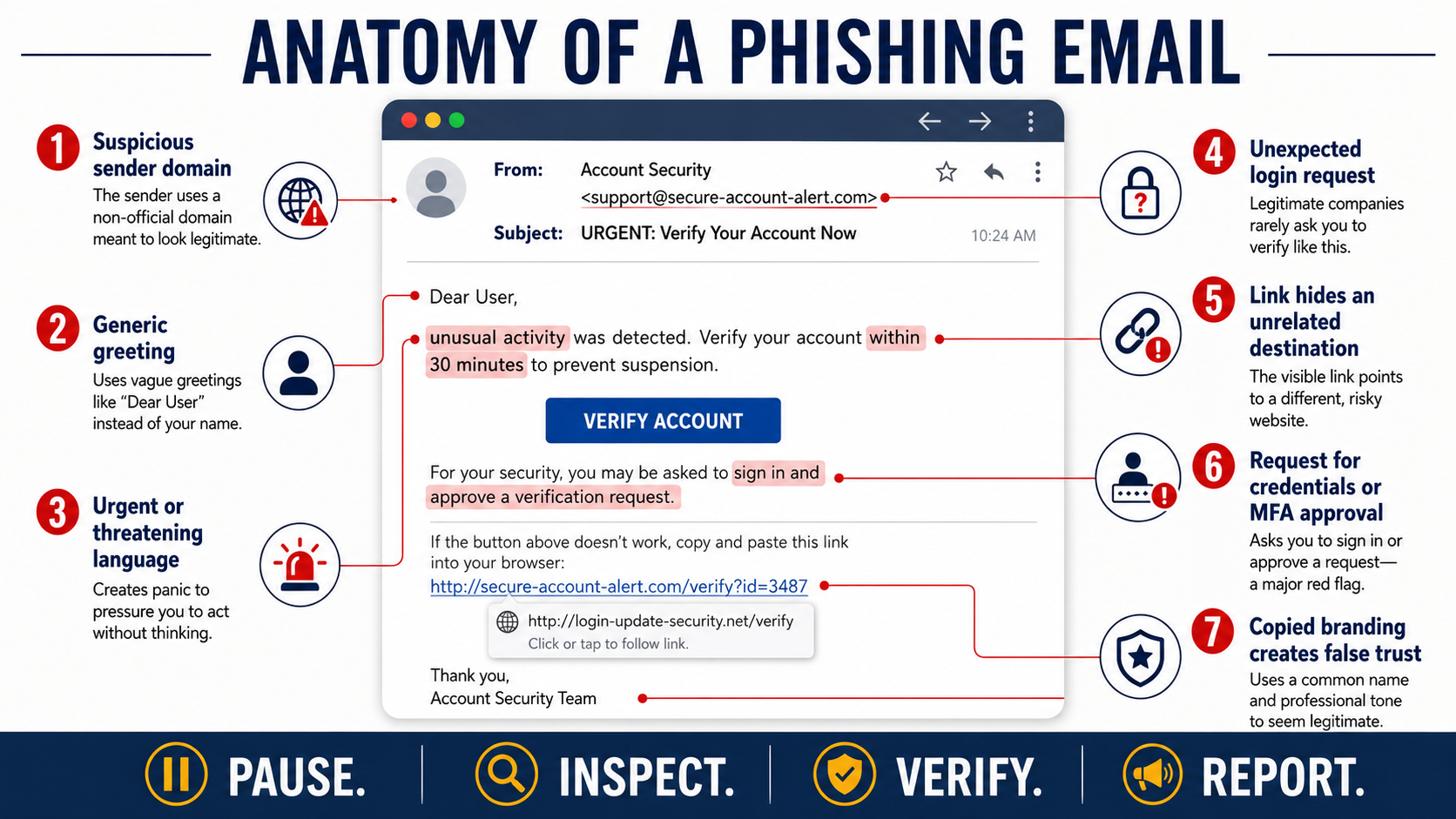
No single warning sign identifies every phishing attempt. Employees should look for combinations of unusual details, including:
Sender address mismatches: The display name may be familiar while the underlying address uses an unrelated or misspelled domain.
Mismatched or shortened links: Hover over links on a computer to preview the destination. On mobile devices, press and hold carefully to view the address without opening it. Avoid links that conceal their destination without a legitimate reason.
Unusual urgency or secrecy: Be cautious when a message demands immediate action or tells you not to consult colleagues.
Requests that bypass normal processes: Payment, payroll, access, or data requests should not override established approval procedures simply because they arrived by email.
Unexpected authentication requests: Do not enter credentials or approve an MFA notification unless you personally initiated the login.
Unusual attachments: Confirm unexpected invoices, resumes, document shares, and password-protected archives before opening them.
Perfect grammar does not prove that a message is genuine. In 2026, employees must evaluate the sender, context, destination, and requested action—not just spelling mistakes.
What to Do If You Suspect a Phishing Email
If a message seems suspicious, do not click its links, open its attachments, scan its QR code, reply to it, or forward it casually to colleagues.
Use the company’s approved reporting method, such as a “Report Phishing” button, helpdesk portal, or security mailbox. Reporting allows the security team to investigate the message and remove similar emails from other inboxes.
Verify the request through a separate channel. Call the person using a number already stored in the company directory or contact them through an established internal platform. Do not reply to the suspicious message or use the contact information it provides.
If you have already clicked, entered a password, downloaded a file, approved an MFA prompt, or sent information, notify IT immediately. Fast reporting gives the security team more time to reset credentials, revoke sessions, isolate a device, or stop a payment. Employees should never be discouraged from reporting an honest mistake.
Build a Workforce That Pauses Before It Clicks
Phishing tactics will continue to change, but most attacks still depend on the same outcome: persuading someone to act before verifying the request.
Regular [security awareness training] should teach employees how these attacks appear in real work, while ongoing [phishing simulations] can help organizations measure whether that knowledge holds up under pressure.
Curious how your team would perform against a realistic phishing attempt? [Try our free phishing simulation tool] and identify opportunities to strengthen employee awareness before an attacker puts it to the test.
Frequently Asked Questions
What is the most common type of phishing attack?
Email phishing remains one of the most common forms because it allows attackers to reach many people at a low cost. Targeted credential phishing, executive impersonation, invoice fraud, and business email compromise are especially dangerous in workplace environments.
Can phishing happen over text messages or social media?
Yes. Phishing can arrive through SMS, WhatsApp, Microsoft Teams, social media, phone calls, QR codes, collaboration platforms, and other communication channels. Employees should evaluate the request and destination regardless of where the message appears.
How can I test whether my employees can spot phishing?
Organizations can run controlled phishing simulations that send safe, realistic messages to employees. The results can reveal which tactics cause confusion and where additional coaching is needed. Simulations should be educational, appropriately authorized, and followed by short, relevant training rather than public embarrassment or punishment.
Please give us a star rating based on your experience.
 (1 votes, average: 5.00 out of 5, rated)


