If you’ve spent any time troubleshooting a network, managing DNS records, or configuring a cache, you’ve probably run into the term TTL. It shows up in ping results, DNS configuration panels, HTTP headers, and CDN settings — often with little explanation of what it actually does.
This guide breaks down what TTL is, how it works, why it exists, and how it applies across different areas of IT: networking, DNS, caching, and security. Whether you’re just starting out or you’re a seasoned IT professional looking for a refresher, this article will give you a clear, practical understanding of TTL.
What Does TTL Stand For?
TTL stands for Time To Live. It’s a value that determines how long a piece of data — a network packet, a DNS record, a cached file — is allowed to exist before it’s discarded or considered invalid.
The concept is simple: instead of letting data live forever or bounce around a system indefinitely, TTL puts a limit on its lifespan. Once that limit is reached, the data expires, gets deleted, or gets refreshed, depending on the context.
TTL isn’t a single, universal mechanism. It’s a general design pattern that shows up in several different technologies, each using it slightly differently:
- Network packets (IP TTL) — limits how many hops a packet can travel before being dropped
- DNS TTL — controls how long a DNS record is cached before it must be looked up again
- Cache TTL — determines how long data stays in a cache (browser, CDN, application, or database cache) before it’s refreshed
- Session TTL — controls how long a user session or token remains valid
Let’s go through each of these in detail.
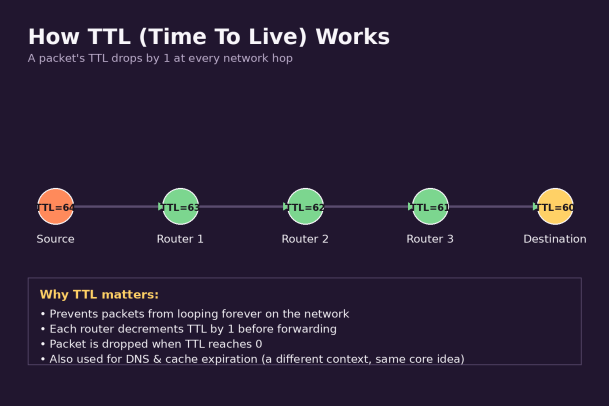
TTL in Networking: Preventing Infinite Loops
The original and most technical use of TTL comes from networking, specifically the IP (Internet Protocol) layer. Every IP packet that travels across a network carries a TTL field in its header — an 8-bit number, typically starting somewhere between 64 and 255 depending on the operating system.
Here’s how it works:
- A device sends a packet with an initial TTL value (for example, 64).
- Every router the packet passes through decreases the TTL by 1.
- If the TTL reaches 0 before the packet arrives at its destination, the router discards the packet and sends back an “ICMP Time Exceeded” message to the sender.
This mechanism exists for one critical reason: to prevent packets from looping forever due to routing errors or misconfigurations. Without TTL, a packet caught in a routing loop could circulate indefinitely, consuming bandwidth and processing power across the network.
You can actually see TTL in action using the ping and traceroute (or tracert on Windows) commands. When you ping a server, the response typically includes the TTL value the reply was sent with, which can even hint at the operating system of the remote host, since different OSes use different default TTL values (Linux commonly starts at 64, while Windows often starts at 128).
traceroute uses TTL even more directly — it sends packets with increasing TTL values (1, 2, 3, and so on) specifically so that each one expires at a different router along the path, revealing the full route a packet takes to its destination.
TTL in DNS: Controlling Cache Freshness
If you manage websites, domains, or any kind of DNS infrastructure, DNS TTL is probably the version of TTL you’ll interact with most often.
Every DNS record — A, AAAA, CNAME, MX, TXT, and so on — has a TTL value, usually measured in seconds. This value tells DNS resolvers (like the ones run by ISPs, browsers, and operating systems) how long they’re allowed to cache that record before they need to query the authoritative DNS server again.
For example, if an A record has a TTL of 3600 seconds (1 hour), a resolver that looks up that record will store it locally and reuse it for any requests over the next hour, rather than querying the authoritative server every time. After the hour is up, the resolver discards the cached value and performs a fresh lookup.
Why DNS TTL Matters
DNS TTL involves a trade-off between performance and flexibility:
- Higher TTL values (e.g., 24 hours) reduce the number of DNS queries, speeding up resolution and reducing load on DNS servers — but they also mean that any changes you make (like updating an IP address) take longer to propagate across the internet.
- Lower TTL values (e.g., 300 seconds / 5 minutes) allow changes to take effect quickly, which is useful during migrations, failovers, or maintenance windows — but they increase the number of lookups resolvers have to perform.
A Common Best Practice
Many IT teams temporarily lower the TTL on a DNS record before making a planned change (like migrating a server or switching providers), then raise it back to a higher value once the change has stabilized. This minimizes downtime and unexpected caching issues during the transition.
TTL in Caching: Keeping Content Fresh
TTL also plays a major role in caching systems — including browser caches, Content Delivery Networks (CDNs), reverse proxies, and application-level caches like Redis or Memcached.
In this context, TTL defines how long a cached object (an image, a webpage, an API response, a database query result) remains valid before the system either deletes it or re-fetches it from the original source.
For example:
- A CDN might cache a static image with a TTL of 7 days, meaning users around the world get fast, local copies of that image without hitting your origin server repeatedly.
- An API response might be cached with a TTL of just 30 seconds if the underlying data changes frequently, ensuring users don’t see wildly outdated information.
- A Redis cache key storing a user’s session data might have a TTL of 20 minutes, automatically expiring inactive sessions without requiring manual cleanup.
Getting cache TTL right is a balancing act. Set it too high, and users may see stale content long after it’s changed. Set it too low, and you lose most of the performance benefit of caching in the first place, since your system ends up re-fetching data almost as often as if there were no cache at all.
TTL and Security: Why IT Pros Should Care
TTL isn’t just a performance or networking detail — it has real implications for security and reliability, which is why it matters to IT and security professionals specifically.
- DDoS mitigation and traffic analysis: Unusual TTL values or patterns in incoming traffic can sometimes indicate spoofed packets, since attackers manipulating source IP addresses don’t always set TTL values consistent with the claimed origin.
- DNS security: Extremely long DNS TTLs can slow down your ability to respond to a compromised or hijacked domain, since malicious records may stay cached longer across the internet. Conversely, some attacks (like DNS cache poisoning) specifically try to exploit or manipulate TTL behavior.
- Session and token expiration: TTL is central to how authentication tokens, session cookies, and API keys are designed to expire. A properly configured TTL on a session token limits the window an attacker has if they manage to steal a valid session.
- Fingerprinting and reconnaissance: Because different operating systems use different default TTL values, TTL can be used (in combination with other signals) for OS fingerprinting during network reconnaissance — something both attackers and defenders are aware of.
For endpoint security and threat-detection platforms, understanding TTL patterns is one small but useful piece of a much larger picture used to detect anomalies, spoofed traffic, and misconfigurations before they turn into real incidents.
How to Check TTL Values Yourself
If you want to see TTL in action, here are a few quick ways:
- Network TTL: Run
ping example.comin your terminal and check the TTL value returned in the response. - DNS TTL: Use
dig example.comornslookupand look for the TTL field next to the returned record. - HTTP cache TTL: Check the
Cache-ControlorExpiresheaders in a website’s HTTP response using your browser’s developer tools (Network tab).
Common TTL Misconceptions
“Lower TTL is always safer.” Not necessarily. Lower TTLs increase query volume and can add latency, and they don’t automatically make a system more secure — they just make it more adaptable to change.
“TTL is only a networking term.” As shown above, TTL shows up in DNS, caching, sessions, and more. The underlying concept — a time-limited lifespan for data — is what unifies all these use cases, not a single specific protocol.
“A packet with TTL=0 always means an attack.” Not true. TTL expiration is a completely normal part of network operation (it’s literally how traceroute works). It only becomes a security signal when combined with other unusual traffic patterns.
Key Takeaways
- TTL (Time To Live) defines how long data is valid before it expires or is discarded.
- In networking, TTL prevents packets from looping forever across routers.
- In DNS, TTL controls how long resolvers cache records before querying again.
- In caching, TTL balances performance against content freshness.
- TTL also plays a role in session expiration, security monitoring, and traffic analysis.
- Choosing the right TTL value is always a trade-off between speed/efficiency and freshness/flexibility.
Understanding TTL gives you a clearer picture of how data moves, expires, and refreshes across almost every layer of modern IT infrastructure — from the packets crossing your network to the DNS records pointing to your website to the caches speeding up your applications.
Strengthen Your Network Visibility and Security Posture
Understanding concepts like TTL is a great start, but real protection against modern threats — spoofed traffic, DNS-based attacks, and network anomalies — requires more than manual monitoring. Xcitium’s endpoint and network security solutions give IT teams the visibility and automated protection needed to catch issues before they become incidents.
Please give us a star rating based on your experience.


 (28 votes, average: 2.43 out of 5, rated)


