Every time you open your laptop at a coffee shop, connect your phone to office Wi-Fi, or plug a new printer into your network, something happens in the background that most people never notice. Within seconds, your device is online, able to browse the web, send emails, and talk to other devices. The quiet workhorse that makes this possible is DHCP.
So, what is DHCP, and why does it matter so much to businesses, IT teams, and security professionals? In this guide, we’ll break down how the Dynamic Host Configuration Protocol works, why it’s essential for modern networks, the risks it can introduce, and how to keep it secure.
What Is DHCP?
DHCP stands for Dynamic Host Configuration Protocol. It is a network management protocol that automatically assigns IP addresses and other network configuration settings to devices when they connect to a network.
Every device on an IP-based network needs a unique IP address to communicate. Without DHCP, a network administrator would have to manually configure each device with an IP address, subnet mask, default gateway, and DNS server. On a small home network, that might be manageable. In an organization with hundreds or thousands of laptops, phones, printers, virtual machines, and IoT devices, manual configuration quickly becomes impossible.
DHCP solves this by acting like an automated front desk. When a device joins the network, it asks for an address, and the DHCP server hands one out from a pool of available addresses, along with all the settings the device needs to function.
DHCP operates at the application layer of the TCP/IP model and uses UDP ports 67 (server) and 68 (client). It was defined in RFC 2131 and has been the standard way of handling IP address assignment on IPv4 networks for decades. A version called DHCPv6 serves the same purpose for IPv6 networks.
Key Components of DHCP
To understand how DHCP works, it helps to know the main pieces involved:
DHCP Server: The device or service that manages the pool of IP addresses and hands them out. In homes and small offices, this is usually the router. In enterprises, it’s often a dedicated server, such as Windows Server, or a network appliance.
DHCP Client: Any device that requests network configuration, including computers, smartphones, smart TVs, printers, and IoT sensors.
IP Address Pool (Scope): The range of IP addresses the server is allowed to assign, such as 192.168.1.100 to 192.168.1.200.
Lease: IP addresses are not assigned permanently. They are “leased” for a set period, after which the client must renew them. This lets addresses be reused when devices leave the network.
DHCP Relay Agent: In larger networks with multiple subnets, a relay agent forwards DHCP messages between clients and a server located on a different network segment.
Reservations: Administrators can reserve specific IP addresses for specific devices (based on MAC address), ensuring servers and printers always receive the same address.
How Does DHCP Work? The DORA Process
DHCP follows a simple four-step exchange commonly known as DORA: Discover, Offer, Request, and Acknowledge.
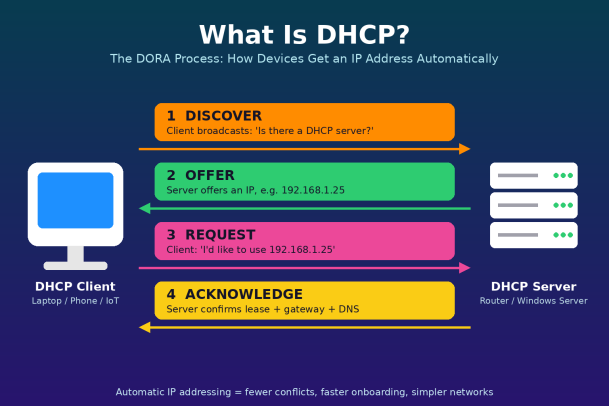
1. Discover: When a device connects to the network, it doesn’t yet have an IP address, so it sends a broadcast message (DHCPDISCOVER) to the entire local network, essentially asking, “Is there a DHCP server out there?”
2. Offer: Any DHCP server that receives the request responds with a DHCPOFFER message. This offer includes an available IP address, the subnet mask, lease duration, and other configuration details.
3. Request: The client selects an offer (usually the first one it receives) and broadcasts a DHCPREQUEST message, formally requesting the offered address. Broadcasting this step also informs any other DHCP servers that their offers were declined.
4. Acknowledge: The chosen server sends a DHCPACK message confirming the assignment. The client now configures its network interface and can begin communicating on the network.
This whole exchange typically takes only milliseconds. Before a lease expires, usually at the halfway point, the client attempts to renew it directly with the server, keeping the connection seamless.
What Information Does DHCP Provide?
DHCP delivers much more than just an IP address. A typical DHCP configuration includes:
- IP address: The unique identifier for the device on the network.
- Subnet mask: Defines which part of the IP address represents the network and which part represents the host.
- Default gateway: The router address the device uses to reach networks outside its own, including the internet.
- DNS servers: The servers that translate domain names like xcitium.com into IP addresses.
- Lease time: How long the device may use the assigned address.
- Additional options: Such as NTP time servers, domain names, and boot server information for network booting (PXE).
Because DHCP distributes these critical settings, whoever controls DHCP effectively controls how devices find their way around the network, which is why DHCP security matters so much.
Benefits of Using DHCP
DHCP has become the default for nearly every network for good reason. Its key advantages include:
Centralized management: Administrators configure network settings in one place rather than on every individual device. Changing a DNS server for the entire organization becomes a single update.
Reduced configuration errors: Manual IP assignment often leads to typos and duplicate addresses. DHCP eliminates most IP conflicts by tracking which addresses are in use.
Efficient use of IP addresses: Leasing allows addresses to be recycled when devices disconnect, which is especially valuable in environments with many transient users, such as guest Wi-Fi, schools, and hotels.
Scalability: Whether a network has 10 devices or 10,000, DHCP scales easily, supporting rapid growth and remote or hybrid work environments.
Mobility support: Laptops and phones can move between networks and automatically receive the correct configuration for each location.
DHCP vs. Static IP Addressing
Not every device should use DHCP. While dynamic addressing works well for end-user devices, some systems benefit from static IP addresses, which are manually configured and never change.
Static IPs are commonly used for servers, network printers, firewalls, and other infrastructure that other devices need to find reliably. However, many organizations achieve the same result using DHCP reservations, which give a device a fixed address while still keeping management centralized.
In practice, most networks use a hybrid approach: DHCP for the majority of devices, and static or reserved addresses for critical infrastructure.
Common DHCP Security Risks
DHCP was designed for convenience, not security. The protocol has no built-in authentication, which means clients generally trust any DHCP server that responds. Attackers can exploit this in several ways:
Rogue DHCP Servers: An attacker (or even a well-meaning employee plugging in a personal router) sets up an unauthorized DHCP server. Devices that accept its offers may receive a malicious default gateway or DNS server, allowing the attacker to intercept traffic in a man-in-the-middle attack or redirect users to phishing sites.
DHCP Starvation Attacks: An attacker floods the DHCP server with requests using spoofed MAC addresses, exhausting the entire pool of available IP addresses. Legitimate devices can no longer join the network, creating a denial-of-service condition, and often paving the way for a rogue server to take over.
DHCP Spoofing and DNS Hijacking: By manipulating DHCP responses, attackers can silently change the DNS settings of victims, sending their web traffic through attacker-controlled servers.
Unauthorized Network Access: Because DHCP hands out addresses to anyone who asks, an unauthorized device plugged into an open network port can gain connectivity instantly unless additional controls are in place.
These risks highlight an important point: network infrastructure protocols are part of your attack surface, and endpoints that blindly trust network settings can be compromised without the user ever noticing.
Best Practices for Securing DHCP
Organizations can dramatically reduce DHCP-related risks by following these best practices:
- Enable DHCP snooping: Most managed switches support DHCP snooping, which only allows DHCP server responses on trusted ports and blocks rogue servers.
- Use port security: Limit the number of MAC addresses allowed per switch port to prevent starvation attacks.
- Implement Dynamic ARP Inspection (DAI): Works alongside DHCP snooping to prevent ARP spoofing.
- Adopt network access control (NAC): Require device authentication (such as 802.1X) before granting network access.
- Monitor DHCP logs: Regularly review lease activity for unusual spikes, unknown devices, or unexpected servers.
- Segment your network: Separate guest, IoT, and corporate devices into different VLANs with their own DHCP scopes.
- Protect endpoints: Even with strong network controls, endpoints remain the final line of defense. Advanced endpoint protection can detect and contain threats that exploit manipulated network settings before they cause damage.
DHCP in Modern IT Environments
Today’s networks are more complex than ever. Cloud workloads, remote employees, BYOD policies, and an explosion of IoT devices all rely on DHCP to connect quickly and reliably. At the same time, this growth means more devices, more entry points, and more opportunities for attackers.
Understanding what DHCP is and how it works gives IT and security teams a clearer view of how devices join the network, and where visibility gaps may exist. Combining secure network configuration with strong endpoint security ensures that convenience doesn’t come at the cost of protection.
Conclusion
So, what is DHCP? It’s the protocol that makes modern networking effortless, automatically assigning IP addresses and configuration details so devices can connect in seconds. It reduces administrative burden, prevents IP conflicts, and supports networks of any size.
But like any foundational technology, DHCP can be abused. Rogue servers, starvation attacks, and DNS hijacking can turn this helpful protocol into an entry point for attackers. By securing your network infrastructure and protecting every endpoint that connects to it, you can enjoy all the benefits of DHCP without the risks.
Protect Every Device That Connects to Your Network
Every device that receives an IP address is a potential target. Xcitium’s advanced endpoint protection uses Zero Trust architecture and patented containment technology to stop unknown threats before they can do harm, no matter how they reach your network.
Request a Demo with Xcitium and see how you can secure your endpoints, close visibility gaps, and stay ahead of evolving cyber threats.
Please give us a star rating based on your experience.

 (22 votes, average: 2.18 out of 5, rated)


