A modem connects your home or office to the internet, while a router shares that connection among your devices and directs traffic between them. That is the short answer, but the details matter more than most people realize — especially when it comes to performance, troubleshooting, and network security.
Most people never think about the two boxes blinking quietly in the corner until something goes wrong. When the Wi-Fi drops or speeds crawl, the first question is usually, “Do I restart the modem or the router?” Many people aren’t even sure they have two separate devices, because internet service providers (ISPs) often ship a single combined unit.
Understanding the difference between a modem and a router helps you make smarter buying decisions, fix connection problems faster, and protect every device on your network. In this guide, we’ll break down what each device does, how they work together, the key differences side by side, and why your router is one of the most important security checkpoints you own.
What is a Modem
A modem is the device that brings the internet into your building. The name comes from modulator-demodulator, which describes exactly what it does: it converts the signal your ISP sends over a physical line into digital data your devices can use, and converts your outgoing data back into a signal the ISP’s network understands.
The type of modem you need depends on how your internet service is delivered:
- Cable modems use the same coaxial cable as cable TV and typically follow the DOCSIS standard (DOCSIS 3.1 and 4.0 are current).
- DSL modems carry data over traditional copper telephone lines.
- Fiber connections use an Optical Network Terminal (ONT), which performs the modem’s job by converting light signals into electrical ones.
- Cellular modems (4G LTE or 5G) connect to a mobile network instead of a wired line.
A modem typically has just one or two Ethernet ports and receives a single public IP address from your ISP. On its own, it can connect exactly one device to the internet. It does not create a Wi-Fi network, assign addresses to multiple devices, or filter incoming traffic. Think of it as the front door to your network: it opens to the outside world, but it doesn’t decide who goes where once they’re inside.
What is a Router
A router creates your local network and shares the modem’s single internet connection with every device you own. It plugs into the modem and becomes the traffic controller for laptops, phones, smart TVs, printers, cameras, and IoT gadgets.
A router handles several jobs at once:
- Assigning local IP addresses to each device using DHCP, so every device has its own identity on the network.
- Network Address Translation (NAT), which lets all those devices share the one public IP address the modem receives.
- Routing traffic so that data requested by your laptop goes to your laptop, not your phone.
- Broadcasting Wi-Fi, usually on 2.4 GHz, 5 GHz, and — with Wi-Fi 6E and Wi-Fi 7 — 6 GHz bands.
- Basic security, including a built-in firewall, WPA2/WPA3 encryption, guest networks, and parental controls.
If the modem is the front door, the router is the hallway, the room numbers, and the security guard combined. It knows which device is which, sends every packet to the right place, and can block traffic that shouldn’t be there.
A router without a modem can still create a local network — your devices could share files or print — but none of them would reach the internet.
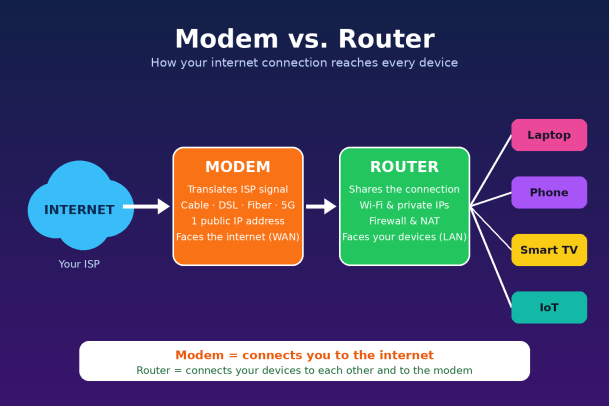
Modem vs. Router: Key Differences
The simplest way to remember the difference between a modem and a router: the modem connects you to the internet, and the router connects your devices to each other and to the modem. Here’s how they compare side by side.
| Feature | Modem | Router |
|---|---|---|
| Main job | Connects your network to your ISP | Shares the connection and directs traffic between devices |
| Network it faces | Wide Area Network (the internet) | Local Area Network (your home or office) |
| IP address | Receives one public IP from the ISP | Assigns private IPs to each device |
| Devices supported | Usually one | Dozens or more, wired and wireless |
| Wi-Fi | No | Yes (on wireless routers) |
| Security features | Minimal | Firewall, encryption, guest networks, access controls |
| ISP-specific? | Yes — must match cable, DSL, fiber, or cellular | No — works with any modem via Ethernet |
The signal flow. Data travels in a fixed order: internet → ISP line → modem → router → your devices. The modem translates, and the router distributes. Remove the modem and nothing reaches the router; remove the router and only one device gets online, with no Wi-Fi and little protection.
Troubleshooting tip. If no device can get online, the problem is usually the modem or the ISP — check the modem’s “online” or “internet” light. If some devices work but others don’t, or Wi-Fi is weak in certain rooms, the router is the more likely culprit. When in doubt, restart the modem first, wait until it fully reconnects, then restart the router.
What About Modem-Router Combos (Gateways)?
Many ISPs provide a single device called a gateway that combines a modem and a router in one box. Gateways save space, reduce cables, and are easy to set up, which makes them popular with households that want plug-and-play internet.
The trade-offs are real, though. Combo units often have fewer advanced settings, slower firmware updates, and limited Wi-Fi range. If one component fails, you replace both. Renting a gateway from your ISP can also add a monthly fee that, over a couple of years, exceeds the cost of buying your own equipment. Separate devices let you upgrade the router — for example, to a Wi-Fi 7 or mesh system — without touching the modem.
Do You Need Both a Modem and a Router?
In almost every case, yes — you need the functions of both, whether they live in one box or two. You need a modem (or ONT) to connect to your ISP, and you need a router to share that connection with more than one device and to create a Wi-Fi network. The only exception is a single computer plugged directly into a modem, which is rare and leaves that computer exposed directly to the internet.
Why the Router Matters for Security
Your router is the first line of defense between the open internet and every device behind it. Its NAT and firewall hide internal devices from direct outside access, but a poorly configured router can undo that protection. Common risks include default admin passwords, outdated firmware with known vulnerabilities, weak Wi-Fi encryption, and remote management features left switched on.
To harden your setup:
- Change the default admin username and password immediately.
- Enable WPA3 (or at least WPA2-AES) encryption on Wi-Fi.
- Turn on automatic firmware updates, or check for updates monthly.
- Disable WPS, UPnP, and remote administration unless you truly need them.
- Put smart home and IoT devices on a separate guest network.
Even a well-secured router has limits. It can’t stop a user from opening a malicious attachment, and it can’t see threats that arrive over encrypted connections or travel with laptops outside the office. For businesses, that’s why network-level protection needs to be paired with endpoint security that defends each device directly.
Frequently Asked Questions
1. Can a router work without a modem? Yes, but only for a local network. Devices can talk to each other, but they won’t have internet access.
2. Can I use any router with my modem? Generally yes. Routers connect to modems over standard Ethernet, so any modern router works with any modem.
3. Can I buy my own modem? Usually, but it must be compatible with your ISP and connection type. Check your provider’s approved device list first.
4. Which should I upgrade for faster Wi-Fi? The router. Wi-Fi speed and coverage depend on the router, while the modem determines the maximum speed your plan can deliver.
Conclusion
The difference between a modem and a router comes down to direction. The modem looks outward, translating your ISP’s signal into usable internet. The router looks inward, sharing that connection, organizing traffic, and guarding the devices on your network. Together — in two boxes or one gateway — they form the foundation of every home and business connection.
But connectivity is only half the story. Every laptop, phone, and IoT device behind your router is a potential entry point for ransomware, phishing payloads, and zero-day attacks that no router firewall can fully stop. Protecting your organization means securing every endpoint, not just the edge of the network.
Xcitium takes a Zero Trust approach to endpoint protection, using patented auto-containment to isolate unknown files before they can do damage — so threats that slip past your network defenses never get the chance to run loose. Whether your team works in the office, at home, or on the road, Xcitium keeps every device protected.
Ready to close the gaps your router can’t? See how Xcitium stops threats before they spread across your network.
Please give us a star rating based on your experience.


 (20 votes, average: 2.35 out of 5, rated)