If you’ve ever asked yourself “what’s a CRM?” while researching ways to grow your business, you’re not alone. It’s one of the most searched terms in the business software world, and for good reason — a CRM sits at the center of how modern companies manage customers, close deals, and deliver support.
In this guide, we’ll break down exactly what a CRM is, how it works, why it matters, and how to choose the right one for your business.
What’s a CRM? The Simple Definition
CRM stands for Customer Relationship Management. At its core, a CRM is software that helps businesses organize, track, and manage every interaction they have with current and potential customers — from the first website visit to the final sale and every support ticket after.
Think of a CRM as a digital filing cabinet that never forgets. Instead of customer information being scattered across spreadsheets, email inboxes, sticky notes, and someone’s memory, a CRM brings it all into one centralized system that your entire team can access.
But a CRM is more than just a contact list. It’s a strategy, a process, and a piece of technology working together to build stronger customer relationships and drive revenue.
What Does a CRM Actually Do?
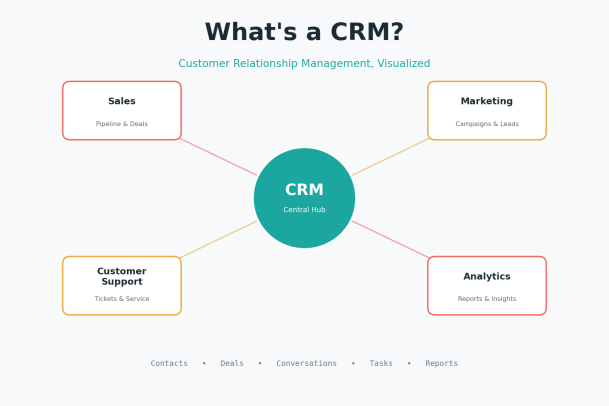
A CRM system typically handles four core functions:
1. Contact and Customer Data Management
Every phone call, email, meeting, and purchase gets logged against a customer’s profile. This means anyone on your team — sales, marketing, or support — can pull up a complete history of that customer instantly, without having to ask around.
2. Sales Pipeline Tracking
CRMs give sales teams a visual pipeline showing exactly where each deal stands — from initial contact to negotiation to closed-won or closed-lost. This helps managers forecast revenue and helps reps know exactly what to do next with each lead.
3. Marketing Automation
Many CRMs integrate with or include marketing tools that let you segment audiences, send targeted email campaigns, and track which leads are engaging with your content — so marketing and sales stay aligned.
4. Customer Support and Service
When a customer submits a ticket or asks a question, a CRM can log it, route it to the right agent, and keep a record of the resolution. This creates continuity, so customers never have to repeat themselves.
Why Businesses Need a CRM
You might be wondering whether your business actually needs one. Here’s why a CRM has become essential rather than optional for most growing companies.
It eliminates data silos. Without a CRM, customer information typically lives in different places: sales has one spreadsheet, support has a separate ticketing tool, and marketing has its own list. A CRM merges these into a single source of truth.
It improves customer experience. When your team has full context on a customer’s history, they can offer faster, more personalized service. Customers notice when a company “remembers” them — and they notice even more when it doesn’t.
It increases sales efficiency. CRMs automate repetitive tasks like follow-up reminders, data entry, and lead scoring, freeing up sales reps to focus on actually selling instead of administrative work.
It provides visibility for leadership. With a CRM, managers and executives can see real-time dashboards of pipeline health, team performance, and customer trends — without waiting for someone to compile a report.
It supports scalability. As your business grows, manual tracking methods break down quickly. A CRM is built to scale from a handful of customers to hundreds of thousands without losing organization.
Key Features to Look For in a CRM
Not all CRMs are built the same. When evaluating options, look for these core capabilities:
- Contact and lead management — centralized records with activity history
- Pipeline and deal tracking — visual stages for sales opportunities
- Task and workflow automation — automatic reminders, follow-ups, and approvals
- Reporting and analytics — dashboards for sales, marketing, and support metrics
- Email and communication integration — sync with tools like Outlook or Gmail
- Customization — the ability to adapt fields, pipelines, and workflows to your business
- Mobile access — so teams can manage relationships on the go
- Integrations — connections with other business tools like accounting, marketing platforms, or customer support software
- Security and access controls — especially important for businesses handling sensitive customer data
Types of CRM Systems
CRMs generally fall into three categories, and understanding the difference helps you pick the right fit.
Operational CRM focuses on streamlining day-to-day business processes — sales automation, marketing automation, and service automation. This is the most common type for small and mid-sized businesses.
Analytical CRM is built around collecting and analyzing customer data to uncover patterns, trends, and insights that inform strategy. It’s often used by larger organizations with dedicated data teams.
Collaborative CRM (sometimes called strategic CRM) focuses on sharing customer information across departments — sales, marketing, support, and even finance — so everyone works from the same playbook.
Many modern CRMs blend all three, offering automation, analytics, and cross-team collaboration in a single platform.
Common Misconceptions About CRMs
“A CRM is just a contact database.” In reality, modern CRMs go far beyond storing names and emails — they manage entire customer journeys, automate workflows, and provide predictive insights.
“CRMs are only for big companies.” Small businesses often benefit the most from a CRM because it prevents leads and customer details from slipping through the cracks as the business grows.
“A CRM will fix a broken sales process.” A CRM is a tool, not a magic fix. It works best when paired with a clear process for how leads are captured, nurtured, and converted.
How to Choose the Right CRM for Your Business
When selecting a CRM, consider the following:
- Define your goals. Are you primarily trying to improve sales tracking, customer support, marketing alignment, or all three?
- Consider your team size and technical comfort. Some CRMs are simple and quick to adopt; others require more setup and training.
- Check integration compatibility. Make sure the CRM works with the tools you already use daily.
- Evaluate security features. Especially important if your business handles sensitive customer or financial data.
- Think about scalability. Choose a system that can grow with your business rather than one you’ll outgrow in a year.
- Request a demo. Reading feature lists only goes so far — seeing the platform in action helps you understand whether it truly fits your workflow.
Final Thoughts
So, what’s a CRM? In short, it’s the central nervous system of a customer-focused business — a tool that connects sales, marketing, and support so every customer interaction is informed, efficient, and consistent. Whether you’re a small business trying to keep track of your first hundred customers or an enterprise managing complex, multi-team relationships, a CRM turns scattered data into a strategic advantage.
Choosing the right CRM isn’t just about features — it’s about finding a platform that fits how your team actually works and that supports your security and growth needs as you scale.
See It in Action
The best way to understand what a CRM can do for your business is to see it firsthand.
Please give us a star rating based on your experience.

 (20 votes, average: 2.00 out of 5, rated)


