Your people are your most valuable asset, and also one of your most targeted. Every hire, payslip, performance review and benefits enrollment creates data that drives business decisions and attracts cybercriminals. That is why HCM has moved from a back-office HR function to a boardroom priority.
In this guide, you will learn what HCM means, how it differs from traditional HR, the core components of an HCM system, and, most importantly, how to protect the sensitive workforce data that HCM platforms hold.
What is HCM
HCM, or Human Capital Management, is the set of strategies, processes and technologies an organization uses to attract, manage, develop and retain its workforce. The term treats employees as “capital”: an investment whose value grows when it is nurtured and measured properly.
In practice, HCM usually refers to an integrated software platform that covers the full employee lifecycle, from recruiting and onboarding to payroll, performance, learning and offboarding. Leading HCM suites include Workday, SAP SuccessFactors, Oracle HCM Cloud, ADP and UKG, though many mid-market and regional vendors serve the same needs.
The goal of HCM is simple: put the right people in the right roles, keep them engaged, and use workforce data to make smarter business decisions.
HCM vs. HR vs. HRIS: What’s the Difference
These terms are often used interchangeably, but they describe different scopes. HR is the department and its day-to-day administration. HRIS is the system of record. HCM is the broader strategy, and the platform that supports it, for getting the most value from your people.
| Term | Focus | Typical scope |
|---|---|---|
| HR (Human Resources) | Administration and compliance | Hiring paperwork, policies, employee relations |
| HRIS (HR Information System) | Storing and tracking employee records | Personal data, job history, time off, basic reporting |
| HCM (Human Capital Management) | Strategic workforce value | HRIS functions plus talent, performance, learning, analytics and planning |
Think of it this way: an HRIS tells you who works for you. An HCM platform helps you decide how to grow, reward and retain them.
Core Components of an HCM System
A modern HCM platform brings every stage of the employee lifecycle into one connected system. Most suites are built around six core modules:
- Talent acquisition: Job postings, applicant tracking, interview scheduling and offer management in one workflow.
- Onboarding: Digital paperwork, account provisioning, policy acknowledgments and first-day checklists.
- Core HR and payroll: Employee records, compensation, tax, benefits administration and time and attendance.
- Performance management: Goal setting, continuous feedback, reviews and succession planning.
- Learning and development: Training libraries, certifications, skills tracking and career paths.
- Workforce analytics: Dashboards on headcount, turnover, cost and engagement that guide planning.
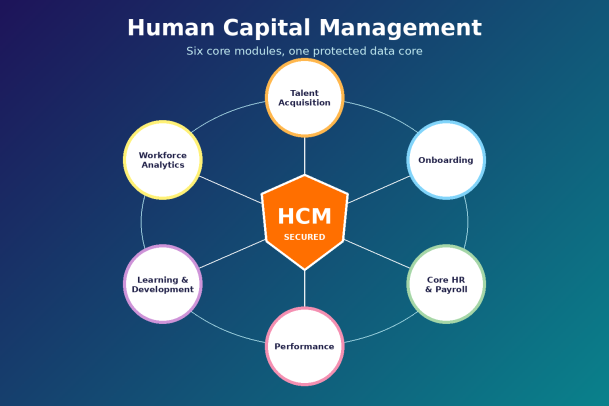
Because these modules share a single data model, information entered once flows everywhere it is needed. That integration is HCM’s biggest strength, and, as we will see, its biggest security responsibility.
Key Benefits of HCM
Organizations adopt HCM to replace scattered spreadsheets and disconnected tools with a single source of truth. The payoff shows up across the business:
- Better hiring decisions: Structured data on candidates and roles shortens time-to-hire and improves quality of hire.
- Higher engagement and retention: Clear goals, regular feedback and visible career paths keep employees invested.
- Operational efficiency: Automated payroll, approvals and self-service portals free HR teams for strategic work.
- Stronger compliance: Built-in rules for labor law, tax and data retention reduce regulatory risk.
- Data-driven planning: Real-time workforce analytics help leaders forecast skills gaps and budget accurately.
In short, HCM turns people management from a cost center into a measurable driver of growth.
Why HCM Data Is a Prime Target for Attackers
An HCM platform may be the richest store of personal data in your company. It holds national ID and tax numbers, bank account details, home addresses, salaries, health and benefits information, and sometimes background-check results. For an attacker, that is everything needed for identity theft, payroll fraud or targeted phishing.
The most common threats to HCM environments include:
- Phishing and credential theft: Attackers impersonate HR or payroll to steal logins, then quietly change direct-deposit details.
- Ransomware: Encrypting HR and payroll systems can halt salary runs and pressure companies into paying.
- Insider threats: Employees or contractors with excessive access may misuse or leak sensitive records.
- Third-party and integration risk: HCM platforms connect to benefits providers, payroll bureaus and identity systems, and each connection is a possible entry point.
- Unsecured endpoints: HR staff and managers access HCM from laptops and phones that may be unpatched or infected.
- Misconfiguration: Overly broad roles, public report links or weak API keys can expose data without any hacking at all.
A breach of HCM data is not just a technical incident. It damages employee trust, triggers regulatory penalties under laws such as GDPR and India’s DPDP Act, and can disrupt the business for weeks.
How to Secure Your HCM Environment: 7 Best Practices
Protecting human capital data requires layered defenses that cover people, devices, applications and integrations.
- Enforce strong identity controls. Require multi-factor authentication for every HCM login and use single sign-on to centralize access.
- Apply least-privilege access. Give users only the permissions their role needs, and review access quarterly, especially after promotions and exits.
- Protect every endpoint. Laptops and mobile devices that reach HCM need advanced endpoint protection that can contain unknown threats before they execute.
- Encrypt data at rest and in transit. Confirm your HCM vendor encrypts stored records, and use TLS for all integrations and file transfers.
- Lock down payroll changes. Add out-of-band verification for bank detail updates to stop direct-deposit fraud.
- Monitor and log activity. Feed HCM audit logs into your security monitoring so unusual exports or logins trigger alerts.
- Train HR and finance teams. These teams are prime phishing targets, so give them regular, realistic awareness training.
Finally, plan for the worst. A tested incident response plan and secure backups mean a breach becomes a manageable event rather than a crisis.
How to Choose the Right HCM Solution
The best HCM platform balances functionality, usability and security. When evaluating vendors, ask these questions:
- Does it fit your size and growth plans? A 200-person company and a 20,000-person enterprise need very different scale and pricing.
- Does it support your regions? Check local payroll, tax and labor-law coverage for every country where you employ staff.
- How strong is its security posture? Look for SOC 2 Type II or ISO 27001 certification, role-based access controls, encryption and clear breach-notification terms.
- How well does it integrate? Native connectors to your finance, identity and collaboration tools reduce risky manual exports.
- Will employees actually use it? Intuitive self-service and mobile apps drive adoption and data accuracy.
Remember that even the most secure HCM vendor only protects its own cloud. The devices, users and networks that connect to it remain your responsibility.
Conclusion
HCM gives organizations a powerful way to hire, grow and retain great people while turning workforce data into strategic insight. But the same data that makes HCM valuable makes it a magnet for cybercriminals. Treating HCM security as an afterthought puts your employees, your reputation and your bottom line at risk.
The smartest HCM strategy pairs a capable platform with proactive protection for every user and device that touches it. Xcitium’s Zero Trust endpoint security isolates unknown threats before they can steal credentials, encrypt payroll systems or exfiltrate employee records, so your human capital stays safe.
Ready to secure the data behind your workforce? See how Xcitium protects your HCM environment from ransomware, phishing and zero-day attacks.
Please give us a star rating based on your experience.

 (23 votes, average: 2.09 out of 5, rated)


