“CS” in a text most often means “Case Sensitive,” “Common Sense,” “Can’t Stop,” or “Customer Service,” depending on who sent it and where. In gaming it usually means Counter-Strike or creep score, and in tech and security circles it can stand for Computer Science or Cybersecurity.
Short forms make messaging fast, but they also create confusion. A two-letter abbreviation like CS can carry a dozen meanings, and reading the wrong one can turn a simple chat into a misunderstanding. A friend saying “use some CS” is not the same as a gamer asking “you on CS tonight?” or an IT admin warning that “the password field is CS.”
This guide breaks down what “CS” means in text across everyday chats, social media, gaming, the workplace and technology. You will also learn how to decode it from context, and why unfamiliar abbreviations in messages can sometimes signal something more serious than slang.
Common Meanings of “CS” in Everyday Texting
In casual chats and on social media, CS is used in a handful of ways. Here are the ones you will see most often.
1. Common Sense
This is one of the most popular uses. People write CS when they think something should be obvious.
“Don’t click random links from strangers. That’s just CS.”
The tone is often mildly sarcastic or teasing, so read it in light of your relationship with the sender.
2. Can’t Stop
Teens and young adults sometimes use CS to show they are hooked on something, from a song to a TV series.
“This new album is on repeat. CS listening!”
3. Customer Service
In shopping, banking or support conversations, CS almost always means customer service.
“I messaged CS about my refund, still waiting.”
4. Cool Story (often sarcastic)
Some users write CS as a shortened version of “cool story, bro.” It usually signals boredom or disbelief rather than genuine interest.
“You ate two pizzas? CS.”
5. Case Sensitive
When people share passwords, Wi-Fi keys or login codes, CS warns that uppercase and lowercase letters matter.
“Wi-Fi password is BlueSky42, CS.”
Quick reference table
| Meaning | Where you’ll see it | Example |
|---|---|---|
| Common Sense | Casual chats, social media | “It’s just CS.” |
| Can’t Stop | Teen texting, fandoms | “CS watching this show.” |
| Customer Service | Shopping, banking, support | “Call CS for help.” |
| Cool Story | Sarcastic replies | “CS, bro.” |
| Case Sensitive | Logins, passwords, IT | “The password is CS.” |
What “CS” Means in Gaming, Work and Technology
Outside casual chat, CS takes on specialised meanings. Knowing these helps you avoid awkward replies in group chats, team channels and online communities.
In gaming
- Counter-Strike: In gaming communities, CS usually refers to the famous tactical shooter series. “Want to play CS later?” is an invite to a match.
- Creep Score: In MOBA games such as League of Legends, CS counts the minions or “creeps” a player has defeated. “My CS is low this game” means the player is falling behind on farming gold.
In the workplace
- Customer Success: Many SaaS and tech companies have a Customer Success team that helps clients get value from a product. “Loop in CS on this account” refers to that team.
- Customer Service / Support: In retail and service businesses, CS often names the support desk.
- Case Study: In marketing and consulting, “the new CS is ready” may mean a finished case study.
In technology and education
- Computer Science: Students and developers use CS for the academic field. “I’m a CS major” is one of the most common uses online.
- Client-Server: In networking, CS can describe a client-server architecture.
- Cybersecurity: Security teams sometimes shorten cybersecurity to CS in internal chats, as in “CS review before we deploy.”
- Case Sensitive: Developers and IT admins use CS to flag that code, file names or credentials treat uppercase and lowercase differently.
In professional settings, never assume. If an abbreviation could change how you act on a request, ask the sender to spell it out.
How to Figure Out Which “CS” Someone Means
The right meaning of CS comes from context: who sent it, where, and what the conversation is about.
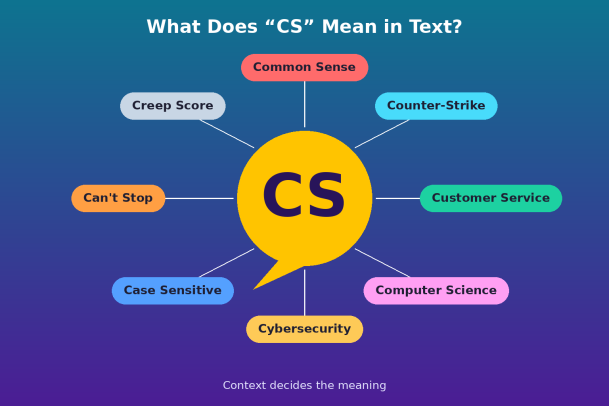
Use these four checks to decode it quickly:
- Look at the platform. On Discord or Steam, CS likely means Counter-Strike. On LinkedIn or Slack, think Customer Success or Computer Science. In a shopping app chat, it is customer service.
- Read the surrounding words. “CS major” points to Computer Science. “My CS dropped” points to creep score. “Password is CS” points to case sensitive.
- Consider the sender. A teenager, a teammate, a gaming buddy and an IT admin will each reach for a different meaning.
- Notice the tone. A one-word “CS” reply to a long story is probably a sarcastic “cool story.” A “that’s just CS” remark usually means common sense.
Real-world examples
| Message | Most likely meaning |
|---|---|
| “Jump on CS in 10?” | Counter-Strike |
| “She switched her major to CS.” | Computer Science |
| “The login is CS, so check your caps.” | Case Sensitive |
| “I’ve been on hold with CS for an hour.” | Customer Service |
| “CS needs to review the new firewall rules.” | Cybersecurity |
| “You forgot your umbrella again? Use some CS.” | Common Sense |
Still unsure? Simply ask, “What do you mean by CS?” It is a normal question, and it saves you from replying to the wrong message entirely.
Why Abbreviations Like “CS” Matter for Cybersecurity
Short, casual messages are exactly what attackers imitate, so a vague abbreviation can be a cover for phishing or social engineering.
Cybercriminals know that people skim texts and act fast. A message such as “CS here, your account is locked, verify now” borrows the familiar “customer service” label to look official. Because the abbreviation feels routine, many people tap the link without a second thought. This tactic, known as smishing (SMS phishing), is one of the most common ways attackers steal credentials and plant malware on phones and laptops.
At work, the risk grows. A spoofed chat claiming to be from “CS” (the security team) could ask an employee to disable a protection, share a one-time code or install a “patch.” One click on a malicious attachment can give an attacker a foothold inside the whole network.
Red flags to watch for
- Messages from unknown numbers that use “CS” to sound like official support
- Urgent language such as “act now,” “account suspended” or “final warning”
- Shortened or misspelled links, or requests to download files
- Requests for passwords, OTPs or payment details over text or chat
- A familiar contact using abbreviations or a tone that feels out of character
How to stay safe
- Verify the sender through an official website, app or phone number, never through the link in the message.
- Never share login details or codes in a text, even with someone claiming to be customer service or IT.
- Report suspicious messages to your IT or security team.
- Use endpoint protection that stops unknown files and malicious code before they can run.
Final Thoughts
“CS” is a small abbreviation with a big range of meanings: common sense, can’t stop, customer service, cool story, case sensitive, Counter-Strike, creep score, computer science and cybersecurity. The platform, the surrounding words, the sender and the tone will almost always tell you which one is meant.
When in doubt, ask. And when a short, urgent message labelled “CS” asks you to click, pay or log in, slow down. That pause is often the difference between a harmless chat and a security incident.
Protect Your Organization from Text-Based Threats
Decoding slang is easy once you know the context. Stopping a phishing message that slips past an employee is much harder, and it only takes one click to compromise a device. Xcitium’s Zero Trust endpoint protection isolates unknown files and applications before they can do damage, so a single mistaken tap doesn’t become a full-blown breach.
See how Xcitium keeps every endpoint protected, from laptops to mobile devices, without slowing your team down.
Please give us a star rating based on your experience.


 (16 votes, average: 2.38 out of 5, rated)


