If you have ever restarted a router out of frustration or waited on hold with an IT help desk while your internet crawled to a halt, you have felt the downstream effects of a network problem that a simple “ping” could have diagnosed in seconds. Pinging is one of the oldest, simplest, and most underrated tools in networking and cybersecurity — yet most people, including many IT professionals, only scratch the surface of what it can tell them.
Understanding pinging isn’t just a technical nicety reserved for network engineers. It’s a foundational skill that touches network performance, uptime monitoring, and even your organization’s exposure to certain cyberattacks. In this article, we’ll break down what pinging actually is, how it works, why it matters for your business, and the security risks tied to it that every IT and security team should know.
What Is Pinging, Exactly?
At its core, a “ping” is a small network utility used to test whether a device on a network is reachable and to measure how long it takes for data to travel to that device and back. The name comes from sonar terminology — much like a submarine sends out a sound pulse and listens for the echo, a ping sends a small data packet and waits for a response.
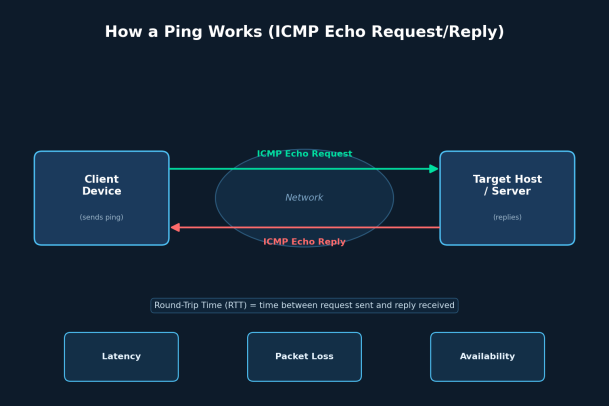
Technically, ping relies on the Internet Control Message Protocol (ICMP), a supporting protocol within the Internet Protocol (IP) suite. When you ping a device, your computer sends an ICMP Echo Request packet to the target address. If the target is online and configured to respond, it sends back an ICMP Echo Reply. The time it takes for this round trip is called the Round-Trip Time (RTT), usually measured in milliseconds.
That’s the entire mechanism. No login, no complex handshake — just a request and a reply. But the simplicity is exactly why it’s so useful.
How Ping Works, Step by Step
- You run the
pingcommand from a terminal or command prompt, targeting an IP address or domain name (e.g.,ping google.com). - Your device packages a small ICMP Echo Request and sends it across the network toward the destination.
- The request travels through routers, switches, and possibly the open internet until it reaches the target device.
- If the target is online and not blocking ICMP traffic, it immediately sends back an ICMP Echo Reply.
- Your device receives the reply and calculates the round-trip time.
- This process typically repeats several times, giving you an average latency, minimum/maximum response times, and a percentage of packet loss.
The result is a quick, at-a-glance health check of a connection — is the device online, how far away is it (in terms of network hops and time), and is the connection stable or dropping packets?
Why Understanding Pinging Matters
1. Faster Network Troubleshooting
When something goes wrong on a network — a server won’t respond, a website won’t load, a remote office loses connectivity — pinging is almost always the first diagnostic step. It tells you immediately whether the problem is a total outage (no reply at all), a partial issue (intermittent packet loss), or a performance problem (high latency). Skipping this step often means IT teams waste time investigating the wrong layer of the network stack.
2. Measuring Latency and Performance
For businesses that depend on real-time applications — video conferencing, VoIP calls, financial trading platforms, cloud-based software — latency is everything. Understanding ping results helps teams identify whether slow performance is due to the network itself or an application-layer issue, which changes the entire troubleshooting path and who gets involved in fixing it.
3. Verifying Uptime and Availability
Many monitoring tools rely on scheduled pings to confirm that critical servers, firewalls, and endpoints are online. If a device stops responding to pings unexpectedly, that’s often the earliest warning sign of a hardware failure, a misconfiguration, or a service outage — long before end users start submitting help desk tickets.
4. Spotting Early Signs of a Security Problem
This is where pinging crosses over from a networking tool into a security concern. Attackers frequently use pinging techniques during the reconnaissance phase of an attack. A “ping sweep” — pinging every address in a range — is a classic way for an attacker to map out which devices on a network are alive and worth targeting further. If your security team understands how legitimate ping traffic looks versus a sweep pattern, they can catch reconnaissance activity before it turns into something worse.
Common Ping-Related Cyberattacks
Because ICMP is a lightweight, low-level protocol, it has historically been a target for abuse. A few attacks every IT and security professional should recognize include:
- Ping Flood (ICMP Flood): An attacker overwhelms a target with a massive volume of ICMP Echo Requests, consuming bandwidth and processing resources until the target becomes slow or unresponsive — a basic form of denial-of-service (DoS) attack.
- Ping of Death: An older but historically significant attack where oversized or malformed ping packets are sent to crash or destabilize systems that couldn’t properly handle them. Most modern systems have been patched against this, but it illustrates how a “simple” protocol can be weaponized.
- Smurf Attack: A more sophisticated variant where an attacker spoofs the source address of ping requests and broadcasts them across a network, causing all responding devices to flood the spoofed victim with replies simultaneously.
- Ping Sweeps for Reconnaissance: As mentioned above, attackers scan entire IP ranges with pings to build a map of live hosts before launching a more targeted attack.
Because of these risks, many organizations restrict or filter ICMP traffic at the firewall level — but doing so without understanding the trade-offs can also break legitimate monitoring and troubleshooting tools that rely on ping.
Best Practices for Using Ping Safely and Effectively
- Don’t disable ICMP entirely without a plan. Blocking all ping traffic can seem like a quick security win, but it also blinds your own monitoring tools and makes basic troubleshooting harder.
- Rate-limit ICMP traffic at the firewall or router level to reduce the risk of flood-based attacks while still allowing legitimate diagnostic pings.
- Monitor for unusual ping patterns, such as a sudden spike in ICMP traffic or sequential sweeps across an IP range, as these are often early indicators of reconnaissance or an active attack.
- Use ping alongside other diagnostic tools like traceroute, MTR, and port scanning utilities to get a fuller picture of network health rather than relying on it in isolation.
- Train your IT and security staff to interpret ping results correctly — recognizing the difference between normal latency fluctuations and signs of a deeper problem.
Why This Matters for Your Broader Security Strategy
Pinging sits at an interesting intersection of network administration and cybersecurity. On one hand, it’s an essential, everyday diagnostic tool. On the other, it’s a technique actively used by threat actors to scope out targets and, in some cases, to launch attacks outright. Organizations that treat ICMP traffic as “just background noise” often miss early warning signs that a more serious breach attempt is underway.
This is precisely why modern endpoint protection and network security platforms build visibility into low-level protocols like ICMP into their broader detection and response capabilities. Understanding how something as simple as a ping request moves across your network — and knowing what abnormal ping behavior looks like — is a small piece of a much larger security posture, but it’s a piece that too many organizations overlook until something goes wrong.
Final Thoughts
Pinging may be one of the oldest tools in the networking toolbox, but its relevance hasn’t diminished. It remains a fast, reliable way to check connectivity, measure performance, and catch early signs of trouble — while also representing a real avenue of risk if left unmonitored or misunderstood. Whether you’re an IT administrator troubleshooting a slow connection or a security analyst watching for reconnaissance activity, understanding pinging gives you a clearer, faster read on what’s actually happening across your network.
Modern threats don’t always announce themselves with an obvious breach. Sometimes they start with something as quiet as a ping sweep across your network. Having the right visibility and protection in place — at the endpoint, the network, and everywhere in between — is what turns that early signal into an early stop.
See This Kind of Visibility in Action
Understanding pinging is just one small part of protecting your network. To see how comprehensive endpoint and network security can help you detect reconnaissance, stop attacks before they spread, and keep your business protected around the clock, talk to the experts.
Please give us a star rating based on your experience.

 (214 votes, average: 1.07 out of 5, rated)


