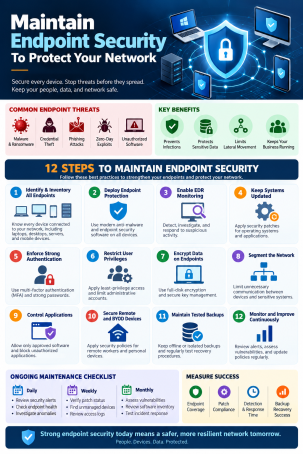
Every laptop, server, and phone that touches your network is a door, and attackers only need one unlocked. If you want to maintain endpoint security to protect your network, treat it as a routine you repeat, not a product you install once. Devices change, software ages, and threats evolve every week.
This guide covers why endpoint security matters, how it differs from network security, and ten practices that keep your devices and your network protected.
What Does It Mean to Maintain Endpoint Security?
Endpoint security is the protection of devices such as laptops, desktops, servers, tablets, and phones that connect to your network. To maintain endpoint security means keeping those protections current, monitored, and enforced across every device, every day.
Endpoint Security vs. Network Security
Network security protects the perimeter and the traffic moving across your infrastructure. Endpoint security protects the devices themselves, wherever they connect from. Threats that slip past network controls, such as a phishing attachment opened on a home Wi-Fi laptop, are stopped (or not) at the endpoint. You need both, but a compromised endpoint can undermine the rest of your network.
Why Endpoint Security Maintenance Matters
- Remote and hybrid work has dissolved the traditional perimeter.
- Ransomware and zero-day attacks often begin with a single compromised device.
- Lateral movement lets an attacker jump from one infected endpoint to servers and shared drives.
- Compliance frameworks expect documented, current controls.
Neglected endpoints are where small problems become network-wide breaches.
10 Practices to Maintain Endpoint Security and Protect Your Network
1. Keep a Complete Endpoint Inventory
You can’t protect what you can’t see. Track every managed device, plus scan regularly for unmanaged or unknown devices on your network. Shadow devices are a common blind spot.
2. Patch Operating Systems and Applications Continuously
Unpatched software is one of the easiest ways in. Automate patching for operating systems, browsers, and third-party apps, and prioritize critical and actively exploited vulnerabilities first.
3. Standardize Security Controls on Every Endpoint
Apply the same baseline everywhere: endpoint protection, a host firewall, full-disk encryption, and secure configuration. Inconsistent coverage creates weak links.
4. Apply Least Privilege
Remove local admin rights where they aren’t needed. Standard user accounts limit what malware can do even when something gets through. Pair this with multi-factor authentication for sensitive access.
5. Deploy EDR for Continuous Monitoring
Antivirus alone misses fileless and novel attacks. Endpoint detection and response (EDR) records process, file, and network activity, so you can detect suspicious behavior and investigate quickly.
6. Contain Unknown Files Before They Can Cause Damage
No detection tool catches everything. Containment runs unknown files in an isolated environment so they can’t touch your real system or data while a verdict is reached. Xcitium’s ZeroDwell Technology and Verdict Cloud work this way, isolating unknown files and classifying them as safe or malicious without slowing users down.
7. Monitor Continuously and Centralize Visibility
Use a single console to watch device health, missing updates, and policy violations. Feed endpoint data into your SIEM or managed service so alerts are correlated instead of siloed.
8. Prepare to Respond and Contain Incidents
Define who acts when an endpoint is compromised. Isolate the device from the network, preserve evidence, and check neighboring systems for lateral movement. Rehearse the plan before you need it.
9. Enforce Policies for Remote and Mobile Devices
Security should follow the device, not the office. Use mobile device management for remote lock, wipe, and encryption of lost or stolen devices, and require secure remote access.
10. Train Users and Back Up Data
People remain a primary entry point. Run regular awareness training and phishing simulations, and keep tested, offline backups so you can recover from ransomware.
Endpoint Security Maintenance Checklist
| Frequency | Task |
|---|---|
| Daily | Review alerts; confirm agents are online and reporting |
| Weekly | Apply critical patches; scan for unmanaged devices |
| Monthly | Audit admin rights and user access; review policy exceptions |
| Quarterly | Test incident response and backup restores; update the device inventory |
| Annually | Reassess your risk profile, tools, and compliance requirements |
Common Mistakes That Weaken Endpoint Security
- Treating endpoint protection as “set and forget”
- Leaving legacy or unmanaged devices on the network
- Delaying patches because of uptime concerns
- Giving every user local admin rights
- Collecting alerts with no one assigned to act on them
How Xcitium Helps You Maintain Endpoint Security
Xcitium brings these practices into one platform: EDR for detection and response, ZeroDwell containment for unknown files, patch management, remote monitoring and management, and mobile device management. If your team lacks 24/7 coverage, Managed EDR adds expert analysts watching your endpoints around the clock.
Frequently Asked Questions
What is the best way to maintain endpoint security?
Combine continuous patching, least-privilege access, EDR monitoring, and containment of unknown threats, all managed from a central console. Consistency matters more than any single tool.
How often should endpoint security be updated?
Security software and definitions should update automatically. Critical patches should be applied within days, and your full policy and inventory reviewed at least quarterly.
How does endpoint security protect a network?
It stops threats on individual devices before they spread, limits attacker movement between systems, and gives you visibility to isolate a compromised device quickly.
Is antivirus enough to protect endpoints?
No. Antivirus handles known malware, but modern attacks use fileless techniques and zero-days. Layer EDR, containment, patching, and access controls on top.
What’s the difference between endpoint security and network security?
Network security guards traffic and the perimeter, while endpoint security protects each device wherever it connects. They work best together.
Conclusion
To maintain endpoint security and protect your network, build a repeatable routine: know your devices, patch fast, limit privileges, monitor continuously, and contain what you can’t yet identify. Small, consistent habits are what keep one compromised laptop from becoming a network-wide incident.
See how Xcitium can secure your endpoints. Request a demo today.
Please give us a star rating based on your experience.

 (26 votes, average: 2.23 out of 5, rated)


