Auditors and compliance reviewers are starting to ask a question most IT teams aren’t ready for: how do you govern the AI agents and tools running inside your environment? A year ago, this barely came up. Now it’s showing up in security questionnaires, vendor risk reviews, cyber insurance renewals, and SOC 2 and ISO audits alike. The problem is that AI adoption has moved faster than most organizations’ governance frameworks. Teams have deployed copilots, automation agents, and AI-powered integrations across departments, often without a central record of what’s running, what it can access, or who approved it.
That gap is exactly what auditors are starting to probe. The good news is that closing it doesn’t require a total governance overhaul it requires a clear checklist, applied consistently. Use the one below to see where you stand before your next audit finds the gaps for you.
Why AI Governance Is Becoming an Audit Item
AI governance is following a familiar pattern: what starts as a best practice becomes an expectation, and what becomes an expectation eventually becomes a checkbox on an audit form. Cloud access, third-party vendors, and remote work all went through this same progression, and AI tools are next in line.
The reasoning is straightforward. AI agents often touch sensitive data, take actions on systems, and operate with a level of autonomy that traditional software doesn’t. That combination broad access plus autonomous action is precisely what auditors and compliance frameworks exist to scrutinize. Adoption is also outpacing oversight at a scale that makes this hard to ignore: Gartner projects that 40% of enterprise applications will feature task-specific AI agents by the end of 2026, up from less than 5% in 2025, and separately predicts that 40% of enterprises will demote or decommission autonomous agents by 2027 after governance gaps surface in production.
The data on how prepared companies actually are tells a similar story. In Schellman’s 2026 AI Governance Research Report, 74% of enterprises said they believe they could pass an AI compliance audit today but only 27% described their governance program as fully mature. That confidence gap is exactly what an auditor is trained to find.
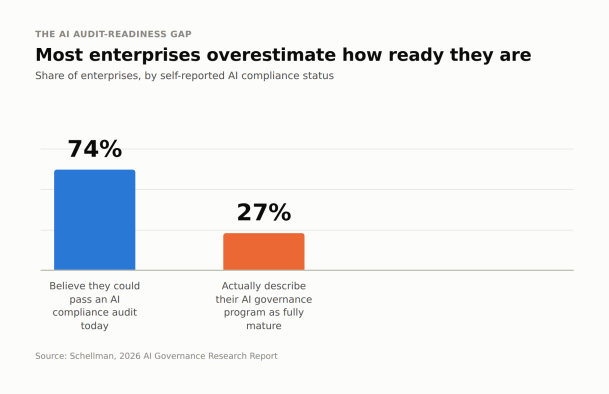
As more companies put AI agents into production workflows, reviewers are starting to ask the same questions they’ve long asked about any privileged system: who has access, what can it do, and how would you know if something went wrong. Organizations that can answer those questions clearly are in a much stronger position, whether the review is a formal audit, a customer’s security questionnaire, or an insurance renewal.
The Checklist
The gap shows up item by item, too. Across the same research, only 57% of enterprises have a formal AI governance policy, 44% have AI-specific incident response procedures, 43% maintain a centralized inventory of their AI agents and integrations, and just 26% say their governance framework is fully keeping pace with how fast AI is being adopted (Schellman, 2026; Smarsh & FTI Consulting, 2026 AI & Compliance Survey). Those four numbers map almost directly onto the first, seventh, and eighth items below.
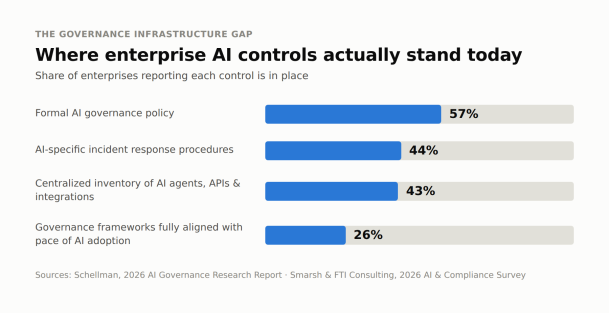
Here’s what a defensible AI governance posture looks like in practice, broken into twelve concrete items.
1. A current inventory of every AI agent or tool in use. Good looks like a single, maintained list of every AI tool and agent operating in your environment not a best guess assembled the week before an audit.
2. Documented data access permissions per agent. Good looks like a written record of exactly what data each agent can read, write, or act on, kept current as tools are added or reconfigured.
3. Role-based access control instead of blanket access. Good looks like agents scoped to the minimum access their function requires, rather than broad, standing permissions granted for convenience.
4. A full audit trail logging every AI-driven action. Good looks like a searchable log of what each agent did, when, and on whose behalf detailed enough to reconstruct an incident after the fact.
5. Human approval gates on irreversible or sensitive actions. Good looks like a required human sign-off before an agent can take actions that are hard to undo, such as deleting data, moving funds, or changing access rights.
6. Data isolation between departments, teams, or clients. Good looks like agents that cannot cross boundaries between business units or client environments, even when they share the same underlying platform.
7. A written policy for approving new AI tools. Good looks like a defined process not an ad hoc Slack thread that any team must follow before adopting a new AI tool or agent.
8. An incident response plan specific to AI misuse. Good looks like a plan that names AI-specific failure modes, such as data leakage through a prompt or an agent taking an unintended action, alongside the standard incident response steps.
9. A regular cadence for reviewing agent access and permissions. Good looks like scheduled reviews quarterly is a common baseline where access is reconfirmed or revoked, not access granted once and forgotten.
10. Employee training on which AI tools are approved and how to use them. Good looks like employees who can name the approved tools for their role and understand the boundaries of acceptable use, not a policy document nobody has read.
11. Vendor and third-party AI risk assessment. Good looks like the same scrutiny applied to any third-party AI tool or embedded AI feature that you’d apply to a new software vendor, including how that vendor handles your data.
12. Clear ownership of AI governance itself. Good looks like a named owner or team accountable for the program overall, so governance doesn’t quietly fall between security, IT, and compliance.
How to Close These Gaps Without a Major Overhaul
Most of this checklist doesn’t require new infrastructure it requires consolidating decisions that are probably already being made informally. A few practical starting points:
Start with the inventory. You can’t govern what you can’t see, so before tackling permissions or policy, get a real list of every AI agent and tool currently in use across the organization. This alone often surfaces the biggest gaps.
Layer in controls incrementally. Role-based access, approval gates, and audit logging can usually be applied to your highest-risk agents first the ones touching sensitive data or taking irreversible actions rather than rolling out every control everywhere at once.
Reuse existing governance structures. If you already have a vendor risk review process, an access review cadence, or an incident response plan, extend those to explicitly cover AI rather than building parallel processes from scratch.
Make the policy short and specific. A one-page policy for approving new AI tools that people will actually follow beats a lengthy document that gets ignored.
Treat this as ongoing, not a one-time project. Governance that’s reviewed on a schedule permissions, tool inventory, training stays audit-ready by default, instead of requiring a scramble every time a review comes up.
Where This Is Already Built In
If this checklist looks like a lot to build, it’s worth knowing that most of it is close to the governance model built into Xcitium Managed AI by default role-based access, centralized visibility into agent activity, and controls designed to keep AI agents scoped and accountable from the start. For IT teams that would rather adopt a platform with governance built in than assemble it piece by piece, that’s a meaningful head start heading into your next audit.
Please give us a star rating based on your experience.
 (1 votes, average: 5.00 out of 5, rated)