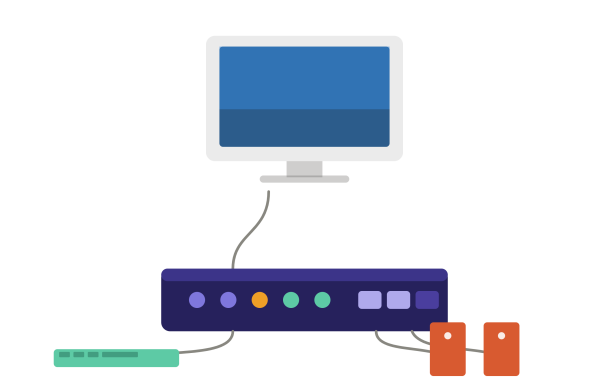
Ever wondered how network administrators manage a dozen servers from a single keyboard, monitor, and mouse without cluttering their desk with duplicate hardware? The answer is a KVM switch. If you’ve asked yourself what is a KVM switch, you’re not alone — this small piece of hardware plays a big role in data centers, IT departments, and increasingly, in conversations about cybersecurity. In this guide, we’ll break down how a KVM switch works, why it matters for security, and how to use one safely.
What Is a KVM Switch?
A KVM switch (Keyboard, Video, Mouse switch) is a hardware device that lets a user control multiple computers using a single set of peripherals — one keyboard, one monitor, and one mouse. Instead of setting up separate input devices and displays for every machine, IT professionals can simply toggle between connected systems with a button press, hotkey combination, or on-screen menu.
KVM switches are widely used in:
- Data centers managing multiple servers
- IT help desks supporting several workstations
- Home or office setups with multiple PCs
- Broadcast and control room environments
The core value of a KVM switch is efficiency — it reduces desk clutter, hardware costs, and the time spent physically switching between systems.
How Does a KVM Switch Work?
A KVM switch connects to multiple computers through cables (USB for keyboard/mouse, and HDMI, DisplayPort, or VGA for video). When a user selects a specific computer — either physically via a button or digitally through software — the switch reroutes the keyboard, video, and mouse signals to that machine only.
Types of KVM Switches
Understanding the different types helps you choose the right one for your environment:
- Hardware KVM Switch: A physical device with manual port-switching buttons. Common in small offices or home labs.
- Network/IP-Based KVM Switch: Allows remote access to multiple servers over a network connection, often used in enterprise data centers.
- Console KVM Switch: Combines a keyboard, monitor, and mouse into a single sliding drawer unit, saving rack space in server rooms.
- USB KVM Switch: A simplified, low-cost option ideal for personal or small-business use with fewer machines.
Why KVM Switches Matter for Cybersecurity
While KVM switches are primarily productivity tools, they carry real cybersecurity implications that internet security teams shouldn’t overlook.
Physical Access Risk
Because a KVM switch provides centralized control over multiple systems, unauthorized physical access to the switch itself can expose every connected machine. If an attacker gains access to the console, they may be able to pivot across systems without needing individual credentials for each one.
Network-Based KVM Vulnerabilities
IP-based KVM switches, which allow remote administration, introduce additional attack surface. If not properly secured, these devices can become an entry point for network intrusion, credential theft, or lateral movement within an organization’s infrastructure — similar to how unsecured remote desktop protocols (RDP) are frequently exploited.
Data Leakage Between Systems
In environments handling sensitive data, a poorly configured KVM switch can inadvertently create a bridge between isolated networks, undermining network segmentation efforts that are core to a strong cybersecurity posture.
Best Practices for Secure KVM Switch Usage
Here are actionable steps IT and security teams can take to minimize risk:
- Restrict Physical Access: Keep hardware KVM switches in locked server rooms or racks accessible only to authorized personnel.
- Use Strong Authentication: For IP-based KVM switches, enforce multi-factor authentication (MFA) and strong, unique passwords.
- Keep Firmware Updated: Regularly patch KVM switch firmware to close known vulnerabilities.
- Segment Your Network: Isolate KVM switch management interfaces on a separate VLAN away from general network traffic.
- Monitor Access Logs: Enable logging and review switch activity regularly to detect unusual access patterns.
- Choose Certified Hardware: Opt for KVM switches that meet security certifications like NIAP or TAA compliance for sensitive environments.
Pairing these practices with a broader endpoint and network security strategy ensures that convenience tools like KVM switches don’t become a weak link in your defenses.
Choosing the Right KVM Switch for Your Environment
When selecting a KVM switch, consider:
- Number of devices you need to manage simultaneously
- Video resolution support (HDMI, 4K compatibility)
- Remote access needs (local hardware vs. IP-based)
- Security certifications relevant to your industry
- Scalability for future infrastructure growth
Matching the right switch to your operational and security requirements helps balance convenience with protection.
Final Thoughts
So, what is a KVM switch? At its core, it’s a productivity tool that simplifies how IT teams manage multiple computers — but it’s also a device that demands the same security scrutiny as any other network-connected hardware. As organizations continue to expand their infrastructure, securing every access point, including KVM switches, is essential to a resilient cybersecurity strategy.
Want to strengthen your organization’s overall security posture beyond hardware-level controls? Xcitium offers advanced endpoint and network protection built to stop threats before they spread.
Request a Free Demo with Xcitium Today
Frequently Asked Questions (FAQ)
1. What is a KVM switch used for?
A KVM switch is used to control multiple computers with a single keyboard, monitor, and mouse, making it easier to manage several systems without duplicate hardware.
2. Is a KVM switch a security risk?
A KVM switch itself isn’t inherently risky, but if left unsecured — especially IP-based models — it can become an entry point for unauthorized access or lateral movement across connected systems.
3. What’s the difference between a hardware KVM switch and an IP-based KVM switch?
A hardware KVM switch requires physical, local access to switch between computers, while an IP-based KVM switch allows remote management over a network connection.
4. Can a KVM switch support multiple monitors?
Yes, many modern KVM switches support dual or multi-monitor setups, depending on the model and video interface (HDMI, DisplayPort, etc.).
5. How do I secure a network KVM switch?
Secure it by enabling multi-factor authentication, updating firmware regularly, isolating it on a separate VLAN, and restricting access to authorized users only.
Please give us a star rating based on your experience.


 (17 votes, average: 2.29 out of 5, rated)


