More than a million businesses now run at least part of their infrastructure on the cloud, and a huge share of them rely on a single provider to do it. So AWS: what is it, exactly, and why does it matter so much to anyone focused on cybersecurity? AWS stands for Amazon Web Services — a cloud computing platform that lets businesses rent servers, storage, databases, and networking tools instead of buying and maintaining their own physical hardware. For security professionals, understanding AWS isn’t optional anymore. It’s one of the most common environments where sensitive data lives, and where a single misconfiguration can expose an entire organization to attackers.
In this guide, we’ll answer AWS: what is it, how it works, and — most importantly — what security teams need to know to keep AWS environments protected from modern cyber threats.
AWS: What Is It, Really? Breaking Down the Basics
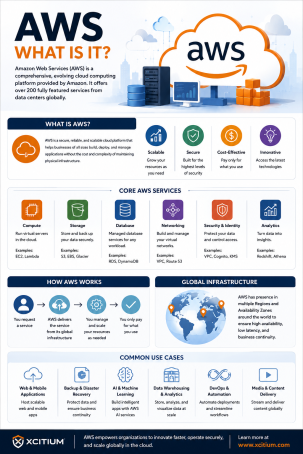
AWS, short for Amazon Web Services, is a cloud computing platform launched by Amazon that provides on-demand access to computing power, storage, and hundreds of other services over the internet. Instead of purchasing physical servers, companies can “rent” exactly the resources they need and scale up or down as demand changes.
Core AWS Services You Should Know
- Amazon EC2 (Elastic Compute Cloud) — virtual servers used to run applications
- Amazon S3 (Simple Storage Service) — scalable cloud storage for files, backups, and data
- Amazon RDS (Relational Database Service) — managed databases for applications
- AWS IAM (Identity and Access Management) — controls who can access what within an AWS account
- Amazon VPC (Virtual Private Cloud) — an isolated network environment within AWS
Each of these components plays a role in how businesses build and run applications — and each one introduces its own internet security considerations.
Why AWS Matters for Cybersecurity and Internet Security
If you’re still wondering AWS: what is it in the context of cybersecurity, the answer is simple: AWS is now core infrastructure for a massive portion of the internet, which makes it a high-value target for attackers.
1. The Shared Responsibility Model
AWS operates on a shared responsibility model. Amazon secures the underlying cloud infrastructure — the physical data centers, networking, and hardware — but customers are responsible for securing what they put in the cloud, including data, access permissions, and application configurations. Many breaches happen not because AWS itself was hacked, but because a customer misconfigured their own environment.
2. Misconfigured Storage Is a Leading Cause of Data Breaches
One of the most common cloud security failures involves publicly exposed Amazon S3 storage buckets. When permissions aren’t set correctly, sensitive files, customer records, or credentials can be left open to anyone on the internet — no hacking skills required.
3. Identity and Access Management Is a Prime Attack Target
Since AWS IAM controls who can access resources, weak or overly permissive access policies are a favorite target for attackers. Compromised credentials with excessive privileges can give an intruder the keys to an entire cloud environment.
Common AWS Security Risks to Watch For
- Open storage buckets — S3 buckets left publicly accessible
- Overly broad IAM permissions — users or applications granted more access than they need
- Unencrypted data — sensitive information stored or transmitted without encryption
- Unpatched or exposed EC2 instances — virtual servers running outdated software or open to unnecessary ports
- Lack of logging and monitoring — missing visibility into who accessed what, and when
Actionable Tips to Secure Your AWS Environment
- Apply the principle of least privilege. Give users and applications only the permissions they need — nothing more.
- Enable multi-factor authentication (MFA). Protect AWS root and IAM accounts with MFA to reduce the risk of credential theft.
- Audit S3 bucket permissions regularly. Use AWS tools or third-party scanners to catch publicly exposed storage before attackers do.
- Enable AWS CloudTrail and monitoring. Continuous logging helps detect suspicious activity and supports incident response.
- Encrypt data at rest and in transit. Use AWS-native encryption options to protect sensitive information across your environment.
- Layer on dedicated endpoint and network security. Native AWS tools are a starting point — a comprehensive cybersecurity solution adds deeper threat detection and response.
AWS: What Is It Beyond the Basics — A Shared Security Responsibility
By now, the answer to AWS: what is it should be clear — it’s a powerful, flexible cloud computing platform that powers a huge share of modern business infrastructure. But its scale and flexibility also mean security can’t be an afterthought. Every EC2 instance, S3 bucket, and IAM policy is a potential entry point, and internet security teams need visibility and control across all of it, not just the pieces Amazon secures by default.
Frequently Asked Questions
Q: AWS: what is it exactly?
A: AWS, or Amazon Web Services, is a cloud computing platform that provides on-demand servers, storage, databases, and other IT resources over the internet, allowing businesses to run applications without owning physical hardware.
Q: Is AWS secure?
A: AWS provides a secure underlying infrastructure, but overall security depends on the shared responsibility model — customers must properly configure access controls, encryption, and monitoring to keep their own data and applications safe.
Q: What is the most common AWS security mistake?
A: Misconfigured S3 storage buckets that are left publicly accessible are one of the most frequent and damaging AWS security mistakes, often exposing sensitive data without any hacking involved.
Q: Do I need additional cybersecurity tools if I use AWS?
A: Yes. While AWS offers native security features, most organizations benefit from additional endpoint protection, threat detection, and monitoring tools to close gaps that default settings don’t cover.
Q: What’s the difference between AWS and other cloud providers like Azure or Google Cloud? A: AWS, Microsoft Azure, and Google Cloud all offer similar cloud computing services, but they differ in pricing models, service offerings, and ecosystem integrations. AWS is currently the largest and most widely adopted provider.
Secure Your Cloud Environment Beyond the Basics
Understanding AWS: what is it is just the starting point — securing it is the real challenge. From misconfigured storage to weak access controls, cloud environments face constant threats that native tools alone may not fully address.
See how Xcitium’s advanced cybersecurity solutions help protect your AWS environment and broader cloud infrastructure from evolving cyber threats.
Please give us a star rating based on your experience.

 (404 votes, average: 1.00 out of 5, rated)


