If you manage databases, sooner or later you’ll need to change the structure of an existing table. Maybe your application needs to track a customer’s phone number, a product’s discount price, or a timestamp for when a record was last updated. Instead of rebuilding the entire table from scratch, SQL gives you a simple, safe way to expand it: the ALTER TABLE statement.
Knowing how to add a new column in SQL is one of the most fundamental skills for developers, database administrators, and IT teams. It’s a small command with a big impact — done correctly, it keeps your database evolving alongside your business needs without downtime or data loss. Done carelessly, it can lock tables, break applications, or introduce security gaps.
This guide walks you through exactly how to add a new column in SQL, step by step, across the most popular database systems, along with best practices to keep your data structure clean, consistent, and secure.
Why You Might Need to Add a New Column
Databases are rarely static. As applications grow, so do their data requirements. Common reasons teams add new columns include:
- New features: A new “loyalty points” field for a rewards program.
- Compliance requirements: Adding an “audit_date” or “consent_flag” column to meet regulatory standards.
- Improved reporting: Adding a “region” or “category” column to make analytics easier.
- Data enrichment: Storing additional metadata, like a “last_login” timestamp.
Whatever the reason, the underlying process is the same: you use the ALTER TABLE command combined with ADD COLUMN to modify the table’s schema.
The Basic Syntax
The general syntax for adding a column to a table looks like this:
sql
ALTER TABLE table_name
ADD COLUMN column_name data_type [constraints];
Breaking that down:
table_name— the table you want to modify.column_name— the name of the new column.data_type— what kind of data the column will store (e.g.,VARCHAR,INT,DATE,BOOLEAN).constraints(optional) — rules likeNOT NULL,DEFAULT, orUNIQUE.
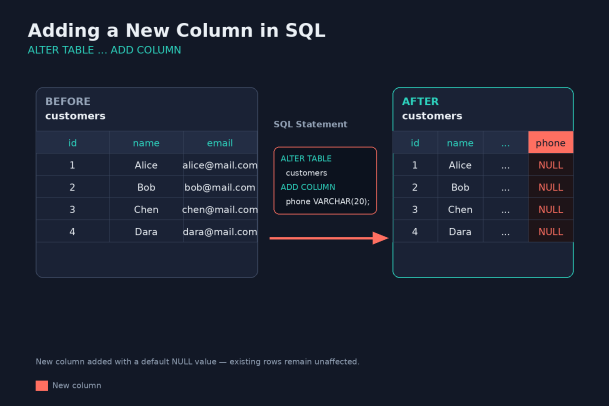
Here’s a simple example using a customers table:
sql
ALTER TABLE customers
ADD COLUMN phone VARCHAR(20);
This command adds a new phone column to the customers table, capable of storing up to 20 characters. Existing rows will automatically have a NULL value in this new column unless you specify a default.
Step-by-Step: Adding a New Column in SQL
Step 1: Identify the Table and Column Details
Before writing any SQL, decide:
- Which table needs the new column.
- What the column should be named (avoid reserved keywords and spaces).
- What data type fits the values you plan to store.
- Whether the column needs constraints, such as a default value or a
NOT NULLrule.
Taking a moment to plan this out prevents costly rework later, especially on large production tables.
Step 2: Back Up Your Database
Schema changes are generally low-risk, but they’re not risk-free — especially on large tables where a lock during the alteration could briefly affect application performance. Always take a backup or work in a staging environment first, particularly for production databases.
Step 3: Write the ALTER TABLE Statement
Using the syntax from earlier, write your statement. For example, if you’re adding a signup_date column to a customers table:
sql
ALTER TABLE customers
ADD COLUMN signup_date DATE;
If you want every existing row to have a default value instead of NULL, you can specify one:
sql
ALTER TABLE customers
ADD COLUMN signup_date DATE DEFAULT CURRENT_DATE;
Step 4: Run the Statement
Execute the command using your SQL client, whether that’s MySQL Workbench, pgAdmin, SQL Server Management Studio, or a command-line interface. Once it runs successfully, the column is immediately part of the table’s structure.
Step 5: Verify the Change
After adding the column, confirm it was created correctly:
sql
DESCRIBE customers;Or, in PostgreSQL:
sql
\d customersThis shows you the updated table structure, including the new column, its data type, and any constraints.
Step 6: Populate the Column (If Needed)
If the new column needs values for existing rows (rather than staying NULL), you can update it with an UPDATE statement:
sql
UPDATE customers
SET signup_date = '2024-01-01'
WHERE signup_date IS NULL;
Adding a Column in Different Database Systems
While the core syntax is similar across systems, there are a few differences worth knowing.
MySQL
sql
ALTER TABLE customers
ADD COLUMN loyalty_points INT DEFAULT 0;
MySQL also lets you specify column position using FIRST or AFTER column_name:
sql
ALTER TABLE customers
ADD COLUMN loyalty_points INT DEFAULT 0 AFTER email;
PostgreSQL
sql
ALTER TABLE customers
ADD COLUMN loyalty_points INTEGER DEFAULT 0;
PostgreSQL doesn’t support positioning new columns — they’re always added at the end of the table.
SQL Server
sql
ALTER TABLE customers
ADD loyalty_points INT DEFAULT 0;
Note that SQL Server’s syntax drops the word COLUMN — just ADD followed by the column definition.
Oracle
sql
ALTER TABLE customers
ADD (loyalty_points NUMBER DEFAULT 0);
Oracle requires parentheses around the column definition, especially when adding multiple columns at once.
Adding Multiple Columns at Once
Most database systems let you add several columns in a single statement, which is more efficient than running multiple separate commands:
sql
ALTER TABLE customers
ADD COLUMN loyalty_points INT DEFAULT 0,
ADD COLUMN last_login DATETIME;
(Syntax for combining multiple additions varies slightly by database, so check your specific system’s documentation.)
Common Mistakes to Avoid
- Skipping a data type review: Choosing
VARCHAR(255)for everything might seem safe, but it wastes storage and can hide data quality issues. Match the data type to the actual data. - Forgetting
NOT NULLimplications: Adding aNOT NULLcolumn without a default value will fail if the table already has rows, since existing rows won’t have a value to satisfy the constraint. - Ignoring downtime risk on large tables: On very large tables, some database engines may lock the entire table while the alteration completes. Plan schema changes during low-traffic periods when possible.
- Not testing in staging first: Always test structural changes in a non-production environment before applying them live.
- Overlooking naming conventions: Consistent naming (snake_case, clear prefixes, no reserved words) keeps your schema maintainable as it grows.
Best Practices for Schema Changes
- Document every change. Keep a changelog or use migration tools (like Flyway, Liquibase, or Django migrations) to track schema history.
- Use default values thoughtfully. They prevent
NULL-related errors but should reflect meaningful, safe defaults. - Communicate with your team. Schema changes can affect application code, reports, and integrations — make sure stakeholders know what’s changing.
- Monitor performance after the change. Especially on large tables, watch query performance to catch any unexpected side effects.
- Secure sensitive new columns. If you’re adding a column that will store sensitive data (like personal information or payment details), apply appropriate access controls and encryption from day one — not as an afterthought.
Final Thoughts
Learning how to add a new column in SQL is a foundational skill that every developer and database professional should be comfortable with. The ALTER TABLE ADD COLUMN statement is simple in principle, but doing it well — with the right data types, constraints, and precautions — is what separates a smooth schema update from a production headache.
As your databases grow more complex and store increasingly sensitive information, the structural changes you make are only one piece of the puzzle. Protecting that data from breaches, ransomware, and unauthorized access matters just as much as designing the schema correctly.
That’s where a strong cybersecurity partner comes in. Xcitium helps organizations protect their critical systems and data with proactive, zero-trust security solutions built to stop threats before they start.
Ready to strengthen the security around your databases and IT infrastructure?
Please give us a star rating based on your experience.


 (16 votes, average: 2.38 out of 5, rated)