Your computer’s fan is roaring, your system is crawling, and you have no idea why. Could the culprit be your graphics card? Many people ask, “What does GPU stand for?” without realizing this component is also a growing target for cybercriminals. GPU stands for Graphics Processing Unit, a specialized processor built to handle complex visual and parallel calculations.
In this guide, you’ll learn what a GPU is, how it works, where it’s used, and how to protect it from modern cyber threats.
What Does GPU Stand For? The Simple Definition
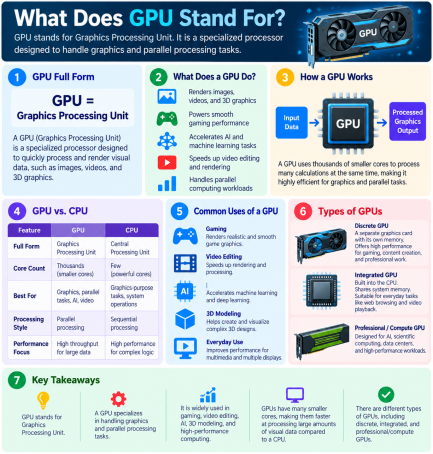
So, what does GPU stand for in computing? GPU means Graphics Processing Unit. It is a processor designed to render images, video, and animations quickly by performing thousands of small calculations at the same time.
GPUs were originally created for video games and graphics. Today they power much more, including artificial intelligence, video editing, scientific research, and cryptocurrency mining.
A Quick History of the GPU
Early computers relied on the CPU for everything, including graphics. As games and visual software grew more demanding, manufacturers built dedicated graphics hardware. Over time, these chips evolved into powerful, general-purpose parallel processors.
How Does a GPU Work?
A GPU contains hundreds or thousands of small cores. Instead of finishing one task at a time, it splits a large job into many pieces and processes them simultaneously. This is called parallel processing, and it is what makes a GPU so fast at graphics, machine learning, and data analysis.
GPU vs. CPU: What’s the Difference?
| Feature | CPU | GPU |
|---|---|---|
| Full name | Central Processing Unit | Graphics Processing Unit |
| Core count | Few, powerful cores | Many, simpler cores |
| Best at | General tasks, logic, system control | Parallel tasks, graphics, AI |
| Processing style | Sequential | Parallel |
In short, the CPU is the “brain” that manages your system, while the GPU is the specialist that handles heavy visual and mathematical workloads.
Integrated vs. Dedicated GPUs
- Integrated GPU: Built into the CPU or motherboard. It’s energy efficient and fine for everyday use.
- Dedicated (discrete) GPU: A separate graphics card with its own memory (VRAM). It’s used for gaming, design, and AI work.
Common Uses of a GPU
Now that you know what GPU stands for, here is where GPUs show up in daily life and business:
- Gaming and 3D rendering for smooth, high-quality visuals
- Video editing and animation for faster exports
- Artificial intelligence and machine learning for training models
- Scientific and data analysis for large-scale computation
- Cryptocurrency mining, a use attackers often abuse illegally
Why GPUs Matter for Cybersecurity
Understanding what a GPU is also means understanding its risks. Because GPUs are powerful and often less monitored than CPUs, attackers have found creative ways to exploit them.
Cryptojacking
Cryptojacking happens when malware secretly uses your GPU to mine cryptocurrency. Signs include sluggish performance, overheating, loud fans, and unusually high power use, all while you’re doing nothing demanding.
GPU-Accelerated Password Cracking
Attackers use GPUs to test billions of password guesses per second. Short or simple passwords can be broken quickly, which is why strong, unique passwords matter.
Malware That Targets GPU Memory
Some malware families try to hide in GPU memory, where traditional security tools may not look. Researchers have also disclosed vulnerabilities in several GPU architectures that could leak data between applications.
Fake and Outdated Drivers
Attackers disguise malware as “free” graphics driver updates or game boosters. Meanwhile, outdated drivers can leave known security flaws unpatched.
How to Protect Your GPU and System: Actionable Tips
You now know what GPU stands for and why it matters. Here is how to keep it safe:
- Download drivers only from official sources. Use the manufacturer’s website (NVIDIA, AMD, or Intel) or your operating system’s update tool.
- Keep your system and drivers updated. Patches close the vulnerabilities attackers rely on.
- Monitor GPU usage. Check Task Manager (Windows) or Activity Monitor (Mac). High GPU activity while idle is a red flag.
- Use strong, unique passwords and multi-factor authentication (MFA). This defends against GPU-powered cracking.
- Install trusted endpoint protection. Advanced tools can detect cryptojacking and unknown malware before they run.
- Avoid pirated software and suspicious downloads. Cracked apps are a common source of mining malware.
- Limit admin privileges. Fewer privileges mean less damage if malware gets in.
- Watch for physical warning signs. Constant overheating, loud fans, and unexplained slowdowns need investigation.
Frequently Asked Questions (FAQs)
1. What does GPU stand for?
GPU stands for Graphics Processing Unit. It is a processor that handles graphics, video, and highly parallel calculations.
2. What is the difference between a GPU and a graphics card?
The GPU is the chip that does the processing. A graphics card is the complete hardware board that includes the GPU, memory, and cooling. People often use the terms interchangeably.
3. Can a GPU be hacked?
A GPU itself isn’t “hacked” like a website, but attackers can abuse it through malware, cryptojacking, or driver and memory vulnerabilities. Keeping drivers updated and using endpoint security reduces the risk.
4. How do I know if malware is using my GPU?
Warning signs include high GPU usage when idle, overheating, loud fans, lag, and unusually high electricity use. Check your task manager and run a full security scan.
5. Do I need a dedicated GPU?
It depends on your work. Everyday browsing and office tasks run well on an integrated GPU, while gaming, video editing, and AI workloads benefit from a dedicated one.
Conclusion: Know Your GPU, Protect Your System
So, what does GPU stand for? Graphics Processing Unit, a powerful component that drives modern computing, and one that cybercriminals increasingly target. By keeping drivers updated, monitoring usage, and using strong security tools, you can enjoy the performance of your GPU without exposing your business or personal data to risk.
Don’t wait for malware to drain your system’s power. Request a free demo of Xcitium today and see how Zero Trust technology stops unknown threats before they cause damage.
Please give us a star rating based on your experience.

 (21 votes, average: 2.19 out of 5, rated)


