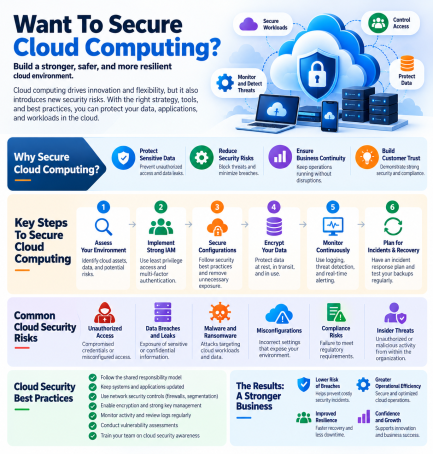
Want to secure cloud computing but not sure where to start? You’re not alone. The cloud makes it easy to launch servers, store data, and scale applications in minutes. That same speed makes it just as easy to leave a storage bucket open or an access key exposed, and attackers look for exactly those mistakes. If you want to secure cloud computing the right way, you need to know where the risks are, who is responsible for what, and which controls matter most.
This guide covers what you need to know if you want to secure cloud computing: the main threats, the shared responsibility model, and ten practical steps you can start applying today.
Why Cloud Security Matters
Businesses now run critical workloads, customer data, and collaboration tools in the cloud. A single misconfiguration or stolen password can expose all of it. Strong cloud security helps you:
- Prevent data breaches and unauthorized access
- Keep applications available and resilient
- Meet compliance requirements such as HIPAA, PCI DSS, and GDPR
- Maintain customer trust
- Gain visibility across multi-cloud and hybrid environments
Common Cloud Security Risks
Misconfigurations
Open storage buckets, overly permissive settings, and unused services left running are among the most common causes of cloud exposure.
Weak Identity and Access Controls
Stolen credentials, shared accounts, and excessive permissions let attackers move freely once they are in.
Insecure APIs and Interfaces
Cloud services rely on APIs. Poorly secured ones give attackers a direct path to your data.
Unprotected Workloads and Containers
Virtual machines, containers, and Kubernetes clusters need runtime protection and regular vulnerability scanning.
Shadow IT and Limited Visibility
Teams that spin up cloud services without approval create blind spots your security team can’t protect.
Ransomware and Data Loss
Attackers increasingly target cloud data and backups. Without tested recovery, an incident can become a crisis.
Understand the Shared Responsibility Model
If you want to secure cloud computing, start with the shared responsibility model. Your cloud provider secures the underlying infrastructure: physical data centers, hardware, and core services. You are responsible for what you put in the cloud, including your data, user access, configurations, applications, and operating systems (depending on the service type). Many breaches happen because customers assume the provider handles more than it does. Read your provider’s documentation so you know exactly where the line falls.
Want to Secure Cloud Computing? Follow These 10 Steps
1. Enforce Strong Identity and Access Management
Require multi-factor authentication (MFA) for every user, especially administrators. Use single sign-on where possible and remove accounts that are no longer needed.
2. Apply Least Privilege
Give users and services only the permissions they need. Review roles regularly and remove excess access.
3. Encrypt Data at Rest and in Transit
Use strong encryption for stored data and secure protocols for data in motion. Manage your encryption keys carefully and rotate them on a schedule.
4. Continuously Check for Misconfigurations
Use cloud security posture management (CSPM) to scan for open storage, risky settings, and policy violations, and fix them automatically where you can.
5. Protect Workloads and Containers
Use cloud workload protection (CWPP) to monitor virtual machines and containers at runtime, and scan images for vulnerabilities before deployment. For Kubernetes, add KSPM to catch cluster misconfigurations.
6. Secure Your APIs
Authenticate and authorize every API call, limit exposure, and monitor for unusual activity.
7. Segment Your Network
Separate workloads and environments so a compromise in one area can’t spread to everything else. Adopt a zero trust approach: verify every request instead of trusting by default.
8. Monitor, Log, and Detect Threats
Collect logs across all cloud accounts and use detection and response to spot suspicious behavior. Extended detection and response (XDR) correlates signals from endpoints, networks, and cloud so you see the whole attack.
9. Back Up and Test Recovery
Keep regular, isolated backups of critical data and test restores. A backup you’ve never tested is a guess, not a plan.
10. Train Your Team and Plan for Incidents
Run security awareness training and phishing simulations, and document an incident response plan that covers cloud accounts. Rehearse it so your team knows who acts first.
Tip for multi-cloud environments: When you want to secure cloud computing across several providers, use consistent policies and one central view. Managing each platform separately leads to gaps.
Cloud Security Checklist
Use this checklist whenever you want to secure cloud computing for a new account or project.
| Area | Action |
|---|---|
| Identity | MFA enabled for all users; unused accounts removed |
| Access | Least privilege applied; roles reviewed quarterly |
| Data | Encryption on; keys rotated; storage not public |
| Configuration | CSPM scans running; findings tracked to closure |
| Workloads | Runtime protection and image scanning in place |
| Monitoring | Logs centralized; alerts reviewed daily |
| Recovery | Backups isolated; restores tested |
| People | Training and phishing simulations scheduled |
Mistakes to Avoid When You Want to Secure Cloud Computing
- Assuming the cloud provider secures everything
- Leaving default settings and public access unchanged
- Granting broad admin rights for convenience
- Ignoring unmanaged or “shadow” cloud services
- Collecting logs but not reviewing them
- Treating cloud security as a one-time setup instead of an ongoing process
Cloud Security for Small and Mid-Sized Businesses
Small teams that want to secure cloud computing often lack a dedicated security staff. Focus first on the basics: MFA everywhere, least privilege, encryption, automated misconfiguration scanning, and tested backups. If you can’t monitor around the clock, a managed detection and response service adds expert analysts who watch your environment 24/7, which is usually more affordable than hiring in-house.
How Xcitium Helps Secure Your Cloud
Whether you want to secure cloud computing for a single account or an entire multi-cloud environment, Xcitium offers the layers covered above in one platform: CNAPP (cloud-native application protection), CWPP for workloads, CSPM for posture and compliance, and KSPM for Kubernetes. XDR connects cloud, endpoint, and network signals, and MDR-Cloud adds managed 24/7 detection and response. You can also start with the Cloud Security Risk and Compliance Assessment to see where your gaps are today.
Frequently Asked Questions
What is the first step if I want to secure cloud computing?
Start by understanding the shared responsibility model and taking inventory of your cloud accounts and data. Then turn on MFA, review permissions, and scan for misconfigurations, since these deliver the biggest risk reduction quickly.
What are the biggest threats to cloud security?
The most common are misconfigurations, weak identity and access controls, insecure APIs, unprotected workloads, and ransomware. Most incidents trace back to a mistake or stolen credential rather than a flaw in the provider’s infrastructure.
Is the cloud less secure than on-premises systems?
Not inherently. Major providers invest heavily in infrastructure security. The risk usually comes from how customers configure and manage their own environment, which is why configuration, access control, and monitoring matter.
What is the difference between CSPM, CWPP, and CNAPP?
CSPM finds misconfigurations and compliance gaps in your cloud settings. CWPP protects workloads such as virtual machines and containers at runtime. CNAPP combines these and other capabilities into a single platform for cloud-native applications.
How can small businesses secure cloud computing on a budget?
Prioritize MFA, least privilege, encryption, automated posture scanning, and tested backups. Consider managed services for monitoring so you get expert coverage without building a security team.
Conclusion
If you want to secure cloud computing, build on a simple foundation: know your responsibilities, lock down identities, encrypt your data, fix misconfigurations fast, protect workloads, monitor continuously, and prepare to recover. Cloud security isn’t a one-time project. It’s a routine you keep improving as your environment grows.
Want to secure cloud computing with confidence? Request a demo with Xcitium today and see how to protect every cloud workload you run.
Please give us a star rating based on your experience.

 (21 votes, average: 2.10 out of 5, rated)


