Why Small Businesses Need Cybersecurity Now
The right cybersecurity solutions for small businesses can be the difference between a minor scare and a business-ending breach. Many owners still believe hackers only chase large enterprises with deep pockets. In reality, attackers often prefer smaller companies because they hold valuable data but rarely have the defenses to protect it.
Think about what your business stores every day: customer names and addresses, payment details, employee records, supplier invoices, and login credentials for cloud apps. To a cybercriminal, that is a ready-made payday. Ransomware gangs, phishing operators, and automated bots scan the internet constantly, looking for unpatched systems and weak passwords. They do not care how big you are. They care how easy you are.
The good news is that protecting a small business no longer requires an enterprise budget or a full-time security team. Modern tools are affordable, cloud-managed, and designed for organizations with limited IT staff. This guide walks you through the threats you face, the essential solutions you need, how to choose the right provider, and a practical roadmap to get protected.
The Threats Small Businesses Face Most
Before choosing a solution, it helps to understand what you are defending against. These are the attacks that hit small businesses most often.
- Phishing and social engineering. Fake emails, texts, and calls trick employees into clicking malicious links, sharing passwords, or approving fraudulent payments. It remains the most common entry point for attacks.
- Ransomware. Malicious software encrypts your files and demands payment to unlock them. Even when businesses pay, they often lose data, and downtime can last days or weeks.
- Business email compromise (BEC). Attackers impersonate a vendor, executive, or partner to redirect invoices or wire transfers. A single successful BEC scam can drain months of profit.
- Malware and zero-day threats. New and unknown malware variants slip past traditional signature-based antivirus, which can only stop threats it has already seen.
- Weak or stolen credentials. Reused passwords and accounts without multi-factor authentication give attackers an easy way in through email, cloud apps, and remote access tools.
- Insider mistakes. Not every incident is malicious. Misconfigured cloud storage, lost laptops, and accidental data sharing cause real damage too.
The common thread is that most attacks target people and endpoints: the laptops, desktops, servers, and mobile devices your team uses every day. That is where your defenses should start.
Essential Cybersecurity Solutions for Small Businesses
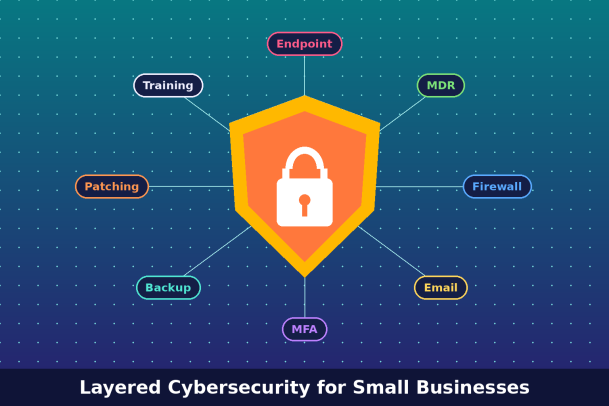
A strong security posture is built in layers. No single product stops everything, but together these solutions cover the most important gaps.
1. Endpoint Protection and EDR
Every device that connects to your network is a potential doorway. Modern endpoint protection goes beyond basic antivirus by combining malware prevention with endpoint detection and response (EDR). EDR continuously monitors device activity, flags suspicious behavior, and lets you isolate an infected machine before an attack spreads. Look for solutions that can contain unknown files so they cannot harm your system, rather than waiting to recognize a threat after the damage is done.
2. Managed Detection and Response (MDR)
Most small businesses cannot staff a security operations center around the clock. MDR fills that gap by pairing security technology with a team of analysts who monitor alerts 24/7, investigate incidents, and help you respond. It is one of the most cost-effective ways to get enterprise-grade protection without hiring in-house experts.
3. Firewalls and Secure Network Access
A next-generation firewall filters incoming and outgoing traffic, blocks malicious sites, and segments your network so a compromise in one area does not reach everything else. With remote and hybrid work now standard, secure access tools such as VPNs or zero-trust network access keep connections safe wherever employees work.
4. Email Security
Since phishing is the top attack vector, dedicated email filtering is essential. It scans messages for malicious links, attachments, spoofed senders, and impersonation attempts before they reach inboxes.
5. Multi-Factor Authentication and Password Management
Multi-factor authentication (MFA) blocks the vast majority of account takeover attempts, even when a password is stolen. Pair it with a business password manager so employees can use strong, unique passwords without writing them down.
6. Backup and Disaster Recovery
Reliable, automated backups are your last line of defense against ransomware. Follow the 3-2-1 rule: three copies of your data, on two different types of media, with one stored offsite or offline. Test your restores regularly so you know they work when it counts.
7. Patch Management
Unpatched software is one of the easiest ways in for attackers. Automated patch management keeps operating systems and applications up to date without relying on employees to click update.
8. Security Awareness Training
Technology cannot fix everything. Regular, short training sessions and simulated phishing tests turn your employees from your biggest risk into an active line of defense.
How to Choose the Right Cybersecurity Solution
With so many vendors promising complete protection, choosing the right partner can feel overwhelming. Use these criteria to narrow the field.
- Prevention, not just detection. Many tools alert you after a threat is already running. Prioritize solutions that stop unknown threats before they execute, such as those using containment or zero-trust approaches to files and applications.
- Ease of management. You likely do not have a dedicated security team. Choose a platform with a single, cloud-based console that is simple to deploy and maintain.
- 24/7 monitoring options. Threats do not keep business hours. Look for providers that offer managed services or round-the-clock expert support.
- Scalability. Your security should grow with you. Per-device or per-user pricing makes it easy to add protection as you hire.
- Transparent pricing. Avoid hidden fees and long lock-in contracts. Ask what is included and what costs extra.
- Compliance support. If you handle payment cards, health data, or customer data from regulated regions, ensure the solution helps you meet standards such as PCI DSS, HIPAA, or GDPR.
- Proven reputation. Check independent reviews, customer case studies, and how quickly the vendor responds to emerging threats.
A consolidated platform that combines endpoint protection, EDR, and managed services often delivers better coverage and lower total cost than stitching together several separate tools.
A Practical Roadmap to Get Protected
You do not need to do everything at once. Follow these steps to build strong protection without disrupting daily operations.
- Assess your risk. List your devices, software, cloud accounts, and the sensitive data you store. Identify which systems would hurt most if they went down.
- Secure your endpoints first. Deploy modern endpoint protection with EDR on every laptop, desktop, and server. This closes the most common attack path immediately.
- Turn on MFA everywhere. Start with email, banking, and admin accounts, then expand to every business application.
- Set up automated backups. Configure the 3-2-1 backup strategy and run a test restore.
- Lock down email and network. Add email filtering and configure your firewall to block known malicious traffic.
- Train your team. Run a short security awareness session and schedule regular phishing simulations.
- Create an incident response plan. Document who to call, how to isolate affected systems, and how to communicate with customers if something goes wrong.
- Add 24/7 monitoring. Partner with an MDR provider so experts are watching your environment even when you are not.
- Review quarterly. Threats evolve. Revisit your tools, policies, and training every few months.
Common Cybersecurity Mistakes to Avoid
Even businesses with good intentions fall into these traps:
- Relying only on free or legacy antivirus that cannot stop modern threats.
- Assuming you are too small to be targeted.
- Sharing admin accounts or skipping MFA for convenience.
- Never testing backups until an emergency strikes.
- Treating security as a one-time project instead of an ongoing process.
Conclusion
Cyberattacks on small businesses are not a question of if, but when. The cost of a single breach, including downtime, recovery, lost customers, and reputational damage, can far exceed the cost of prevention. By investing in the right cybersecurity solutions for small businesses, from endpoint protection and EDR to backups, MFA, and 24/7 monitoring, you give your company the resilience to keep growing with confidence.
The smartest move is to choose a solution built to prevent threats rather than simply react to them. Xcitium delivers zero-trust endpoint protection, EDR, and managed detection and response in one easy-to-manage platform, designed to stop known and unknown threats before they can cause damage.
Ready to see how it works for your business? Request a Demo with Xcitium and take the first step toward complete, worry-free protection today.
Please give us a star rating based on your experience.


 (18 votes, average: 2.33 out of 5, rated)


