Smartphones and tablets have quietly become the most used, and least protected, endpoints in the modern enterprise. Employees check email, approve payments, access CRM records, join video calls, and open shared files from devices that travel everywhere, connect to any Wi-Fi network, and often double as personal phones. For attackers, that makes mobile devices an attractive entry point into corporate systems.
Traditional perimeter defenses were never designed for this reality. A firewall cannot follow an iPhone into an airport lounge, and a desktop antivirus agent cannot inspect an Android app sideloaded from a third-party store. That is why organizations are turning to a combined approach: EDR & MDM for mobile endpoint security & management.
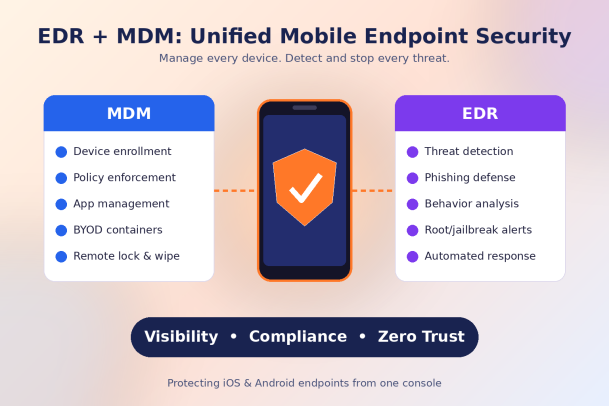
Mobile Device Management (MDM) gives IT teams control over how devices are enrolled, configured, and governed. Endpoint Detection and Response (EDR) gives security teams visibility into threats and the ability to act on them quickly. Used separately, each solves half the problem. Used together, they create a unified strategy that keeps mobile endpoints compliant, visible, and protected.
In this guide, we break down what each technology does, why they work best as a pair, which capabilities to prioritize, and how to roll them out successfully across your mobile fleet.
What MDM Does for Mobile Endpoint Management
Mobile Device Management is the operational foundation of mobile security. It answers a basic but critical question: which devices are accessing company resources, and are they configured the way they should be?
A modern MDM platform typically handles:
- Device enrollment and inventory: Register corporate-owned and BYOD devices, and keep an up-to-date record of models, OS versions, owners, and installed apps.
- Policy enforcement: Require screen locks, strong passcodes, device encryption, and minimum OS versions before a device can reach corporate email or apps.
- App management: Push approved apps, block risky ones, and manage app configurations from a central console.
- Containerization for BYOD: Separate work data from personal data so IT can protect corporate content without touching employee photos or messages.
- Remote actions: Lock, locate, or wipe a lost or stolen device to prevent data exposure.
- Patch and update management: Prompt or enforce OS and app updates to close known vulnerabilities.
MDM keeps your mobile fleet consistent and compliant. However, it is mainly preventive and configuration-focused. It can tell you a device is missing a passcode, but it is not built to detect a malicious app quietly exfiltrating data or a phishing link that harvested a user’s credentials. That is where EDR comes in.
What EDR Does for Mobile Endpoint Security
Endpoint Detection and Response focuses on what happens on a device after it is in use. Instead of only checking settings, EDR continuously monitors device activity, looks for signs of compromise, and gives security teams the context and tools to respond.
For mobile endpoints, EDR capabilities usually include:
- Threat detection: Identify malicious or risky apps, suspicious network connections, man-in-the-middle attacks on public Wi-Fi, and device-level exploits.
- Phishing protection: Mobile users are far more likely to tap a malicious link in an SMS, messaging app, or email. EDR can detect and block these attempts in real time.
- Behavioral analysis: Spot unusual patterns, such as an app requesting excessive permissions or a device communicating with known command-and-control servers.
- Jailbreak and root detection: Flag devices whose built-in security controls have been bypassed.
- Investigation and forensics: Provide a timeline of events so analysts can understand how an incident began and what it touched.
- Automated response: Isolate a device, revoke access, or trigger remediation workflows the moment a threat is confirmed.
EDR turns mobile devices from blind spots into monitored assets. It gives your security operations team the same depth of visibility on phones and tablets that it already expects on laptops and servers.
Why EDR & MDM Work Better Together
MDM controls the device; EDR protects it. When the two share data and work from a common policy framework, organizations gain advantages that neither tool can deliver alone.
Complete visibility across the device lifecycle. MDM shows you who owns a device and how it is configured. EDR shows you what is happening on it right now. Together, they provide a full picture from enrollment to retirement.
Risk-aware access control. When EDR detects a malicious app or a compromised network, it can signal MDM to mark the device non-compliant. Access to email, cloud apps, and internal systems is then restricted automatically until the issue is resolved. This is a core building block of a Zero Trust architecture.
Faster, coordinated response. Instead of an analyst spotting a threat and then filing a ticket with IT, the combined platform can isolate the device, remove the offending app, or wipe corporate data within seconds.
Reduced tool sprawl. A unified approach means fewer consoles, fewer agents, and fewer integration gaps. Security and IT teams work from the same data, which cuts alert fatigue and speeds decisions.
Stronger compliance posture. Regulations increasingly require proof that sensitive data is protected on every device. MDM supplies the configuration evidence, while EDR supplies the threat monitoring and incident records auditors expect.
Key Capabilities to Look for in an EDR & MDM Solution
Not every platform delivers the same depth of protection. When evaluating EDR & MDM for mobile endpoint security & management, prioritize these capabilities:
- Unified console: Manage devices and investigate threats from one dashboard, rather than switching between disconnected tools.
- Cross-platform coverage: Support for iOS, iPadOS, and Android, alongside Windows, macOS, and Linux, so every endpoint follows the same security standard.
- Real-time threat intelligence: Continuously updated detection for malicious apps, phishing domains, and network attacks.
- Risk-based conditional access: Automatically restrict or grant access based on live device risk, not just static compliance settings.
- Privacy-respecting BYOD controls: Clear separation between work and personal data, which builds employee trust and supports regulatory requirements.
- Automated remediation: Built-in playbooks that respond instantly, reducing the workload on lean IT and security teams.
- Zero Trust alignment: Default-deny principles that verify every device, app, and connection before allowing access to sensitive resources.
- Compliance reporting: Audit-ready reports that support frameworks such as GDPR, HIPAA, PCI DSS, and ISO 27001.
- Scalability: The ability to onboard thousands of devices quickly, including through zero-touch enrollment programs.
- Integration with your wider security stack: Feeds into SIEM, XDR, and identity platforms so mobile signals enrich your overall threat picture.
Best Practices for Implementing EDR & MDM on Mobile Devices
Technology alone does not secure a mobile fleet. A thoughtful rollout makes the difference between a tool that is installed and a strategy that actually reduces risk.
Start with a complete inventory. You cannot protect what you cannot see. Identify every device that accesses corporate data, including personal phones used for email or messaging apps.
Define clear policies for corporate and BYOD devices. Corporate-owned devices can be fully managed, while BYOD devices usually need lighter, container-based controls. Document what IT can and cannot see on personal devices, and share it with employees.
Enforce baseline hygiene first. Require encryption, passcodes, biometric locks, and supported OS versions. These simple controls close a large share of common attack paths.
Layer EDR on top of MDM. Once devices are enrolled and compliant, deploy EDR to monitor apps, networks, and behavior. Link EDR risk scores to MDM and identity policies so access adapts automatically.
Automate the response. Configure playbooks for common scenarios, such as quarantining a device that installs a malicious app or blocking access after a detected phishing click.
Train your users. Teach employees to recognize smishing, fake app prompts, and suspicious QR codes. Informed users are a strong first line of defense.
Review and refine regularly. Track metrics like time to detect, time to respond, and compliance rates, then adjust policies as new threats and devices appear.
Secure Every Mobile Endpoint with Confidence
Mobile devices are now central to how work gets done, and attackers know it. Relying on MDM alone leaves you blind to active threats, while relying on EDR alone leaves devices misconfigured and unmanaged. Combining EDR & MDM for mobile endpoint security & management gives you the control, visibility, and speed needed to protect a modern, mobile workforce.
Xcitium brings endpoint management and advanced threat protection together in one platform, built on Zero Trust principles. You can enroll and govern devices, detect threats in real time, and contain attacks before they cause damage, all from a single console.
Ready to close the mobile security gap? See how Xcitium unifies EDR and MDM to protect every device your team uses.
Please give us a star rating based on your experience.


 (20 votes, average: 2.30 out of 5, rated)


