If you’ve ever opened up a desktop computer and seen long slots on the motherboard where a graphics card, sound card, or network adapter plugs in, you’ve seen PCI in action. Peripheral Component Interconnect (PCI) is one of the most foundational technologies in modern computing hardware — a standard that has shaped how internal components talk to each other for more than three decades.
In this article, we’ll break down what PCI is, how it works, its history, its evolution into PCI Express (PCIe), and why understanding this hardware standard still matters today — especially from a security perspective.
What is PCI
Peripheral Component Interconnect, or PCI, is a local computer bus standard used to connect internal hardware components — such as graphics cards, sound cards, network adapters, and storage controllers — to a computer’s motherboard. It defines the electrical, mechanical, and logical specifications that allow these peripheral devices to communicate with the CPU, memory, and each other.
Put simply, PCI is the “language and pathway” that lets add-on hardware components plug into your computer and function as if they were built directly into the system. Instead of having a separate, incompatible physical port for every device type, PCI created a standardized slot and protocol that any compliant hardware manufacturer could design for.
PCI was introduced by Intel in 1992 and quickly became the dominant expansion bus standard for personal computers throughout the 1990s and into the 2000s, replacing older standards like ISA (Industry Standard Architecture) and VESA Local Bus.
Why was PCI Created
Before PCI, computers relied on the ISA bus, which was slow, had limited bandwidth, and required manual configuration (jumpers and DIP switches) to install new hardware. As personal computers grew more powerful and users demanded better graphics, sound, and networking capabilities, the industry needed a faster, more flexible, and easier-to-configure standard.
PCI solved these problems by introducing:
- Higher bandwidth — supporting data transfer speeds far beyond ISA
- Plug-and-play functionality — the operating system could automatically detect and configure new hardware
- Processor independence — PCI worked across different CPU architectures, not just x86
- Multi-device support — several devices could share the bus efficiently
This combination made PCI the backbone of expandable computer hardware for years.
How Does PCI Work
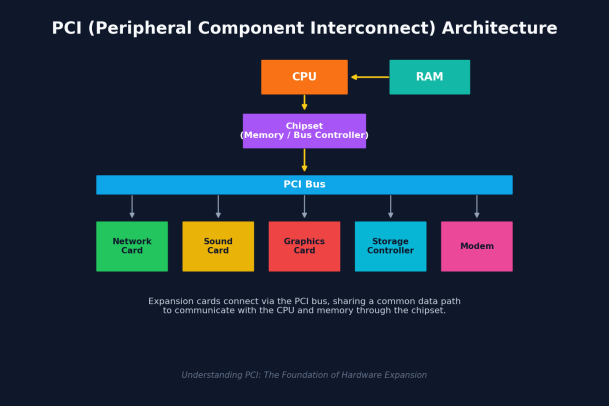
At its core, PCI functions as a shared communication bus. Here’s a simplified breakdown of how data moves through a PCI-based system:
- The CPU sends and receives instructions and data.
- The chipset (often called the memory or bus controller) manages traffic between the CPU, RAM, and connected devices.
- The PCI bus acts as the shared highway that connects the chipset to all PCI-compliant devices.
- PCI slots on the motherboard allow expansion cards — like graphics or network cards — to physically connect to this bus.
Because PCI uses a shared bus architecture, all devices connected to it take turns communicating, coordinated through an arbitration process that prevents data collisions. Each device is assigned specific memory address ranges and interrupt requests (IRQs), which the operating system uses to communicate with it directly.
PCI originally supported a 32-bit data path running at 33 MHz, giving a maximum theoretical throughput of around 133 MB/s. Later revisions extended this to 64-bit paths and higher clock speeds (66 MHz), improving performance for more demanding applications like enterprise servers and graphics-intensive systems.
Common PCI Devices
Over the years, a wide range of hardware has used PCI slots, including:
- Graphics cards (before PCIe became standard)
- Sound cards for audio input/output
- Network interface cards (NICs) for wired networking
- Modems for dial-up and early broadband connections
- RAID and storage controllers
- TV tuner cards
- USB and FireWire expansion cards
Essentially, any hardware that needed to communicate directly with the system’s CPU and memory at high speed could be built as a PCI device.
PCI vs. PCI Express (PCIe)
While PCI was revolutionary in its time, it eventually reached the limits of its shared-bus design. As applications demanded more bandwidth — particularly graphics-intensive software and gaming — the industry needed something faster and more scalable.
Enter PCI Express (PCIe), introduced in 2003. Unlike traditional PCI, which uses a shared parallel bus, PCIe uses a point-to-point serial connection, giving each device its own dedicated communication lane rather than sharing bandwidth with other devices. This design offers several advantages:
| Feature | PCI | PCI Express (PCIe) |
|---|---|---|
| Architecture | Shared parallel bus | Point-to-point serial lanes |
| Speed | Up to ~133 MB/s (32-bit/33MHz) | Multiple GB/s per lane, scalable |
| Devices per Bus | Multiple devices sharing bandwidth | Each device gets dedicated bandwidth |
| Scalability | Limited | Highly scalable (x1, x4, x8, x16 lanes) |
| Current Usage | Legacy systems, older hardware | Standard in modern computers |
Today, PCIe has almost entirely replaced traditional PCI in new computer hardware. However, PCI’s design principles — standardized communication, plug-and-play detection, and shared system resources — laid the essential groundwork that made PCIe possible.
Why PCI Still Matters Today
Even though most modern systems have shifted to PCIe, PCI remains relevant for a few important reasons:
1. Legacy Systems Many industrial machines, older servers, embedded systems, and specialized equipment still rely on PCI-based hardware. Understanding PCI is essential for IT teams maintaining or upgrading these systems.
2. Foundational Knowledge PCI concepts — such as bus arbitration, memory-mapped I/O, interrupt handling, and device enumeration — form the conceptual basis for how PCIe and other modern interconnects operate. IT professionals and security teams benefit from understanding these fundamentals.
3. Security Implications This is where PCI becomes especially important from a cybersecurity standpoint. Because PCI and PCIe devices can access system memory directly (via Direct Memory Access, or DMA), they represent a potential attack surface. Malicious or compromised hardware peripherals — including network cards, storage controllers, and even seemingly harmless expansion devices — can be exploited to bypass software-level security controls and access sensitive data directly through the hardware bus.
This is why endpoint security solutions need to account for more than just software-based threats. Firmware-level attacks, rogue hardware, and DMA-based exploits are real risks in environments where legacy PCI hardware or poorly vetted peripherals are still in use.
Key Takeaways
- PCI (Peripheral Component Interconnect) is a hardware bus standard introduced in 1992 that connects internal components like graphics cards, sound cards, and network adapters to a computer’s motherboard.
- It replaced older standards like ISA, offering higher speeds, plug-and-play configuration, and cross-platform compatibility.
- PCI works through a shared bus architecture, coordinated by the chipset, connecting the CPU, memory, and peripheral devices.
- PCI Express (PCIe) succeeded PCI with a faster, scalable, point-to-point serial architecture, and is now the standard in modern computers.
- PCI remains relevant for legacy systems, foundational IT knowledge, and — critically — cybersecurity, since hardware-level access via PCI/PCIe devices can be exploited if not properly secured.
Frequently Asked Questions
1. Is PCI still used in new computers? Not typically for primary expansion slots — most modern motherboards use PCIe instead. However, some specialized industrial and embedded systems still ship with legacy PCI slots for compatibility with older equipment.
2. What’s the difference between PCI and PCI-X? PCI-X (PCI Extended) was an enhanced version of PCI developed mainly for servers and workstations. It increased the bus width and clock speed, allowing for significantly higher throughput than standard PCI, while remaining backward compatible with existing PCI cards. It served as a transitional technology before PCIe became the industry standard.
3. Can PCI and PCIe cards be used interchangeably? No. PCI and PCIe use different physical slot designs and communication protocols, so a PCI card cannot be inserted into a PCIe slot, and vice versa. Adapter solutions exist for very specific use cases, but they are not a native, plug-and-play substitute.
4. Does PCI pose a security risk? Any hardware interface that allows direct memory access can be a potential vector for attack if not properly secured. This includes older PCI devices as well as modern PCIe peripherals. Organizations should ensure that all connected hardware, drivers, and firmware are verified, updated, and monitored as part of a broader endpoint security strategy.
Final Thoughts
Peripheral Component Interconnect may be an older technology, but its impact on modern computing is undeniable. It standardized how hardware components communicate, paved the way for today’s high-speed PCIe architecture, and continues to influence how engineers think about system design and security.
For organizations managing a mix of legacy and modern hardware, understanding technologies like PCI isn’t just a technical footnote — it’s part of building a comprehensive security posture that accounts for every layer of the system, from software down to the hardware bus itself.
Protect Every Layer of Your Environment
Modern threats don’t stop at the software layer — vulnerabilities can exist anywhere from your applications down to your hardware and firmware. Xcitium’s advanced endpoint protection is built to defend your organization against known and unknown threats, wherever they originate.
Please give us a star rating based on your experience.

 (21 votes, average: 2.05 out of 5, rated)


