When was the last time you updated your passwords or installed a security patch? If you’re unsure, you’re not alone—and that’s exactly why understanding what is cyber hygiene is so important today.
Cyber threats are increasing at an alarming rate. From ransomware attacks to phishing scams, poor security habits are often the weakest link. Just like personal hygiene keeps you healthy, cyber hygiene helps keep your systems, data, and networks safe.
For IT managers, cybersecurity professionals, and business leaders, maintaining strong cyber hygiene is essential for preventing attacks and minimizing risk. In this guide, we’ll explain what is cyber hygiene, why it matters, and how you can implement best practices to strengthen your cybersecurity posture.
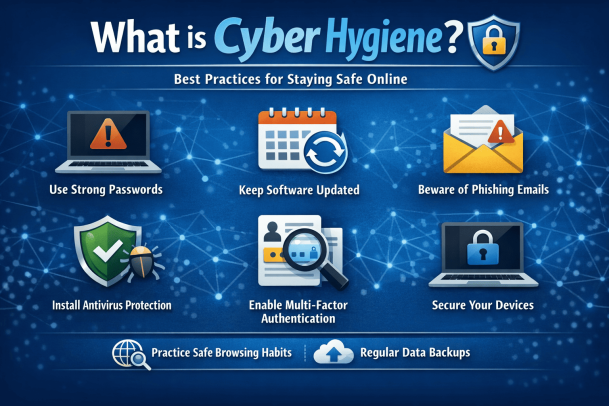
What is Cyber Hygiene?
Cyber hygiene refers to a set of routine practices and steps that individuals and organizations take to maintain the health and security of their digital systems.
Just as brushing your teeth prevents illness, cyber hygiene prevents cyber threats.
Key Objective of Cyber Hygiene
The goal of cyber hygiene is to:
-
Protect sensitive data
-
Reduce vulnerabilities
-
Prevent cyberattacks
-
Maintain system performance
Understanding what is cyber hygiene helps organizations build a strong foundation for cybersecurity.
Why Cyber Hygiene is Important
Poor cyber hygiene can lead to serious consequences.
Common Risks of Weak Cyber Hygiene
Organizations with weak cyber hygiene may face:
-
Data breaches
-
Malware infections
-
Ransomware attacks
-
Unauthorized access
-
Financial and reputational damage
Maintaining strong cyber hygiene reduces these risks significantly.
Core Elements of Cyber Hygiene
A strong cyber hygiene strategy includes multiple components.
1. Regular Software Updates
Outdated software often contains vulnerabilities.
Best Practices
-
Enable automatic updates
-
Apply security patches promptly
-
Update operating systems and applications
-
Replace unsupported software
Regular updates are a key part of understanding what is cyber hygiene.
2. Strong Password Management
Weak passwords are one of the easiest ways for attackers to gain access.
Password Best Practices
-
Use long, complex passwords
-
Avoid reusing passwords
-
Use password managers
-
Enable multi-factor authentication (MFA)
Strong authentication is essential for maintaining cyber hygiene.
3. Data Backup and Recovery
Backups protect data from loss due to cyberattacks or system failures.
Backup Strategies
-
Perform regular backups
-
Use secure storage solutions
-
Test backup recovery processes
-
Maintain offline backups
This ensures business continuity in case of incidents.
4. Network Security Practices
Securing networks is critical for preventing unauthorized access.
Network Security Tips
-
Use firewalls
-
Secure Wi-Fi networks
-
Monitor network activity
-
Disable unused ports
These practices help protect systems from external threats.
5. Endpoint Security
Endpoints such as laptops and mobile devices must be secured.
Endpoint Best Practices
-
Install antivirus software
-
Use device encryption
-
Monitor device activity
-
Apply security policies
Endpoint security strengthens overall cyber hygiene.
6. Access Control and Permissions
Limiting access reduces the risk of data exposure.
Access Control Measures
-
Implement least privilege access
-
Use role-based access control (RBAC)
-
Review permissions regularly
-
Remove inactive accounts
Proper access control is a key component of what is cyber hygiene.
7. Security Awareness Training
Human error is a major cause of cyber incidents.
Training Topics
-
Phishing awareness
-
Safe browsing habits
-
Password security
-
Reporting suspicious activity
Educated users are a strong defense against cyber threats.
Cyber Hygiene Best Practices for Organizations
Organizations should adopt a structured approach to cyber hygiene.
1. Develop Security Policies
Create clear policies for:
-
Password management
-
Data handling
-
Device usage
-
Incident reporting
2. Conduct Regular Security Audits
Audits help identify vulnerabilities and improve security measures.
3. Implement Multi-Layered Security
Combine multiple security tools such as:
-
Firewalls
-
Endpoint protection
-
Intrusion detection systems
4. Monitor Systems Continuously
Continuous monitoring helps detect threats early.
5. Use Automation
Automated tools can:
-
Apply patches
-
Monitor activity
-
Detect threats
Automation improves efficiency and accuracy.
Cyber Hygiene for Remote Work
Remote work introduces new security challenges.
Remote Work Best Practices
-
Secure home networks
-
Use VPNs
-
Avoid public Wi-Fi
-
Keep devices updated
-
Enable MFA
Maintaining cyber hygiene in remote environments is critical.
Common Cyber Hygiene Mistakes
Organizations often overlook basic security practices.
Ignoring Updates
Delaying updates increases vulnerability.
Weak Passwords
Simple passwords are easy to crack.
Lack of Backups
Without backups, data loss can be catastrophic.
Poor User Awareness
Untrained users are more likely to fall for attacks.
Avoiding these mistakes improves cyber hygiene significantly.
Benefits of Good Cyber Hygiene
Maintaining strong cyber hygiene offers several advantages.
Reduced Risk of Cyberattacks
Fewer vulnerabilities mean fewer opportunities for attackers.
Improved System Performance
Regular maintenance keeps systems running efficiently.
Better Compliance
Helps meet regulatory requirements.
Enhanced Data Protection
Protects sensitive information from unauthorized access.
The Future of Cyber Hygiene
Cyber hygiene practices will continue to evolve.
Future trends include:
-
AI-driven security monitoring
-
Automated patch management
-
Zero trust security models
-
Advanced threat detection systems
Organizations must stay updated to maintain strong security.
Frequently Asked Questions (FAQ)
What is cyber hygiene?
Cyber hygiene refers to routine practices that help maintain the security and health of digital systems and data.
Why is cyber hygiene important?
It helps prevent cyberattacks, protect data, and reduce vulnerabilities.
What are examples of cyber hygiene practices?
Examples include updating software, using strong passwords, enabling MFA, and backing up data.
How often should cyber hygiene practices be performed?
Cyber hygiene should be practiced continuously, with regular updates and monitoring.
Who is responsible for cyber hygiene?
Both individuals and organizations share responsibility for maintaining good cyber hygiene.
Strengthen Your Cyber Hygiene Today
Understanding what is cyber hygiene is the first step toward building a strong cybersecurity foundation. By adopting consistent practices and staying proactive, organizations can significantly reduce risks and protect their digital assets.
Cybersecurity is not a one-time effort—it’s an ongoing process.
👉 Request a demo today:
https://www.xcitium.com/request-demo/
Discover how advanced cybersecurity solutions can help you maintain strong cyber hygiene and protect your organization from evolving threats.
Please give us a star rating based on your experience.
 (1 votes, average: 5.00 out of 5, rated)