Email remains the backbone of modern business communication. From internal collaboration to customer engagement, organizations rely on email every day. However, this convenience also makes email one of the most targeted attack vectors in cybersecurity. In fact, cybersecurity reports consistently show that over 90% of cyberattacks start with a phishing email.
So, how can businesses protect themselves?
Implementing strong email security best practices is essential for preventing phishing attacks, malware infections, data breaches, and financial fraud. Without proper safeguards, a single malicious email can compromise an entire network.
For IT managers, cybersecurity professionals, and business leaders, strengthening email security is not just a technical task—it’s a critical part of protecting company operations and customer trust.
In this guide, we’ll explore essential email security best practices, common threats targeting email systems, and practical steps organizations can take to secure their email environments.
Why Email Security Is Critical for Businesses
Email is one of the most widely used communication tools in the workplace. Unfortunately, it is also a primary entry point for cybercriminals.
Attackers exploit email systems to deliver malicious payloads and trick users into revealing sensitive information.
Common Email-Based Cyber Threats
Understanding these threats helps organizations implement effective email security best practices.
Some of the most common email threats include:
-
Phishing attacks
-
Business email compromise (BEC)
-
Malware attachments
-
Ransomware delivery
-
Credential theft
-
Spoofed email domains
Even sophisticated organizations can fall victim to these attacks if proper security controls are not in place.
Understanding Modern Email Threats
Cybercriminals continue to develop new methods to bypass traditional email defenses.
Phishing Attacks
Phishing is one of the most common email-based cyber threats.
Attackers send emails pretending to be trusted entities such as:
-
Banks
-
Cloud service providers
-
Business partners
-
Internal company departments
These messages often include malicious links designed to steal login credentials.
Business Email Compromise (BEC)
Business Email Compromise attacks target organizations by impersonating executives or trusted employees.
How BEC Attacks Work
Attackers send emails requesting urgent actions such as:
-
Wire transfers
-
Invoice payments
-
Confidential information
Because the messages appear legitimate, employees may unknowingly comply.
Malware and Ransomware Attachments
Malicious email attachments remain a major security risk.
Common file types used in malware attacks include:
-
PDF files
-
Office documents
-
ZIP files
-
Executable files
Once opened, these attachments can install malware or ransomware on the victim’s system.
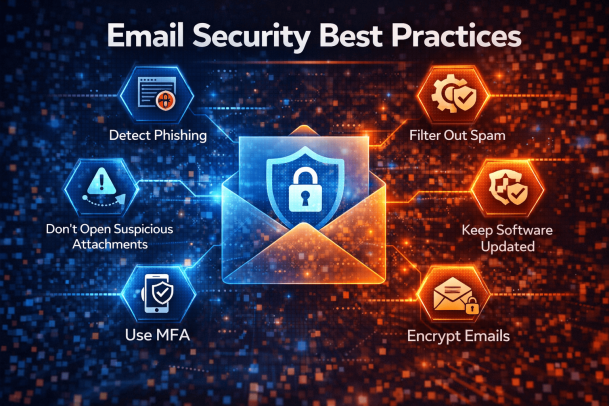
Essential Email Security Best Practices
Organizations must implement a layered security approach to protect email systems effectively.
Below are the most important email security best practices every organization should follow.
1. Implement Multi-Factor Authentication (MFA)
Multi-factor authentication is one of the most effective email security measures.
MFA requires users to verify their identity using two or more authentication factors.
Examples of MFA Methods
Common authentication methods include:
-
Password + mobile authentication app
-
Password + SMS verification code
-
Password + biometric authentication
Even if attackers obtain login credentials, MFA prevents unauthorized access.
2. Use Advanced Email Filtering
Email filtering systems help detect and block malicious messages before they reach users.
Modern email security platforms analyze:
-
Email headers
-
Attachments
-
Links within messages
-
Sender reputation
These tools automatically quarantine suspicious emails.
3. Enable Email Authentication Protocols
Email authentication protocols prevent attackers from spoofing legitimate domains.
Key Email Authentication Technologies
Organizations should implement:
SPF (Sender Policy Framework)
SPF verifies that incoming emails originate from authorized servers.
DKIM (DomainKeys Identified Mail)
DKIM adds a digital signature to verify email authenticity.
DMARC (Domain-based Message Authentication)
DMARC helps detect and block domain spoofing attempts.
Together, these protocols significantly improve email security.
4. Conduct Regular Employee Security Training
Human error remains one of the biggest cybersecurity risks.
Even the best email security systems can fail if employees unknowingly click malicious links.
Key Training Topics
Employee training should include:
-
Identifying phishing emails
-
Recognizing suspicious attachments
-
Reporting potential threats
-
Verifying unexpected requests
Regular awareness programs strengthen organizational defenses.
5. Scan Email Attachments and Links
Organizations should deploy advanced scanning tools that inspect attachments and embedded links.
These tools can:
-
Detect malware signatures
-
Analyze suspicious links
-
Sandbox unknown attachments
Sandboxing allows security tools to analyze files safely before delivering them to users.
6. Enforce Strong Password Policies
Weak passwords make it easier for attackers to compromise email accounts.
Strong Password Guidelines
Organizations should require:
-
Minimum password length
-
Combination of letters, numbers, and symbols
-
Regular password updates
-
Prohibition of password reuse
Combining strong passwords with MFA greatly enhances email security.
7. Monitor Email Activity and Logs
Monitoring email activity helps detect unusual behavior that may indicate a compromised account.
Security teams should track:
-
Failed login attempts
-
Suspicious login locations
-
Mass email forwarding
-
Unexpected password changes
Early detection allows security teams to respond quickly.
8. Implement Data Loss Prevention (DLP)
Data Loss Prevention tools protect sensitive information from leaving the organization through email.
DLP solutions can detect:
-
Confidential documents
-
Customer data
-
Financial records
-
Intellectual property
If sensitive data is detected, the system can block or quarantine the email.
Building a Strong Email Security Strategy
Implementing email security best practices requires a comprehensive approach that combines technology, policies, and employee awareness.
Key Elements of an Effective Strategy
Organizations should focus on:
-
Advanced email threat protection
-
User awareness training
-
Secure email infrastructure
-
Continuous monitoring and response
When these components work together, organizations can significantly reduce their email security risks.
Challenges in Email Security
Despite improved security tools, email threats continue evolving.
Sophisticated Phishing Campaigns
Attackers now use AI-generated messages that appear highly convincing.
These campaigns are difficult to detect without advanced security tools.
Insider Threats
Sometimes threats originate from within the organization.
Employees may accidentally send sensitive information or fall victim to social engineering attacks.
Rapidly Changing Threat Landscape
Cybercriminals constantly adapt their tactics to bypass security systems.
Organizations must continuously update their email security best practices to stay protected.
The Future of Email Security
As cyber threats evolve, email security technologies are also advancing.
Future solutions will likely include:
-
AI-powered phishing detection
-
Behavioral analysis of email activity
-
Automated threat response systems
-
Integrated cloud email security platforms
These technologies will help organizations respond to threats faster and more effectively.
Frequently Asked Questions (FAQ)
What are email security best practices?
Email security best practices include implementing multi-factor authentication, using advanced email filtering, enabling authentication protocols, and training employees to recognize phishing threats.
Why is email security important for businesses?
Email security protects organizations from phishing attacks, malware infections, data breaches, and financial fraud that can originate through malicious email messages.
What is the most common email security threat?
Phishing attacks are the most common email security threat. These attacks attempt to trick users into revealing sensitive information or installing malware.
How can companies prevent phishing attacks?
Organizations can prevent phishing attacks by using email filtering tools, enabling authentication protocols like SPF and DKIM, and providing employee cybersecurity training.
What technologies help improve email security?
Technologies such as multi-factor authentication, data loss prevention, sandboxing, and threat detection platforms help strengthen email security.
Strengthen Your Email Security Today
Email continues to be one of the most targeted entry points for cyberattacks. Without strong protection, organizations risk data breaches, financial losses, and reputational damage.
Implementing the right email security best practices can dramatically reduce these risks and protect critical business communications.
Want to see how advanced cybersecurity solutions can strengthen your email protection?
👉 Request a demo today:
https://www.xcitium.com/request-demo/
Discover how modern threat detection and email security technologies can help your organization stay ahead of cyber threats and safeguard sensitive information.
Please give us a star rating based on your experience.
 (1 votes, average: 5.00 out of 5, rated)