Have you ever received an email that looked legitimate—but something felt off? That uneasy feeling often signals what is a phishing email, one of the most common and damaging cyber threats today. Phishing emails are responsible for the majority of data breaches, ransomware infections, and credential theft incidents worldwide.
For IT managers, cybersecurity teams, and business leaders, understanding what is a phishing email is no longer optional. As attackers become more sophisticated, phishing emails are harder to detect, more targeted, and more costly when successful.
In this guide, we’ll explain what is a phishing email, how phishing attacks work, common examples, how to spot them, and—most importantly—how organizations can defend against them effectively.
What Is a Phishing Email?
To start with the basics, what is a phishing email?
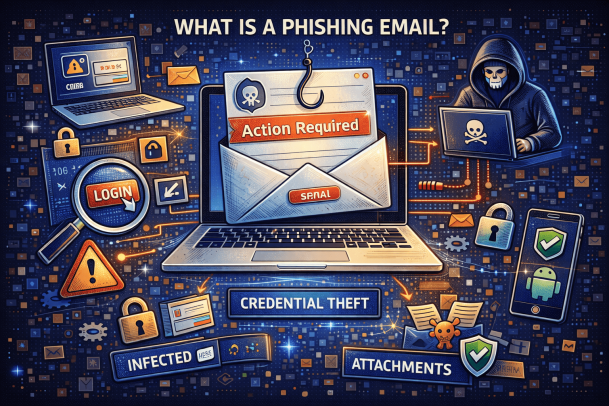
A phishing email is a fraudulent message designed to trick recipients into revealing sensitive information, clicking malicious links, or downloading harmful attachments. These emails often impersonate trusted organizations, colleagues, or service providers to create urgency or fear.
The goal of a phishing email is usually to steal:
-
Login credentials
-
Financial information
-
Personal data
-
Access to corporate systems
Phishing emails exploit human behavior, not technical vulnerabilities—which makes them especially dangerous.
Why Phishing Emails Are So Effective
Understanding what is a phishing email also means understanding why they work so well.
Key Reasons Phishing Emails Succeed
-
They look legitimate and professional
-
They exploit urgency or fear
-
They target busy or distracted users
-
They bypass traditional security controls
Even well-trained employees can fall victim when phishing emails are well-crafted.
How Phishing Emails Work
To fully understand what is a phishing email, let’s break down how a typical phishing attack unfolds.
Step-by-Step Phishing Process
-
An attacker sends a deceptive email
-
The email impersonates a trusted source
-
The recipient clicks a link or opens an attachment
-
Credentials or data are stolen—or malware is installed
Once attackers gain access, they can move laterally across systems or launch larger attacks.
Common Types of Phishing Emails
Not all phishing emails look the same. Recognizing the variations is critical.
1. Credential Harvesting Emails
These phishing emails attempt to steal usernames and passwords by directing users to fake login pages.
Common Examples
-
Fake Microsoft 365 login alerts
-
Bank or payroll verification emails
-
Cloud service password reset requests
These attacks are especially dangerous for organizations using cloud platforms.
2. Malware Delivery Emails
Another form of what is a phishing email involves malicious attachments.
Typical Attachments
-
Fake invoices
-
ZIP files
-
PDF or Word documents with macros
Opening these files can install ransomware, spyware, or remote access trojans.
3. Spear Phishing Emails
Spear phishing is a targeted phishing email aimed at a specific individual or role.
Why Spear Phishing Is Dangerous
-
Highly personalized
-
Appears internal or familiar
-
Often bypasses suspicion
Executives and finance teams are common targets.
4. Business Email Compromise (BEC)
BEC attacks are among the most costly phishing email schemes.
BEC Characteristics
-
Impersonates executives or vendors
-
Requests wire transfers or sensitive data
-
Often has no links or attachments
BEC attacks rely purely on social engineering.
Real-World Examples of Phishing Emails
Understanding what is a phishing email becomes clearer with examples.
Example 1: Fake Security Alert
“Your account has been compromised. Click here to secure it immediately.”
Example 2: Invoice Scam
“Please review the attached invoice for immediate payment.”
Example 3: Executive Impersonation
“I need you to process this request urgently. I’m in a meeting.”
These emails are designed to override logic with urgency.
How to Identify a Phishing Email
Recognizing what is a phishing email early can prevent serious damage.
Common Warning Signs
-
Unexpected urgency
-
Generic greetings
-
Misspelled domain names
-
Suspicious attachments or links
-
Requests for sensitive information
However, modern phishing emails may lack obvious red flags.
Why Phishing Emails Are a Major Business Risk
For organizations, phishing emails are more than an annoyance—they’re a strategic threat.
Business Impact of Phishing Attacks
-
Financial loss
-
Data breaches
-
Ransomware incidents
-
Compliance violations
-
Reputational damage
Most large-scale breaches start with a single phishing email.
Phishing Emails and Cybersecurity Compliance
Understanding what is a phishing email is critical for compliance with regulations such as:
-
GDPR
-
HIPAA
-
PCI DSS
-
ISO 27001
Failure to protect against phishing can result in fines and audit failures.
Why Traditional Email Filters Are Not Enough
Many organizations rely solely on spam filters—but phishing emails often bypass them.
Limitations of Traditional Email Security
-
Signature-based detection
-
Lack of behavioral analysis
-
Poor visibility into user actions
Modern phishing attacks require advanced, behavior-based protection.
Best Practices to Protect Against Phishing Emails
Preventing phishing emails requires a layered defense strategy.
Recommended Security Measures
-
Advanced email threat detection
-
User behavior monitoring
-
Zero Trust access controls
-
Continuous employee training
-
Incident response planning
Technology and training must work together.
How Employee Training Reduces Phishing Risk
Even with strong tools, people remain the first line of defense.
Effective Training Includes
-
Real phishing simulations
-
Clear reporting procedures
-
Ongoing awareness campaigns
Well-trained employees dramatically reduce phishing success rates.
How Cybersecurity Teams Should Respond to Phishing Emails
When phishing emails slip through, fast response matters.
Incident Response Steps
-
Isolate affected accounts
-
Reset compromised credentials
-
Analyze email headers and payloads
-
Remove similar messages from inboxes
-
Review logs for lateral movement
Prepared teams reduce damage and recovery time.
Phishing Emails in a Zero Trust Security Model
Zero Trust assumes no email or user is trusted by default.
Zero Trust Benefits
-
Limits damage from compromised accounts
-
Detects suspicious behavior early
-
Prevents lateral movement
Zero Trust is especially effective against phishing-based attacks.
The Future of Phishing Emails
Attackers continue to evolve.
Emerging Phishing Trends
-
AI-generated phishing emails
-
Deepfake voice and video phishing
-
Multi-stage social engineering attacks
Organizations must adapt continuously.
Actionable Tips for IT Managers and Executives
To reduce phishing risk:
-
Audit current email security controls
-
Implement advanced detection tools
-
Enforce least-privilege access
-
Test incident response readiness
-
Track phishing metrics regularly
Leadership involvement is key to success.
Frequently Asked Questions (FAQ)
1. What is a phishing email in simple terms?
A phishing email is a fake message designed to trick users into revealing sensitive information or clicking malicious links.
2. How can I tell if an email is phishing?
Look for urgency, unusual requests, suspicious links, and unexpected attachments.
3. Are phishing emails still common?
Yes. Phishing emails remain the most common cyberattack method worldwide.
4. Can phishing emails bypass spam filters?
Yes. Many phishing emails are carefully crafted to avoid detection.
5. What should I do if I click a phishing link?
Report it immediately, disconnect from the network, and reset affected credentials.
Final Thoughts: Why Understanding Phishing Emails Matters
Knowing what is a phishing email is critical in today’s threat landscape. Phishing attacks target people—not systems—making them one of the hardest threats to stop without visibility, awareness, and modern security tools.
Organizations that combine advanced threat detection, user training, and zero trust security are far better equipped to stop phishing attacks before damage occurs.
👉 See how advanced cybersecurity solutions stop phishing attacks before they spread.
Request a personalized demo today.
🔗 Request a demo:
https://www.xcitium.com/request-demo/
Please give us a star rating based on your experience.

 (1 votes, average: 1.00 out of 5, rated)