Software teams used to dread integration day. Developers worked in isolation for weeks, then merged their code all at once — and everything broke. Continuous Integration (CI) was born to fix exactly that problem, and today it sits at the core of every mature DevOps and DevSecOps practice.
If you’re a DevOps engineer, security architect, or engineering leader trying to understand what CI really means — beyond the buzzword — this guide breaks it down: what it is, how it works, why it matters for security, and how to build a CI process that scales safely.
What is Continuous Integration?
Continuous Integration is a software development practice where developers merge their code changes into a shared repository frequently — often several times a day. Each merge automatically triggers a build and a suite of automated tests, so problems are caught within minutes instead of weeks.
The core idea is simple: instead of letting code changes pile up and diverge, CI forces small, frequent integrations. Every commit is verified automatically, which means bugs, broken builds, and conflicting changes surface immediately, while they’re still cheap and easy to fix.
CI is usually the first link in a longer chain that includes Continuous Delivery (CD) and Continuous Deployment, collectively known as CI/CD. CI focuses on the “build and validate” stage; CD extends that automation into packaging, staging, and production release.
How Continuous Integration Works
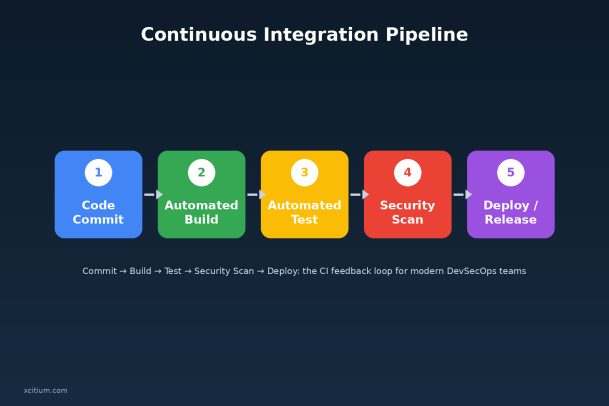
A typical CI workflow follows a consistent loop:
- Commit — A developer pushes code to a shared version control repository (Git, for example).
- Trigger — The CI server (Jenkins, GitHub Actions, GitLab CI, CircleCI, etc.) detects the new commit and automatically kicks off a pipeline.
- Build — The application is compiled or packaged to confirm the code is structurally sound.
- Test — Automated unit, integration, and regression tests run against the build to catch functional bugs.
- Scan — In a modern DevSecOps pipeline, static analysis, dependency checks, and vulnerability scans run alongside functional tests.
- Report — Results are reported back to the team instantly. A failed build blocks the merge until it’s fixed.
- Merge & Repeat — Once everything passes, the code is merged into the main branch, and the cycle starts again with the next commit.
This loop is what makes CI powerful: it’s continuous, automated, and fast. Nothing waits for a “release day” review — validation happens constantly, in the background, as a natural part of writing code.
Why Continuous Integration Matters for DevOps Teams
CI isn’t just a technical nicety — it changes how teams work and how confidently they ship software.
- Faster feedback loops. Developers learn within minutes if their change broke something, instead of discovering it weeks later during a painful merge.
- Higher code quality. Automated testing on every commit means fewer regressions slip into production.
- Reduced integration risk. Small, frequent merges are far easier to troubleshoot than giant, infrequent ones.
- Increased deployment velocity. CI is the foundation that makes Continuous Delivery and Continuous Deployment possible, letting teams ship multiple times a day if needed.
- Better collaboration. Everyone works against a single source of truth, reducing “it works on my machine” disputes.
For organizations trying to modernize their software delivery, CI is often the first meaningful step in a broader DevOps transformation — it establishes the automation habits and tooling that everything else builds on.
Why Continuous Integration Matters for Security Leaders
For security and risk teams, CI represents both an opportunity and a responsibility. Done right, it becomes one of the most effective places to catch vulnerabilities before they ever reach production. Done poorly, it can quietly become a new attack surface.
The opportunity: shifting security left. Traditional security reviews happen late — often right before release, when fixing a flaw is expensive and delays are painful. CI pipelines let security teams embed automated checks directly into the development workflow:
- Static Application Security Testing (SAST) to catch insecure code patterns as they’re written.
- Software Composition Analysis (SCA) to flag vulnerable or outdated open-source dependencies.
- Secrets scanning to prevent API keys, credentials, and tokens from being committed to source control.
- Container and infrastructure-as-code scanning to catch misconfigurations before they’re deployed.
This is the essence of DevSecOps: security isn’t a gate at the end of the pipeline, it’s a continuous check woven into every commit.
The responsibility: securing the pipeline itself. CI systems have become high-value targets. They typically hold sensitive credentials, have broad access to production environments, and run code automatically with elevated privileges. A compromised CI server or a poisoned dependency introduced during the build stage can propagate a threat straight into production — bypassing many traditional perimeter defenses.
That’s why security leaders increasingly treat CI/CD infrastructure as critical infrastructure, applying the same rigor they’d apply to production systems: least-privilege access, isolated build environments, signed artifacts, and continuous monitoring for anomalous pipeline behavior or endpoint compromise.
Key Components of a Modern CI Pipeline
A well-designed CI pipeline typically includes:
- Version control system (VCS): The shared repository (Git is the industry standard) where all code changes are tracked.
- CI server / orchestrator: The engine that detects changes and runs the pipeline — Jenkins, GitHub Actions, GitLab CI/CD, CircleCI, Azure Pipelines, and similar tools.
- Automated build tooling: Compilers, package managers, and build scripts that turn source code into a runnable artifact.
- Automated testing frameworks: Unit, integration, and regression test suites that validate functionality on every change.
- Security and compliance scanning: SAST, SCA, secrets detection, and policy-as-code checks integrated directly into the pipeline.
- Artifact repository: A place to store validated build outputs (like Docker images or compiled packages) ready for deployment.
- Notification and reporting layer: Instant feedback to developers via Slack, email, or dashboards when a build passes or fails.
Common Challenges in Implementing CI
CI sounds straightforward in theory, but teams often run into friction points:
- Flaky tests that fail intermittently and erode trust in the pipeline.
- Long build times that slow down feedback and tempt teams to skip validation.
- Insufficient test coverage, which lets bugs pass through undetected.
- Security scanning treated as an afterthought, bolted on late rather than integrated from day one.
- Pipeline sprawl, where dozens of loosely governed CI configurations make it hard to enforce consistent security policy across the organization.
Overcoming these challenges usually comes down to treating the CI pipeline itself as a product: invest in its reliability, monitor its performance, and give it the same security scrutiny you’d give any production system.
Continuous Integration Best Practices
To get the most out of CI — securely and efficiently — most high-performing teams follow a similar set of principles:
- Commit early and often. Small, frequent commits are easier to test, review, and roll back.
- Keep the build fast. A slow pipeline discourages frequent integration; aim for feedback within minutes.
- Fail the build on any test failure. Don’t let broken code merge “just this once.”
- Integrate security scanning natively. Run SAST, SCA, and secrets detection automatically on every commit, not as a periodic audit.
- Maintain a single source of truth. Everyone should build from the same shared, up-to-date branch.
- Monitor and harden the CI environment. Apply least-privilege access, rotate credentials, and monitor pipeline endpoints for suspicious activity — just as you would for any production asset.
- Make pipeline health visible. Dashboards and alerts should make build and security status obvious to the whole team, not just DevOps.
CI, DevOps, and Security: A Shared Responsibility
The most resilient organizations no longer treat CI as a purely engineering concern or security as a separate, downstream gate. Instead, they build pipelines where speed and safety reinforce each other: automated tests catch functional bugs, automated security scans catch vulnerabilities, and hardened infrastructure protects the pipeline itself from becoming a backdoor into production.
This is where DevOps and security leadership genuinely converge. CI gives engineering teams the velocity they need to compete, and it gives security teams a continuous checkpoint to enforce policy — provided the pipeline, its endpoints, and its credentials are properly protected against compromise.
Final Thoughts
Continuous Integration is far more than an engineering best practice — it’s the backbone of modern, secure software delivery. It shortens feedback loops, improves code quality, and, when paired with strong security scanning and pipeline hardening, becomes one of the most effective places to stop threats before they ever reach production.
For DevOps and security leaders alike, the question isn’t whether to adopt CI — it’s whether your CI environment is fast, reliable, and secure enough to trust with your organization’s most critical code.
Ready to secure your DevOps pipeline end-to-end?
Xcitium helps DevOps and security teams protect CI/CD environments, endpoints, and production systems from advanced threats — without slowing down delivery.
Please give us a star rating based on your experience.


 (15 votes, average: 2.27 out of 5, rated)


