If you’ve ever set up home internet, you’ve probably come across the term “DSL” as one of the connection options alongside cable and fiber. But what is DSL, exactly, and how does it manage to deliver internet access over the same copper wires that have carried telephone calls for over a century? This guide breaks down what DSL is, how it works, its different types, and where it fits into today’s connectivity and security landscape.
What is DSL?
DSL stands for Digital Subscriber Line. It is a family of technologies that transmits digital data over standard copper telephone lines, the same wiring already installed in most homes and offices for landline phone service. Unlike dial-up internet, which used the entire phone line and blocked voice calls while connected, DSL was designed to let both data and voice traffic travel over the line simultaneously without interfering with each other.
DSL achieves this by using frequencies that sit above the range used for human speech. A standard voice call occupies a narrow band of low frequencies, while DSL signals use higher frequency bands on the same wire. Because these frequency ranges don’t overlap, a household can browse the internet and make a phone call at the same time over a single copper connection.
This approach made DSL one of the first widely available forms of “always-on” broadband internet, replacing the slower, connection-based dial-up model that dominated the 1990s.
A Brief History of DSL
DSL technology emerged in the mid-1990s as telecommunications companies looked for ways to deliver faster internet speeds without the enormous cost of laying entirely new cabling infrastructure. Since copper telephone lines were already run to nearly every home, DSL offered a practical bridge between existing infrastructure and growing consumer demand for broadband.
Telecom providers rolled out DSL service widely through the late 1990s and 2000s, and for many years it was the most common way households accessed broadband internet, competing directly with cable internet providers. While fiber-optic internet has since overtaken DSL in speed and availability in many urban markets, DSL remains a relevant and often necessary option, particularly in suburban and rural areas where fiber infrastructure hasn’t been built out.
How Does DSL Work?
To understand DSL, it helps to break down the core components involved in a typical connection:
- The Copper Telephone Line – This is the physical medium. The same wire that carries your voice calls also carries digital data using higher frequency signals.
- The DSL Modem – Located at the customer’s home or office, this device converts the digital signals from a computer or router into a form that can travel over the telephone line, and vice versa.
- A Splitter (or Filter) – Small filters are often installed at phone jacks to separate voice frequencies from data frequencies, preventing the static or interference you might otherwise hear on a phone call.
- The DSLAM (Digital Subscriber Line Access Multiplexer) – Located at the telephone company’s local exchange or central office, the DSLAM aggregates DSL connections from many customers and routes the data traffic to the broader internet.
- The Internet Service Provider (ISP) – From the DSLAM, traffic is passed along to the ISP’s network and out to the wider internet.
Here’s a visual breakdown of how these pieces connect:
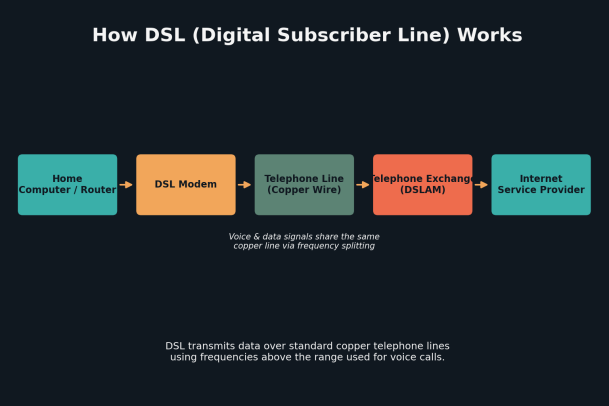
One important technical detail is distance sensitivity. DSL signal quality and speed degrade the farther a customer’s home is from the telephone company’s central office or DSLAM. Customers located close to a provider’s equipmentment tend to get faster, more stable speeds, while those farther away, common in rural areas, may see significantly reduced performance.
Types of DSL
“DSL” isn’t a single, uniform technology. Several variants exist, each with different speed profiles and typical use cases:
- ADSL (Asymmetric Digital Subscriber Line) – The most common residential form of DSL. It’s called “asymmetric” because download speeds are significantly faster than upload speeds, which suits typical home use like streaming and browsing.
- SDSL (Symmetric Digital Subscriber Line) – Provides equal upload and download speeds. It’s more common in business settings where uploading large files or hosting services is important.
- VDSL (Very High Bit-Rate Digital Subscriber Line) – Offers substantially higher speeds than ADSL but only over shorter distances, making it more suitable for customers located close to network infrastructure.
- HDSL (High Bit-Rate Digital Subscriber Line) – An older variant primarily used for business-grade dedicated lines rather than typical consumer broadband.
Each variant represents a tradeoff between speed, distance, and symmetry, allowing providers to tailor service to different customer needs.
DSL vs. Cable vs. Fiber
It’s useful to see how DSL stacks up against the other two dominant broadband technologies:
- DSL uses existing copper telephone lines. It’s widely available and generally affordable, but speeds are limited compared to newer technologies and degrade with distance from provider infrastructure.
- Cable internet uses the coaxial cabling originally built for television service. It generally offers faster speeds than DSL but performance can dip during peak usage hours since bandwidth is often shared among neighborhood users.
- Fiber-optic internet uses light signals through glass fiber cabling, delivering the fastest and most consistent speeds with minimal distance-related degradation. However, fiber infrastructure is expensive to install and isn’t yet available everywhere.
For many rural and semi-rural customers, DSL remains one of the only broadband options available, since laying new fiber or cable infrastructure in low-density areas is often not economically viable for providers.
Advantages of DSL
- Wide availability – Because it uses existing telephone infrastructure, DSL is accessible in many areas where cable or fiber hasn’t been deployed.
- Dedicated bandwidth – Unlike some cable connections, a DSL line isn’t shared with neighbors, so speeds tend to remain more consistent regardless of local usage spikes.
- Simultaneous voice and data – Users can browse the internet and use a landline phone at the same time.
- Lower cost – DSL plans are often more affordable than fiber, making it a practical entry point for budget-conscious households or businesses.
Limitations of DSL
- Distance-dependent speed – The farther a location is from the provider’s central office, the slower and less reliable the connection becomes.
- Lower maximum speeds – Compared to fiber, and often cable, DSL’s theoretical speed ceiling is lower, which can be limiting for households with heavy streaming, gaming, or multiple simultaneous users.
- Aging infrastructure – Copper telephone lines degrade over time and are more susceptible to weather and physical damage than fiber-optic cabling.
DSL and Network Security Considerations
As with any internet connection type, DSL networks are only as secure as the devices and practices protecting them. Home and business routers connected via DSL modems can be entry points for malicious actors if left with default credentials, outdated firmware, or unmonitored open ports. Because DSL is frequently used in small business and branch-office settings where dedicated IT security staff may be limited, endpoint protection becomes especially important.
Businesses relying on DSL connections, particularly at remote offices or in bandwidth-constrained regions, should treat their internet gateway as a potential attack surface. This means keeping router firmware updated, disabling unused services, using strong network segmentation, and deploying endpoint security solutions capable of detecting and containing threats before they can move laterally across a network.
The Future of DSL
While fiber-optic deployment continues to expand, DSL isn’t disappearing anytime soon. Telecommunications providers continue to invest in newer DSL standards, such as VDSL2 and G.fast, which push copper-based connections closer to fiber-like speeds over short distances. In many parts of the world, DSL will likely remain a critical “last-mile” technology for years to come, especially in areas where full fiber buildouts remain economically or logistically challenging.
Final Thoughts
DSL technology played a foundational role in bringing broadband internet into homes and businesses around the world, and it continues to serve as a reliable connectivity option today, particularly where newer infrastructure hasn’t yet arrived. Understanding how DSL works, its strengths, and its limitations can help individuals and businesses make smarter decisions about their internet setup and the security measures needed to protect it.
Whatever your connection type, cybersecurity should never be an afterthought. Endpoints connected through DSL, cable, or fiber all face the same fundamental risks: malware, ransomware, phishing, and unauthorized access attempts. A strong endpoint security strategy is essential regardless of how your network connects to the internet.
Secure Your Network, Whatever Your Connection Type
Your internet connection is only one piece of the security puzzle. Whether your business runs on DSL, cable, or fiber, protecting the endpoints on your network is critical to preventing breaches, ransomware, and data loss.
Request a Demo with Xcitium and see how proactive, zero-trust endpoint protection can keep your business secure no matter how you connect.
Please give us a star rating based on your experience.


 (27 votes, average: 2.30 out of 5, rated)