If you’ve ever set up Wi-Fi at home or plugged in a new device at the office, you’ve used a router — even if you never gave it much thought. It sits quietly in a corner, blinking away, and somehow every laptop, phone, smart speaker, and printer in the building manages to get online at the same time. But what does a router actually do, and why does it matter so much to how modern networks function?
In this article, we’ll break down exactly what a router is, how it works, the different types you’ll encounter, and why understanding its role is more important than ever in a world where networks are constant targets for cyber threats.
What Is a Router?
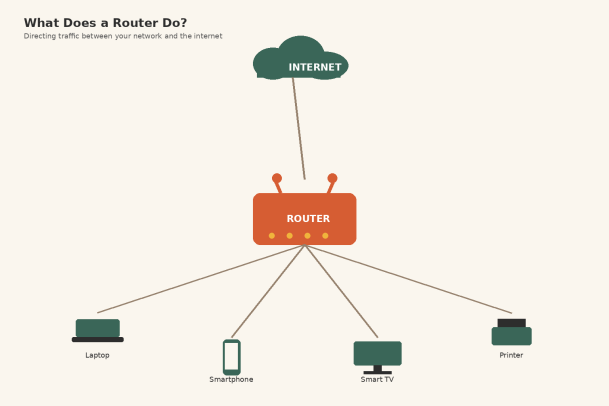
A router is a networking device that forwards data packets between computer networks. In the simplest terms, its job is to connect your local network — the devices in your home or office — to a larger network, most commonly the internet.
Think of a router as a traffic director standing at a busy intersection. Data arrives from many directions (your laptop requesting a webpage, your phone checking email, a smart TV streaming a show), and the router’s job is to figure out where each piece of data needs to go and send it there as efficiently as possible.
Without a router, each device would need a direct connection to the internet, and there would be no way to manage or organize traffic between multiple devices on the same network. Routers make it possible for many devices to share a single internet connection while still communicating with each other locally.
How Does a Router Work?
To understand what a router does, it helps to understand a few core functions it performs continuously, often within milliseconds.
1. Directing Data Packets
When you request a webpage, that request is broken into small units called packets. The router examines the destination address on each packet and determines the best path to send it — whether that’s out to the internet or to another device on your local network. This process is called packet routing, and it’s the fundamental job the device is named after.
2. Assigning IP Addresses
Every device on a network needs a unique identifier, called an IP address, so data can find its way to the right place. Most routers include a feature called DHCP (Dynamic Host Configuration Protocol), which automatically assigns IP addresses to devices as they connect. This is why you can join a Wi-Fi network without manually configuring anything — the router handles it behind the scenes.
3. Network Address Translation (NAT)
Your home or office likely has dozens of devices, but your internet service provider only gives you one public IP address. Routers use a process called Network Address Translation to let all those devices share that single public address while keeping track of which internal device sent which request. NAT also adds a layer of privacy, since devices behind the router aren’t directly visible from the outside internet.
4. Managing Traffic and Bandwidth
Routers can prioritize certain types of traffic over others, a feature known as Quality of Service (QoS). For example, a router might prioritize a video call over a large file download to keep the call from lagging. This traffic management becomes increasingly important as more devices compete for the same bandwidth.
5. Acting as a Basic Security Checkpoint
Many routers include a built-in firewall that filters incoming traffic, blocking unsolicited connection attempts from the outside world. While this isn’t a substitute for dedicated security software, it does provide a first line of defense by controlling what’s allowed to enter your network in the first place.
Router vs. Modem vs. Switch: Clearing Up the Confusion
These three devices are often mentioned together, and it’s easy to mix up their roles.
- Modem: Connects your home network to your internet service provider, translating signals between your ISP’s infrastructure (cable, fiber, DSL) and a format your local network can use.
- Router: Takes that internet connection from the modem and distributes it to multiple devices, while also managing traffic between those devices.
- Switch: Expands the number of wired connections available on a network, typically used in larger networks or offices with many devices that need Ethernet connections.
Many home devices today combine a modem and router into a single unit, which is why the distinction can feel blurry. But in enterprise environments, these are usually still separate, specialized devices.
Types of Routers
Not all routers are built the same. Depending on the scale and purpose of a network, you’ll encounter a few different categories:
- Wireless routers: The most common type for homes and small offices, broadcasting Wi-Fi signals to nearby devices.
- Wired routers: Connect devices via Ethernet cables only, often used where reliability and speed are prioritized over convenience.
- Core routers: Used by internet service providers and large enterprises to manage massive volumes of traffic within the core of a network.
- Edge routers: Sit at the boundary of a network, connecting it to external networks such as the internet, and often play a key role in enforcing security policies.
- Virtual routers: Software-based routing functions that run on virtual machines or cloud infrastructure, increasingly common as organizations shift toward cloud-first network architectures.
Understanding which type of router is right for a given environment depends on factors like the number of connected devices, expected traffic volume, and security requirements.
Why Understanding Routers Matters for Network Security
Routers don’t just move data — they’re also one of the most attractive targets for attackers. Because a router sits at the entry point of a network, a compromised router can expose every device connected to it. Common risks include:
- Default or weak credentials: Many routers ship with default admin passwords that are never changed, giving attackers an easy way in.
- Outdated firmware: Like any piece of software, router firmware can contain vulnerabilities that are patched over time — but only if updates are actually applied.
- DNS hijacking: Attackers who gain access to a router can redirect traffic to malicious sites without the user ever noticing.
- Botnet recruitment: Poorly secured routers are frequently hijacked and added to botnets used for large-scale attacks.
For businesses especially, routers are a foundational piece of network infrastructure that deserves the same security attention as endpoints and servers. A single misconfigured or unpatched router can become the weak link that undermines an otherwise strong security posture.
Best Practices for Router Security
Whether you’re managing a home network or an enterprise environment, a few practices go a long way:
- Change default credentials immediately after setup.
- Keep firmware updated to patch known vulnerabilities.
- Disable remote management unless it’s explicitly needed.
- Segment your network so that guest devices, IoT devices, and critical systems aren’t all sharing the same access.
- Monitor for unusual traffic patterns, which can be an early sign of compromise.
- Pair router-level protection with endpoint security, since a router’s built-in firewall is only one layer of defense, not a complete security solution.
The Router’s Role Keeps Growing
As networks become more complex — spanning remote employees, cloud services, IoT devices, and hybrid work environments — the router’s role has expanded well beyond simply “getting online.” Modern routers are expected to manage traffic intelligently, support growing device counts, and serve as a first line of defense against a constantly evolving threat landscape.
Understanding what a router does isn’t just useful trivia; it’s foundational knowledge for anyone responsible for keeping a network fast, reliable, and secure. Whether you’re troubleshooting a slow connection at home or architecting a secure network for a growing business, the router remains one of the most important — and most underappreciated — pieces of the puzzle.
Strengthen the Security Behind Your Network
Routers are the gateway to your network, but they’re only one piece of a much bigger security picture. Real protection means securing every device that connects through that gateway — before threats ever have the chance to spread.
Request a Demo with Xcitium and see how a layered, zero-trust approach to endpoint security can keep your network protected from the inside out.
Please give us a star rating based on your experience.


 (22 votes, average: 2.32 out of 5, rated)