Every technology leader eventually runs into the same wall: a team that ships features nobody asked for, a roadmap built on assumptions instead of evidence, or a product that technically “works” but nobody enjoys using. Design thinking exists to solve exactly that problem. It’s not a design-team buzzword — it’s a structured way of solving problems that has become a core competency for engineering leaders, product managers, and executives across the tech industry.
This guide breaks down what design thinking actually is, how it works, and why it matters for anyone leading innovation in a technology organization.
What is Design Thinking?
Design thinking is a human-centered approach to problem-solving that puts the needs, behaviors, and pain points of real users at the center of every decision. Instead of starting with a solution and working backward, design thinking starts with deep empathy for the people experiencing the problem, then moves through a repeatable, iterative process to arrive at solutions that are desirable, feasible, and viable.
The concept was popularized by the design firm IDEO and later formalized by Stanford’s d.school, but its roots go back further — to industrial design, engineering, and even architecture, where practitioners have long known that the best solutions come from understanding constraints and users before drawing anything.
For tech leaders, the key distinction is this: design thinking is not “make it look nice.” It’s a rigorous methodology for reducing risk before you invest engineering hours into building the wrong thing.
The Five Stages of Design Thinking
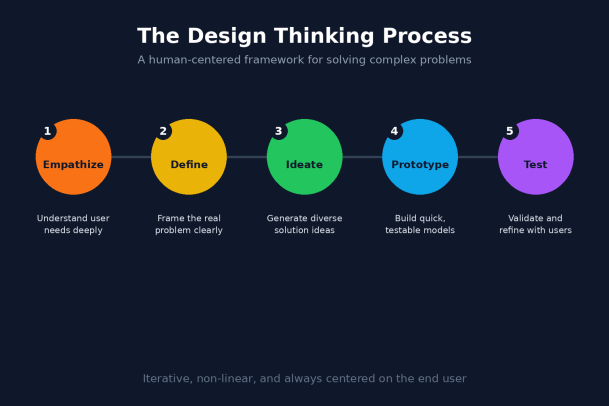
Most frameworks describe design thinking as five interconnected stages. They’re not strictly linear — teams often loop back to earlier stages as they learn — but together they form a reliable structure for tackling ambiguous problems.
1. Empathize
This stage is about understanding the people you’re building for — not through assumptions, but through direct observation, interviews, and immersion. For a tech team, this might mean watching how support engineers actually triage tickets, or shadowing a customer through their onboarding flow, rather than relying on a feature request buried in a backlog.
2. Define
Once you’ve gathered real insight, the next step is to synthesize it into a clear, specific problem statement. A well-defined problem is framed around the user’s need, not a proposed feature. “Users abandon checkout because they don’t trust how their payment data is handled” is a defined problem. “We need a new payment page” is not — it’s a solution in disguise.
3. Ideate
With the problem clearly framed, teams generate a wide range of possible solutions before narrowing down. This stage deliberately resists the urge to jump to the first workable idea. Techniques like brainstorming, “How Might We” questions, and cross-functional workshops help surface options that a single engineer or product manager might never consider alone.
4. Prototype
Rather than building a fully engineered solution, teams create low-cost, low-fidelity representations — wireframes, clickable mockups, or even a rough script for a workflow — to make ideas tangible enough to react to. The goal isn’t polish; it’s speed and learnability.
5. Test
Prototypes are put in front of real users to see what works, what doesn’t, and what was missed. Feedback often sends the team back to Define or Ideate, refining the solution before a single line of production code is written.
This iterative loop is what separates design thinking from a traditional, linear product development process. It builds in checkpoints for learning before the cost of being wrong gets expensive.
Why Design Thinking Matters for Tech and Innovation Leaders
It Reduces the Cost of Being Wrong
Engineering time is one of the most expensive resources in any tech organization. Design thinking front-loads discovery and validation so that teams spend fewer cycles building features that get abandoned, rolled back, or ignored after launch.
It Builds Alignment Across Disciplines
Design thinking gives engineers, designers, product managers, and business stakeholders a shared language and a shared process. Instead of debating opinions, cross-functional teams can point to user research, defined problem statements, and tested prototypes as the basis for decisions.
It Strengthens Innovation Culture
Leaders who embed design thinking into how their teams operate create an environment where experimentation is expected, failure at the prototype stage is treated as useful data rather than a setback, and decisions are grounded in evidence rather than hierarchy or gut feel.
It Applies Beyond Product Design
While design thinking is often associated with UX and product teams, the same methodology applies to internal tooling, security workflows, IT operations, and infrastructure decisions. Any time a team is solving a problem for a defined group of users — whether that’s customers, employees, or administrators — the same empathize-define-ideate-prototype-test loop applies.
How to Bring Design Thinking Into Your Organization
Leaders don’t need to overhaul their entire development process to start applying design thinking. A few practical starting points:
- Start with a real problem, not a roadmap item. Pick a pain point your team already knows is frustrating users, and run it through the five stages before jumping to a build.
- Get engineers into user conversations. Direct exposure to real user pain builds intuition that no spec document can replace.
- Timebox ideation and prototyping. Design thinking works best when it moves fast — a two-week sprint dedicated to problem discovery and a rough prototype can be more valuable than a two-month planning cycle built on assumptions.
- Treat testing as non-negotiable. Skipping the test phase is the most common shortcut teams take, and it’s the one that erases most of the value of the process.
- Make it a leadership habit, not a one-off workshop. Design thinking sticks when leaders consistently ask “What did we learn from users?” before asking “When can we ship?”
Design Thinking and Security-Minded Innovation
For leaders in technology and cybersecurity specifically, design thinking has a particular advantage: it forces teams to understand how real users actually behave — including the shortcuts they take, the friction they tolerate, and the workarounds they invent when a security control gets in their way. Some of the most effective security tools fail not because the underlying technology is weak, but because they were designed without empathy for the people who have to use them every day. Leaders who apply design thinking to security and IT tooling end up with solutions that people actually adopt, rather than ones they quietly bypass.
Final Thoughts
Design thinking isn’t a soft skill reserved for designers — it’s a disciplined, repeatable framework for reducing risk, aligning teams, and building things people actually want to use. For leaders in tech and innovation, adopting this mindset means fewer wasted sprints, stronger cross-functional collaboration, and products and tools that hold up under real-world use.
Whether you’re rethinking a customer-facing product or evaluating the tools protecting your organization, the same principle holds: understand the user first, and let that understanding drive every decision that follows.
Ready to see innovation-driven security in action?
Please give us a star rating based on your experience.


 (18 votes, average: 2.33 out of 5, rated)